Writer has a markdown import/export filter in Collabora Online, and we have some exciting news to be shared about the improved paste functionality.
A recent improvement allows taking a markdown snippet from the clipboard and pasting that into an existing Writer document, now in a much improved way.
The problem: Writer import filters operate in two modes: normally an empty model gets populated by reading user input from a file, in a certain format. You can also paste similar data from the clipboard, in which case the target model is not empty and this introduces some complexity.
The markdown import was missing some tweaks which were there already in the ODT and RTF paste code. Additionally, given that markdown only allows limited formatting, it makes sense to inherit more formatting from the paste position, so the pasted content’s formatting is consistent with the formatting of the surrounding content.
The solution: we made three fixes in this area, so that now:
The pasted content is inserted at the correct position, undo after paste works correctly
The bullet format is inherited from the paste position, if there are any bullets there
The paragraph style / formatting is also inherited
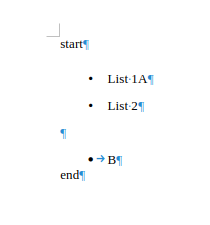
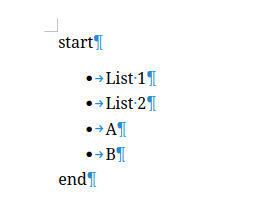
With these, if your document has bullets with text “A” and “B”, and you past “List 1” and “List 2” at the start, you get the below consistent formatting, instead of the broken result.