

Note: Post archived from previous website - some links, images, and/or post formatting may not display correctly. Contact us using the contact page below if you have any questions about post contents.
 We start the year with a list of updates for Collabora Online Development Edition 2.0, including some cool new features, fixes and API improvements.
New features and fixes
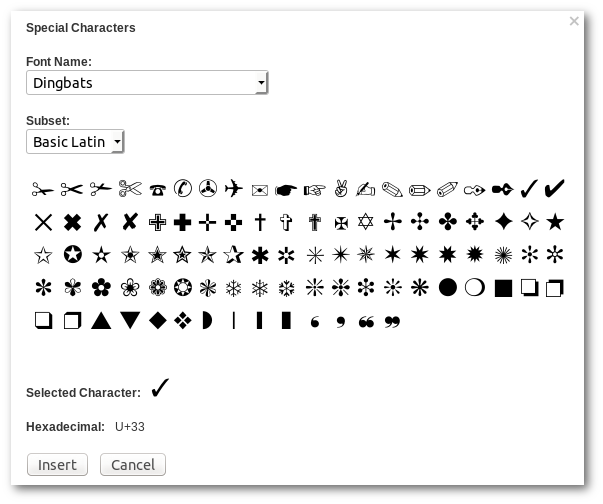
- Insert Special Characters feature (in menu and on toolbar)
- Initial support for IME. Now it is, for example, possible to type in Chinese
- Many stability fixes
- Various UI fixes (toolbar, tooltips, retina display)
- Fixed printing on MS Edge
- A user with slow network connection cannot block the work of other users of the same document any more.
- Updated localizations
- Many more, small fixes
API
- Use EnableOwnerTermination property for ownertermination
Document owners (sessions with their WOPI UserId = OwnerId) can close the document (for all sessions), if EnableOwnerTermination property is specified. Note that EnableOwnerTermination is an extension to WOPI, and not part of original WOPI standard. - DisablePrint, DisableExport, and DisableCopy WOPI properties
These boolean properties, when passed with CheckFileInfo, disable printing, download and copy to/from clipboard respectively.
Deployment
Important change in Apache2 reverse proxy config:
We had previously:
AllowEncodedSlashes OnNow we need:
AllowEncodedSlashes NoDecode
We had previously:
ProxyPassMatch "/lool/(.*)/ws$" wss://127.0.0.1:9980/lool/$1/wsNow we need:
ProxyPassMatch "/lool/(.*)/ws$" wss://127.0.0.1:9980/lool/$1/ws nocanon
How to update
Simply update with:
docker pull collabora/code

6 Responses
Hello,
Thank you very much for the update, please explain the modifications for Nginx.
Regards,
Did somebody found a solution for nginx as reverse proxy?
Hi. Have you tried out the “Setting up Nginx reverse proxy” steps on https://www.collaboraoffice.com/code/? Please let us know if it worked for you.
Do I need to make any changes for NGINX reverse proxy related to this post https://icewind.nl/entry/collabora-online/ ?
Is it expected behavior that upgrading and changing the mentioned config settings breaks everything? I have got a running setup, and pulling the new image, starting it with the same command (adding username and password) and changing the apache2 config breaks the functionality completely. I always get wrong WOPI.
Im having issues accessing the Collabora documents with Nextcloud using the nginx webserver configuration you provided at http://www.collaboraoffice/code I read that the Apache configuration made the following two important changes in the 2.0 update which would be needed to be equivalently set in the nginx configuration:
AllowEncodedSlashes NoDecode
ProxyPassMatch “/lool/(.*)/ws$” wss://127.0.0.1:9980/lool/$1/ws nocanon
For now I have the following error message anytime I open a collabora document within NextCloud. “Well, this is embarrassing, we cannot connect to your document. Please try again.”
If you know how to fix, please make a reply and I’ll post to others on the nextcloud help forum.