<?xml version="1.0" encoding="UTF-8"?><feed
	xmlns="http://www.w3.org/2005/Atom"
	xmlns:thr="http://purl.org/syndication/thread/1.0"
	xml:lang="en-US"
	>
	<title type="text">Collabora Online and Collabora Office</title>
	<subtitle type="text">Secure Document Collaboration, Controlled by You</subtitle>

	<updated>2026-06-19T14:54:01Z</updated>

	<link rel="alternate" type="text/html" href="https://www.collaboraonline.com/" />
	<id>https://www.collaboraonline.com/feed/atom/</id>
	<link rel="self" type="application/atom+xml" href="https://www.collaboraonline.com/feed/atom/" />

	<generator uri="https://wordpress.org/" version="7.0">WordPress</generator>
<icon>https://www.collaboraonline.com/wp-content/uploads/2023/06/collabora-symbols-600-150x150.png</icon>
	<entry>
		<author>
			<name>Adrià Figuera</name>
					</author>

		<title type="html"><![CDATA[Flatpak Repository for Collabora Office Desktop Nightly Builds]]></title>
		<link rel="alternate" type="text/html" href="https://www.collaboraonline.com/blog/flatpak-repository-for-collabora-office-desktop-nightly-builds/" />

		<id>https://www.collaboraonline.com/?p=59977</id>
		<updated>2026-06-19T14:54:00Z</updated>
		<published>2026-06-18T08:57:07Z</published>
		<category scheme="https://www.collaboraonline.com/" term="Developer Blog" />
		<summary type="html"><![CDATA[<p>Collabora Office Desktop nightly builds are now available for Linux through Flatpak &#8211; install once, then execute a single flatpak update to pull the newest snapshot whenever you require it. Quick Start 1. Add the repository flatpak --user remote-add --if-not-exists collabora-nightly https://www.collaboraoffice.com/downloads/Collabora-Office-Flatpak-Nightly/collabora-nightly.flatpakrepo 2. Install the nightly snapshot flatpak --user install collabora-nightly com.collaboraoffice.Office 3. Run it [&#8230;]</p>
<p>The post <a href="https://www.collaboraonline.com/blog/flatpak-repository-for-collabora-office-desktop-nightly-builds/">Flatpak Repository for Collabora Office Desktop Nightly Builds</a> appeared first on <a href="https://www.collaboraonline.com/">Collabora Online and Collabora Office</a>.</p>
]]></summary>

					<content type="html" xml:base="https://www.collaboraonline.com/blog/flatpak-repository-for-collabora-office-desktop-nightly-builds/"><![CDATA[		<div data-elementor-type="wp-post" data-elementor-id="59977" class="elementor elementor-59977" data-elementor-post-type="post">
				<div class="elementor-element elementor-element-01c1acc e-flex e-con-boxed e-con e-parent" data-id="01c1acc" data-element_type="container">
					<div class="e-con-inner">
				<div class="elementor-element elementor-element-8278f2c elementor-author-box--avatar-yes elementor-author-box--name-yes elementor-author-box--biography-yes elementor-author-box--link-no elementor-widget elementor-widget-author-box" data-id="8278f2c" data-element_type="widget" data-widget_type="author-box.default">
				<div class="elementor-widget-container">
							<div class="elementor-author-box">
							<div  class="elementor-author-box__avatar">
					<img decoding="async" src="https://www.collaboraonline.com/wp-content/uploads/2026/06/cropped-Afiguera-Headshot-300x300.jpg" alt="Picture of Adrià Figuera" loading="lazy">
				</div>
			
			<div class="elementor-author-box__text">
									<div >
						<h4 class="elementor-author-box__name">
							Adrià Figuera						</h4>
					</div>
				
									<div class="elementor-author-box__bio">
											</div>
				
							</div>
		</div>
						</div>
				</div>
				<div class="elementor-element elementor-element-2f3d1e9 elementor-widget elementor-widget-text-editor" data-id="2f3d1e9" data-element_type="widget" data-widget_type="text-editor.default">
				<div class="elementor-widget-container">
									<p>Collabora Office Desktop nightly builds are now available for Linux through Flatpak &#8211; install once, then execute a single flatpak update to pull the newest snapshot whenever you require it.</p>								</div>
				</div>
				<div class="elementor-element elementor-element-47128b3 elementor-widget elementor-widget-heading" data-id="47128b3" data-element_type="widget" data-widget_type="heading.default">
				<div class="elementor-widget-container">
					<h1 class="elementor-heading-title elementor-size-default">Quick Start</h1>				</div>
				</div>
				<div class="elementor-element elementor-element-654be7e elementor-widget elementor-widget-heading" data-id="654be7e" data-element_type="widget" data-widget_type="heading.default">
				<div class="elementor-widget-container">
					<h2 class="elementor-heading-title elementor-size-default">1. Add the repository</h2>				</div>
				</div>
				<div class="elementor-element elementor-element-4e1978e elementor-widget elementor-widget-code-highlight" data-id="4e1978e" data-element_type="widget" data-widget_type="code-highlight.default">
				<div class="elementor-widget-container">
							<div class="prismjs-default copy-to-clipboard word-wrap">
			<pre data-line="" class="highlight-height language-bash line-numbers">
				<code readonly="true" class="language-bash">
					<xmp>flatpak --user remote-add --if-not-exists collabora-nightly \
  https://www.collaboraoffice.com/downloads/Collabora-Office-Flatpak-Nightly/collabora-nightly.flatpakrepo</xmp>
				</code>
			</pre>
		</div>
						</div>
				</div>
				<div class="elementor-element elementor-element-0dd728d elementor-widget elementor-widget-heading" data-id="0dd728d" data-element_type="widget" data-widget_type="heading.default">
				<div class="elementor-widget-container">
					<h2 class="elementor-heading-title elementor-size-default">2. Install the nightly snapshot</h2>				</div>
				</div>
				<div class="elementor-element elementor-element-11f29bb elementor-widget elementor-widget-code-highlight" data-id="11f29bb" data-element_type="widget" data-widget_type="code-highlight.default">
				<div class="elementor-widget-container">
							<div class="prismjs-default copy-to-clipboard word-wrap">
			<pre data-line="" class="highlight-height language-bash line-numbers">
				<code readonly="true" class="language-bash">
					<xmp>flatpak --user install collabora-nightly com.collaboraoffice.Office</xmp>
				</code>
			</pre>
		</div>
						</div>
				</div>
				<div class="elementor-element elementor-element-5762faf elementor-widget elementor-widget-heading" data-id="5762faf" data-element_type="widget" data-widget_type="heading.default">
				<div class="elementor-widget-container">
					<h2 class="elementor-heading-title elementor-size-default">3. Run it</h2>				</div>
				</div>
				<div class="elementor-element elementor-element-1854587 elementor-widget elementor-widget-code-highlight" data-id="1854587" data-element_type="widget" data-widget_type="code-highlight.default">
				<div class="elementor-widget-container">
							<div class="prismjs-default copy-to-clipboard word-wrap">
			<pre data-line="" class="highlight-height language-bash line-numbers">
				<code readonly="true" class="language-bash">
					<xmp>flatpak run com.collaboraoffice.Office//master</xmp>
				</code>
			</pre>
		</div>
						</div>
				</div>
				<div class="elementor-element elementor-element-39663a9 elementor-widget elementor-widget-heading" data-id="39663a9" data-element_type="widget" data-widget_type="heading.default">
				<div class="elementor-widget-container">
					<h2 class="elementor-heading-title elementor-size-default">4. Update to the latest build</h2>				</div>
				</div>
				<div class="elementor-element elementor-element-a7a4dc5 elementor-widget elementor-widget-code-highlight" data-id="a7a4dc5" data-element_type="widget" data-widget_type="code-highlight.default">
				<div class="elementor-widget-container">
							<div class="prismjs-default copy-to-clipboard word-wrap">
			<pre data-line="" class="highlight-height language-bash line-numbers">
				<code readonly="true" class="language-bash">
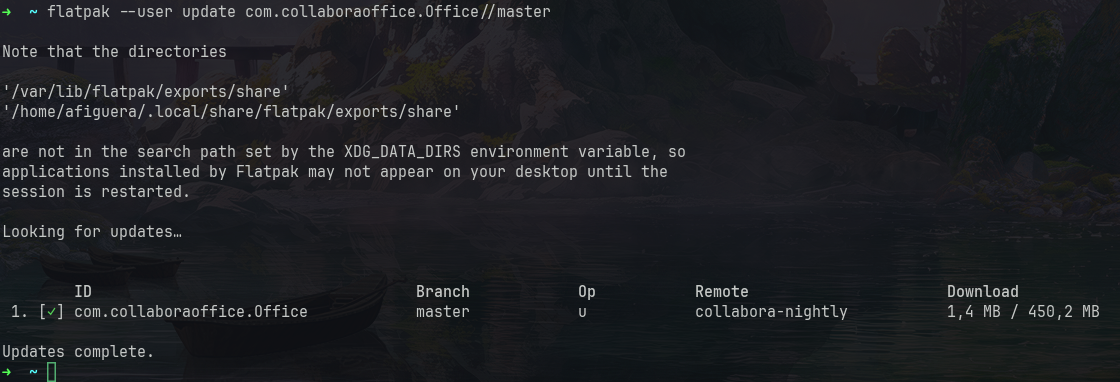
					<xmp>flatpak --user update com.collaboraoffice.Office//master</xmp>
				</code>
			</pre>
		</div>
						</div>
				</div>
				<div class="elementor-element elementor-element-171205d elementor-widget elementor-widget-heading" data-id="171205d" data-element_type="widget" data-widget_type="heading.default">
				<div class="elementor-widget-container">
					<h1 class="elementor-heading-title elementor-size-default">Under the hood</h1>				</div>
				</div>
				<div class="elementor-element elementor-element-f4a9fc4 elementor-widget elementor-widget-text-editor" data-id="f4a9fc4" data-element_type="widget" data-widget_type="text-editor.default">
				<div class="elementor-widget-container">
									<p class="western">Flatpak uses <span style="color: #000080;"><u><a href="https://ostreedev.github.io/ostree/introduction/">OSTree</a></u></span> &#8211; think Git, but for application binaries. Updates only pull down objects that actually changed, and precomputed <em>static deltas</em> shrink them further by transferring only the changed bytes inside large recompiled binaries. That matters for a big, mostly-stable codebase like Collabora Office, turning a multi-megabyte nightly into a small update.</p>								</div>
				</div>
				<div class="elementor-element elementor-element-62a4da7 elementor-widget elementor-widget-image" data-id="62a4da7" data-element_type="widget" data-widget_type="image.default">
				<div class="elementor-widget-container">
												<figure class="wp-caption">
											<a href="https://www.collaboraonline.com/wp-content/uploads/2026/06/flatpak-nightly-builds001.png" data-elementor-open-lightbox="yes" data-elementor-lightbox-title="flatpak-nightly-builds001" data-e-action-hash="#elementor-action%3Aaction%3Dlightbox%26settings%3DeyJpZCI6NTk5ODIsInVybCI6Imh0dHBzOlwvXC9hZG1pbi5jb2xsYWJvcmFvbmxpbmUuY29tXC93cC1jb250ZW50XC91cGxvYWRzXC8yMDI2XC8wNlwvZmxhdHBhay1uaWdodGx5LWJ1aWxkczAwMS5wbmcifQ%3D%3D">
							<img fetchpriority="high" decoding="async" width="800" height="273" src="https://www.collaboraonline.com/wp-content/uploads/2026/06/flatpak-nightly-builds001-1024x349.png" class="attachment-large size-large wp-image-59982" alt="" srcset="https://www.collaboraonline.com/wp-content/uploads/2026/06/flatpak-nightly-builds001-1024x349.png 1024w, https://www.collaboraonline.com/wp-content/uploads/2026/06/flatpak-nightly-builds001-300x102.png 300w, https://www.collaboraonline.com/wp-content/uploads/2026/06/flatpak-nightly-builds001-768x262.png 768w, https://www.collaboraonline.com/wp-content/uploads/2026/06/flatpak-nightly-builds001.png 1120w" sizes="(max-width: 800px) 100vw, 800px" />								</a>
											<figcaption class="widget-image-caption wp-caption-text">E.g. an incremental update that pulls only ~1.4 MB</figcaption>
										</figure>
									</div>
				</div>
				<div class="elementor-element elementor-element-42961b3 elementor-widget elementor-widget-text-editor" data-id="42961b3" data-element_type="widget" data-widget_type="text-editor.default">
				<div class="elementor-widget-container">
									<div id="meta-origin" data-coolorigin="https%3A%2F%2Fshare.collaboraonline.com%2Fcool%2Fclipboard%3FWOPISrc%3Dhttps%253A%252F%252Fshare.collabora.com%252Findex.php%252Fapps%252Frichdocuments%252Fwopi%252Ffiles%252F7187740_ocytfm4ehh09%26ServerId%3DCF589DF0%26ViewId%3D4%26Tag%3D6ED884C012F3A4F8"><p class="western">Every package is GPG-signed, allowing flatpak to verify the integrity of each snapshot before installing.</p></div>								</div>
				</div>
				<div class="elementor-element elementor-element-f92b373 elementor-widget elementor-widget-heading" data-id="f92b373" data-element_type="widget" data-widget_type="heading.default">
				<div class="elementor-widget-container">
					<h1 class="elementor-heading-title elementor-size-default">How did we set up the repository</h1>				</div>
				</div>
				<div class="elementor-element elementor-element-daf488f elementor-widget elementor-widget-text-editor" data-id="daf488f" data-element_type="widget" data-widget_type="text-editor.default">
				<div class="elementor-widget-container">
									<p>An archive-z2 OSTree repository is just a directory on collaboraoffice.com:</p><pre># Create and initialize the repo
mkdir -p Collabora-Office-Flatpak-Nightly &amp;&amp; cd Collabora-Office-Flatpak-Nightly
ostree init --mode=archive-z2 –repo=repo

# Import a build and publish, signed with the nightly key
flatpak build-import-bundle --gpg-sign=flatpak-nightly@collaboraoffice.com \
repo ../Collabora-Office-Linux-Snapshot/CollaboraOffice-some-timestamp.flatpak

# generate static deltas
flatpak build-update-repo --generate-static-deltas --gpg-sign=flatpak-nightly@collaboraoffice.com repo</pre><p>The build-update-repo option publishes the update (regenerating the summary so clients see it) and &#8211;generate-static-deltas makes it smaller.</p><p>Each nightly build process just uploads the new bundle, logs into the web server and repeats the last two commands.</p>								</div>
				</div>
				<div class="elementor-element elementor-element-6ce94a1 elementor-widget elementor-widget-heading" data-id="6ce94a1" data-element_type="widget" data-widget_type="heading.default">
				<div class="elementor-widget-container">
					<h1 class="elementor-heading-title elementor-size-default">Availability</h1>				</div>
				</div>
				<div class="elementor-element elementor-element-46b8391 elementor-widget elementor-widget-text-editor" data-id="46b8391" data-element_type="widget" data-widget_type="text-editor.default">
				<div class="elementor-widget-container">
									<p class="western">Find the instructions for Flatpak Nightly here <span style="color: #000080;"><u><a href="https://www.collaboraoffice.com/downloads/Collabora-Office-Flatpak-Nightly/">https://www.collaboraoffice.com/downloads/Collabora-Office-Flatpak-Nightly/</a></u></span></p>
<p class="western">We also have Snap, macOS TestFlight and Collabora Office Preview app in Windows Store <span style="color: #000080;"><u><a href="https://www.collaboraoffice.com/downloads/CODA-Hd7wwbJWxm/" target="_blank" rel="noopener">https://www.collaboraoffice.com/downloads/CODA-Hd7wwbJWxm/</a></u></span></p>								</div>
				</div>
					</div>
				</div>
				</div>
		<p>The post <a href="https://www.collaboraonline.com/blog/flatpak-repository-for-collabora-office-desktop-nightly-builds/">Flatpak Repository for Collabora Office Desktop Nightly Builds</a> appeared first on <a href="https://www.collaboraonline.com/">Collabora Online and Collabora Office</a>.</p>
]]></content>
		
					<link rel="replies" type="text/html" href="https://www.collaboraonline.com/blog/flatpak-repository-for-collabora-office-desktop-nightly-builds/#comments" thr:count="0" />
			<link rel="replies" type="application/atom+xml" href="https://www.collaboraonline.com/blog/flatpak-repository-for-collabora-office-desktop-nightly-builds/feed/atom/" thr:count="0" />
			<thr:total>0</thr:total>
			</entry>
		<entry>
		<author>
			<name>Andras Timar</name>
					</author>

		<title type="html"><![CDATA[Thumbnail of password protected documents]]></title>
		<link rel="alternate" type="text/html" href="https://www.collaboraonline.com/blog/thumbnail-of-password-protected-documents/" />

		<id>https://www.collaboraonline.com/?p=59945</id>
		<updated>2026-06-19T14:54:00Z</updated>
		<published>2026-06-17T10:34:43Z</published>
		<category scheme="https://www.collaboraonline.com/" term="Developer Blog" />
		<summary type="html"><![CDATA[<p>Integrations generate thumbnails for office documents with Collabora Online’s convert-to API. Obviously, it is not possible to generate a “document preview” thumbnail for password protected documents, because these documents cannot be opened without the password. Previously the convert-to endpoint returned an error for password protected documents, leaving misleading messages in the log. Now “locked document” [&#8230;]</p>
<p>The post <a href="https://www.collaboraonline.com/blog/thumbnail-of-password-protected-documents/">Thumbnail of password protected documents</a> appeared first on <a href="https://www.collaboraonline.com/">Collabora Online and Collabora Office</a>.</p>
]]></summary>

					<content type="html" xml:base="https://www.collaboraonline.com/blog/thumbnail-of-password-protected-documents/"><![CDATA[		<div data-elementor-type="wp-post" data-elementor-id="59945" class="elementor elementor-59945" data-elementor-post-type="post">
				<div class="elementor-element elementor-element-1159c66 e-flex e-con-boxed e-con e-parent" data-id="1159c66" data-element_type="container">
					<div class="e-con-inner">
				<div class="elementor-element elementor-element-09827b7 elementor-author-box--avatar-yes elementor-author-box--name-yes elementor-author-box--biography-yes elementor-author-box--link-no elementor-widget elementor-widget-author-box" data-id="09827b7" data-element_type="widget" data-widget_type="author-box.default">
				<div class="elementor-widget-container">
							<div class="elementor-author-box">
							<div  class="elementor-author-box__avatar">
					<img decoding="async" src="https://secure.gravatar.com/avatar/1b735c14447291ba14dc7af745163af6fbf0b3fc8100fb22e78bb0003acf26fe?s=300&#038;d=mm&#038;r=g" alt="Picture of Andras Timar" loading="lazy">
				</div>
			
			<div class="elementor-author-box__text">
									<div >
						<h4 class="elementor-author-box__name">
							Andras Timar						</h4>
					</div>
				
									<div class="elementor-author-box__bio">
											</div>
				
							</div>
		</div>
						</div>
				</div>
				<div class="elementor-element elementor-element-70214ec elementor-widget elementor-widget-text-editor" data-id="70214ec" data-element_type="widget" data-widget_type="text-editor.default">
				<div class="elementor-widget-container">
									<p>Integrations generate thumbnails for office documents with Collabora Online’s convert-to API. Obviously, it is not possible to generate a “document preview” thumbnail for password protected documents, because these documents cannot be opened without the password. Previously the convert-to endpoint returned an error for password protected documents, leaving misleading messages in the log. Now “locked document” icons are returned.</p>								</div>
				</div>
				<div class="elementor-element elementor-element-538da98 elementor-widget elementor-widget-gallery" data-id="538da98" data-element_type="widget" data-settings="{&quot;gallery_layout&quot;:&quot;justified&quot;,&quot;lazyload&quot;:&quot;yes&quot;,&quot;ideal_row_height&quot;:{&quot;unit&quot;:&quot;px&quot;,&quot;size&quot;:200,&quot;sizes&quot;:[]},&quot;ideal_row_height_tablet&quot;:{&quot;unit&quot;:&quot;px&quot;,&quot;size&quot;:150,&quot;sizes&quot;:[]},&quot;ideal_row_height_mobile&quot;:{&quot;unit&quot;:&quot;px&quot;,&quot;size&quot;:150,&quot;sizes&quot;:[]},&quot;gap&quot;:{&quot;unit&quot;:&quot;px&quot;,&quot;size&quot;:10,&quot;sizes&quot;:[]},&quot;gap_tablet&quot;:{&quot;unit&quot;:&quot;px&quot;,&quot;size&quot;:10,&quot;sizes&quot;:[]},&quot;gap_mobile&quot;:{&quot;unit&quot;:&quot;px&quot;,&quot;size&quot;:10,&quot;sizes&quot;:[]},&quot;overlay_background&quot;:&quot;yes&quot;,&quot;content_hover_animation&quot;:&quot;fade-in&quot;}" data-widget_type="gallery.default">
				<div class="elementor-widget-container">
							<div class="elementor-gallery__container">
							<div class="e-gallery-item elementor-gallery-item elementor-animated-content">
					<div class="e-gallery-image elementor-gallery-item__image" data-thumbnail="https://www.collaboraonline.com/wp-content/uploads/2026/06/Password-protected-thumbnail-001.png" data-width="256" data-height="256" aria-label="" role="img" ></div>
											<div class="elementor-gallery-item__overlay"></div>
														</div>
							<div class="e-gallery-item elementor-gallery-item elementor-animated-content">
					<div class="e-gallery-image elementor-gallery-item__image" data-thumbnail="https://www.collaboraonline.com/wp-content/uploads/2026/06/Password-protected-thumbnail-002.png" data-width="256" data-height="256" aria-label="" role="img" ></div>
											<div class="elementor-gallery-item__overlay"></div>
														</div>
							<div class="e-gallery-item elementor-gallery-item elementor-animated-content">
					<div class="e-gallery-image elementor-gallery-item__image" data-thumbnail="https://www.collaboraonline.com/wp-content/uploads/2026/06/Password-protected-thumbnail-003.png" data-width="256" data-height="256" aria-label="" role="img" ></div>
											<div class="elementor-gallery-item__overlay"></div>
														</div>
							<div class="e-gallery-item elementor-gallery-item elementor-animated-content">
					<div class="e-gallery-image elementor-gallery-item__image" data-thumbnail="https://www.collaboraonline.com/wp-content/uploads/2026/06/Password-protected-thumbnail-004.png" data-width="256" data-height="256" aria-label="" role="img" ></div>
											<div class="elementor-gallery-item__overlay"></div>
														</div>
					</div>
					</div>
				</div>
					</div>
				</div>
				</div>
		<p>The post <a href="https://www.collaboraonline.com/blog/thumbnail-of-password-protected-documents/">Thumbnail of password protected documents</a> appeared first on <a href="https://www.collaboraonline.com/">Collabora Online and Collabora Office</a>.</p>
]]></content>
		
					<link rel="replies" type="text/html" href="https://www.collaboraonline.com/blog/thumbnail-of-password-protected-documents/#comments" thr:count="0" />
			<link rel="replies" type="application/atom+xml" href="https://www.collaboraonline.com/blog/thumbnail-of-password-protected-documents/feed/atom/" thr:count="0" />
			<thr:total>0</thr:total>
			</entry>
		<entry>
		<author>
			<name>copychris</name>
					</author>

		<title type="html"><![CDATA[Finding a Secure Document Editor for Your Organisation  Part 2]]></title>
		<link rel="alternate" type="text/html" href="https://www.collaboraonline.com/blog/finding-a-secure-document-editor-for-your-organisation-part-2/" />

		<id>https://www.collaboraonline.com/?p=59689</id>
		<updated>2026-06-18T00:20:35Z</updated>
		<published>2026-06-15T17:07:40Z</published>
		<category scheme="https://www.collaboraonline.com/" term="Collabora Online" /><category scheme="https://www.collaboraonline.com/" term="Integrators" />
		<summary type="html"><![CDATA[<p>TL;DR In Part 2, we continue revealing Collabora’s multi-layered ‘security onion’ by exploring the architecture of Collabora Online’s three main processes. We explain how the architecture isolates each document within its own secure container, strictly limiting system calls and filesystem access through technologies such as Seccomp-bpf. CoolWSD is the only process that communicates with the [&#8230;]</p>
<p>The post <a href="https://www.collaboraonline.com/blog/finding-a-secure-document-editor-for-your-organisation-part-2/">Finding a Secure Document Editor for Your Organisation  Part 2</a> appeared first on <a href="https://www.collaboraonline.com/">Collabora Online and Collabora Office</a>.</p>
]]></summary>

					<content type="html" xml:base="https://www.collaboraonline.com/blog/finding-a-secure-document-editor-for-your-organisation-part-2/"><![CDATA[
<h2 class="wp-block-heading" id="h-tl-dr">TL;DR</h2>


<p class="wp-block-paragraph">In Part 2, we continue revealing Collabora’s multi-layered ‘security onion’ by exploring the architecture of Collabora Online’s three main processes.</p>


<p class="wp-block-paragraph">We explain how the architecture isolates each document within its own secure container, strictly limiting system calls and filesystem access through technologies such as Seccomp-bpf.</p>


<p class="wp-block-paragraph">CoolWSD is the only process that communicates with the outside world and handles client network connections, manages user input routing, and securely communicates with external storage using encrypted tokens.</p>


<p class="wp-block-paragraph">CoolWSD controls a helper process called CoolForKit. This component never interacts with or opens documents directly; instead, it pre-loads core software libraries into memory and rapidly forks itself to spin up individual CoolKit document instances.</p>


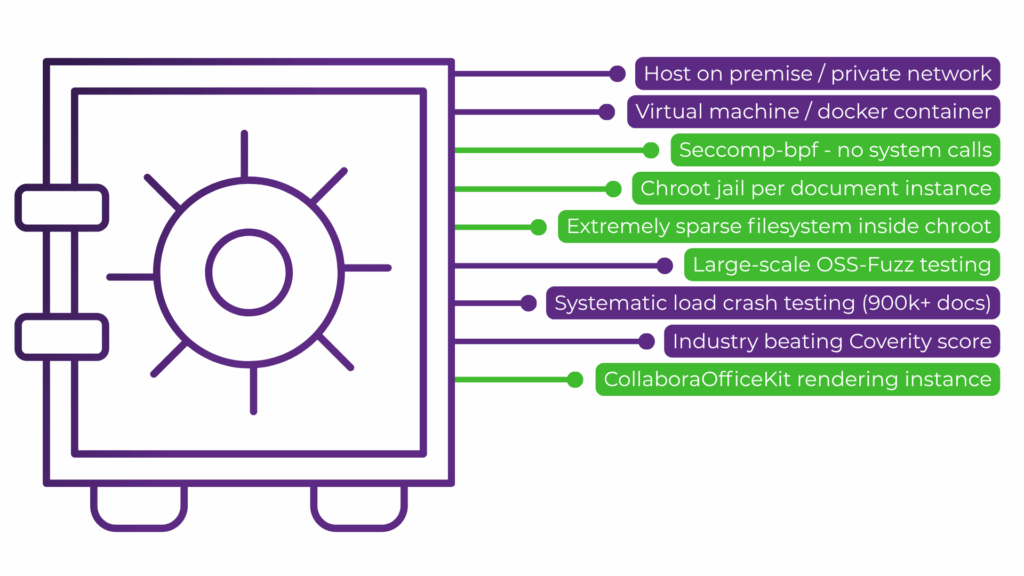
<p class="wp-block-paragraph">To lock down the system, CoolKit runs inside a “chroot jail” that completely isolates it from the host machine. This environment operates as a sparse filesystem that contains no system shells, no core system directories, and strictly limits kernel API system calls to enforce the principle of least privilege.</p>


<p class="wp-block-paragraph">Read <a href="/blog/finding-a-secure-document-editor-for-your-organisation/">Part 1</a> where we explain how Collabora Productivity’s security strategy is built on organisation compliance from our <a href="/security/">ISO 9001 and ISO 27001 certifications</a> and large-scale continuous automated crash testing, fuzzing and regular static code analysis.</p>


<h2 class="wp-block-heading" id="h-a-many-layered-security-onion">A Many Layered Security Onion</h2>


<p class="wp-block-paragraph">Security is a core consideration for Collabora Productvity, flowing from our internal processes to informing our software design and technical architecture through to our software development implementation, continuous testing, security reporting and support. In Part 2, we highlight our security strategy for software design and technical architecture.</p>


<p class="wp-block-paragraph">If you missed <a href="/blog/finding-a-secure-document-editor-for-your-organisation/">Part 1 of this series you can read it here</a>, we cover Collabora’s organisation compliance and large-scale continuous automated testing.</p>


<p class="wp-block-paragraph">The design of Collabora Online’s architecture involves a multi-layer security strategy to make it as secure as possible out-of-the-box. Why is this important? While it is possible that a problem in the software at one layer enables some negative foo, because a situation would need to chain problems together to breach all of the layers we can dramatically reduce the probability, and ensure your systems remain safe while we fix any individual layer problems.</p>


<figure class="wp-block-image size-large"><img decoding="async" width="1024" height="576" src="https://www.collaboraonline.com/wp-content/uploads/2026/06/Security-Onion-1024x576.png" alt="" class="wp-image-59506" srcset="https://www.collaboraonline.com/wp-content/uploads/2026/06/Security-Onion-1024x576.png 1024w, https://www.collaboraonline.com/wp-content/uploads/2026/06/Security-Onion-300x169.png 300w, https://www.collaboraonline.com/wp-content/uploads/2026/06/Security-Onion-768x432.png 768w, https://www.collaboraonline.com/wp-content/uploads/2026/06/Security-Onion-1536x864.png 1536w, https://www.collaboraonline.com/wp-content/uploads/2026/06/Security-Onion.png 1920w" sizes="(max-width: 1024px) 100vw, 1024px" /><figcaption class="wp-element-caption">Collabora Productivity’s Security Onion involves layers that go beyond architectural design and software development and include internal company processes, continuous testing methods, security reporting and support.</figcaption></figure>


<h2 class="wp-block-heading" id="h-the-three-main-processes">The Three Main Processes</h2>


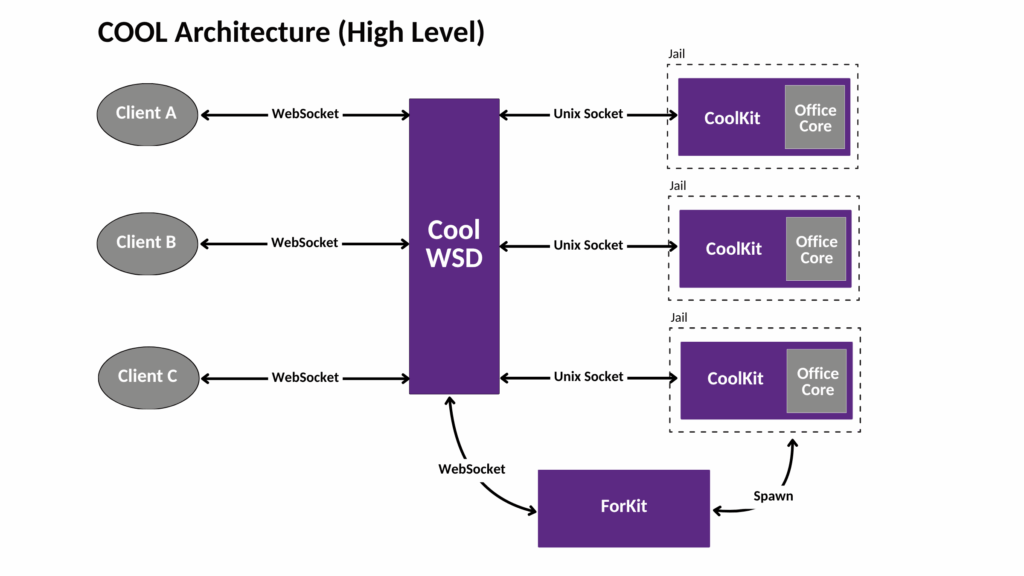
<p class="wp-block-paragraph">COOL’s self-contained architecture is made up of three groups of processes:</p>


<ul class="wp-block-list">
<li>Cool Web Service Daemon (CoolWSD)</li>


<li>CoolForKit (named after its function to ‘fork Kit’)</li>


<li>CoolKit</li>
</ul>


<p class="wp-block-paragraph"></p>


<p class="wp-block-paragraph">In very broad terms, CoolWSD is the ‘master’ or ‘broker’ process that handles and routes network traffic. CoolForKit is a ‘helper’ or ‘forker /spawner’ process controlled by CoolWSD that optimises creating document processes by pre-loading and sharing the core libraries and before rapidly forking itself to provide instances of CoolKit &#8211; the ‘document engine’, that isolates and contains each document from other documents.</p>


<figure class="wp-block-image"><img decoding="async" width="1024" height="576" src="https://www.collaboraonline.com/wp-content/uploads/2026/06/COOL-Architecure-High-Level-1024x576.png" alt="" class="wp-image-59691" srcset="https://www.collaboraonline.com/wp-content/uploads/2026/06/COOL-Architecure-High-Level-1024x576.png 1024w, https://www.collaboraonline.com/wp-content/uploads/2026/06/COOL-Architecure-High-Level-300x169.png 300w, https://www.collaboraonline.com/wp-content/uploads/2026/06/COOL-Architecure-High-Level-768x432.png 768w, https://www.collaboraonline.com/wp-content/uploads/2026/06/COOL-Architecure-High-Level-1536x864.png 1536w, https://www.collaboraonline.com/wp-content/uploads/2026/06/COOL-Architecure-High-Level-2048x1152.png 2048w" sizes="(max-width: 1024px) 100vw, 1024px" /><figcaption class="wp-element-caption"><br>The three main processes of COOL Architecture. Storage and authentication is outside of the architecture and uses a WOPI-like protocol and storage provided by the integrator.</figcaption></figure>


<h3 class="wp-block-heading" id="h-coolwsd">CoolWSD</h3>


<p class="wp-block-paragraph">CoolWSD is the only process in COOL that communicates externally. It is responsible for spawning CoolForKit, setting up the childroot directory for documents and listening on the public port (9980, by default) for client connections and routing user input (for example, when a user opens a document and a ‘load ‘ command is sent).</p>


<p class="wp-block-paragraph">COOL uses isolated per document processes, which start when CoolWSD requests CoolForKit to ‘fork itself’ to create a Kit instance for each document. CoolForKit finds the CoolKit, based on a unique key, and sends on the CoolWSD request to the Kit instance to load the first document view.</p>


<figure class="wp-block-table is-style-regular"><table class="has-black-color has-white-background-color has-text-color has-background has-link-color has-fixed-layout"><thead><tr><th>Security in CoolWSD</th></tr></thead><tbody><tr><td><strong>Jail ID Isolation</strong>: When it sets up the childroot directory, CoolWSD generates a random jailid path for the directory creating further isolation.</td></tr><tr><td><strong>Controlled Comms</strong>: CoolWSD is the only process that communicates externally, and listens for incoming SSL-encrypted client WebSocket connections (on port 9980).</td></tr><tr><td><strong>Auth Tokens</strong>: As COOL does not provide a document storage system, CoolWSD handles authentication via Collabora’s WOPI-like protocol. It stores and passes back an opaque authentication token supplied from the client sent to WSD. This token is sent back by WSD to the storage embedded in WOPI requests (via HTTPS) to read or save a document.</td></tr><tr><td><strong>Validity checks</strong>: Messages to the WOPI storage are signed with WOPI proofsand naturally WSD checks the validity of the WOPI storage’s TLS certificate when making WOPI requests.</td></tr><tr><td><strong>Host-local security</strong>: As mentioned, below, in relation to Kit, we containerise Kit instances in a ‘chroot jail’ where seccomp-bpf limits system calls and filesystem access, and where only one document is loaded per instance. As WSD and Kit are run on the same machine they communicate over a UNIX domain socket connection, benefiting from host-local security. The socket connection is verified using user id and group id matching.</td></tr></tbody></table></figure>


<h3 class="wp-block-heading" id="h-coolforkit">CoolForKit</h3>


<p class="wp-block-paragraph">As mentioned above, CoolForKit is primarily an optimization responsible for forking Kit instances. It does this by loading up Collabora Office dynamic object libraries (DSOs) into memory and pre-initializing all of the data we will need inside the Kit processe to ensure these will be Copy on Write shared. To make loading of documents faster CoolForKit forks Kit instances ahead of time (based on a prespawn config setting) and stands ready to fork more instances when requested by CoolWSD.</p>


<figure class="wp-block-table is-style-regular"><table class="has-black-color has-white-background-color has-text-color has-background has-link-color has-fixed-layout"><thead><tr><th>Security in CoolForKit</th></tr></thead><tbody><tr><td><strong>Helper-only</strong>: ForKit never loads documents itself, it forks additional instances that do the document loading and are themselves isolated in many ways (see below).</td></tr></tbody></table></figure>


<h3 class="wp-block-heading" id="h-coolkit">CoolKit</h3>


<p class="wp-block-paragraph">The CoolKit process is the fundamental core of our document editing engine. It is responsible for loading and rendering documents and for passing input and commands from users to the document and, similarly, for passing document events (e.g., a user typing etc) generated back to the client.</p>


<p class="wp-block-paragraph">The Kit process contains the eight million lines of C++ code that comprises most of our attack surface, and as such we add many more layers of the security onion around it.</p>


<figure class="wp-block-table is-style-regular"><table class="has-black-color has-white-background-color has-text-color has-background has-link-color has-fixed-layout"><thead><tr><th>More Security in CoolKit</th></tr></thead><tbody><tr><td><strong>Isolated from start</strong> CoolKit creates an isolated environment even before it becomes visible to CoolWSD.</td></tr><tr><td><strong>A sparse jail &amp; shadow filesystem</strong> is created for CoolKit. Bind-mounting is the preferred method (although linking and/or copying is possible as a fallback). bind-mount uses read-only permissions, this adds another security layer. Critically the jail contains no shell, very little code, and is compromised mostly of font data. There is no /proc, no /sys and no device nodes.</td></tr><tr><td><strong>Per-document namespace or chroot jail</strong>: Using one of these two approaches the root filesystem for the document is changed to use the above filesystem, either by using the chroot(2) syscall, or the namespace unshare(2) approach &#8211; which restricts the filesystem view to this jail subdirectory. The kit process cannot then access or see files outside of this new root, and this isolates CoolKit from the host system completely. In the case of namespaces this also isolates the CoolKit in its own process namespace.</td></tr><tr><td><strong>Least privilege</strong>: To finish the isolation process, Collabora applies the principle of least privilege using Seccomp-bpf (see below) and all system calls, including those used to implement the isolation, are disabled.</td></tr><tr><td>Internal A CoolKit instance only connects internally via websocket to CoolWSD.</td></tr><tr><td><strong>Seccomp-bpf</strong>: For disabling Kernel APIs within coolKit instances, Collabora uses the Linux’s secure computing mode (Seccomp) coupled with the flexible approach of Berkley Packet Filter (BFP). This enables a less extreme restrictive approach than seccomp while applying tailored filter rules for each specific application. For example, we disable:<br>&#8211; Kernel APIs which have no legitimate use by CollaboraOfficeKit, and have proven to cause local privilege escalation issues.<br>&#8211; APIs that target other processes, such as kill, so they cannot be used even if a Kit instance is compromised.<br>&#8211; Debugging APIs such as ptrace, which has been used in real-world scenarios to escalate privileges.<br>&#8211; Server calls, such as listen, to reduce attack service and apply the principle of least privilege.</td></tr></tbody></table></figure>


<p class="wp-block-paragraph">As the main three processes in Collabora Online demonstrate, our multi-layered security architecture is designed to be as secure as possible, approaches using strict isolation, container jails (chroot) and the principle of least privilege.</p>


<p class="wp-block-paragraph">In Part 3, we explore Collabora Online’s WOPI-like protocol and our approach to storage, we look at how server-side tile rendering keeps your documents secure, and highlight how our dedicated security engineers continuously work to improve security every day.</p>


<p class="wp-block-paragraph">Evaluate Collabora Online for your organisation today. Try a pilot deployment of a document editor; obtain enterprise-grade protection straight out of the box so your organisation can collaborate with total peace of mind.</p>


<div class="wp-block-buttons is-content-justification-center is-layout-flex wp-container-core-buttons-is-layout-3e41869c wp-block-buttons-is-layout-flex">
<div class="wp-block-button"><a class="wp-block-button__link has-white-color has-text-color has-background has-link-color wp-element-button" href="/demo" style="background-color:#5c2983">Try the Free Demo</a></div>
</div>


<p class="wp-block-paragraph"></p>
<p>The post <a href="https://www.collaboraonline.com/blog/finding-a-secure-document-editor-for-your-organisation-part-2/">Finding a Secure Document Editor for Your Organisation  Part 2</a> appeared first on <a href="https://www.collaboraonline.com/">Collabora Online and Collabora Office</a>.</p>
]]></content>
		
					<link rel="replies" type="text/html" href="https://www.collaboraonline.com/blog/finding-a-secure-document-editor-for-your-organisation-part-2/#comments" thr:count="0" />
			<link rel="replies" type="application/atom+xml" href="https://www.collaboraonline.com/blog/finding-a-secure-document-editor-for-your-organisation-part-2/feed/atom/" thr:count="0" />
			<thr:total>0</thr:total>
			</entry>
		<entry>
		<author>
			<name>Darshan Upadhyay</name>
					</author>

		<title type="html"><![CDATA[Open Source in Action #7: CODE 26.04.1 Ships, 3,000 Merges Crossed, and Test Builds Everywhere]]></title>
		<link rel="alternate" type="text/html" href="https://www.collaboraonline.com/blog/open-source-in-action-7/" />

		<id>https://www.collaboraonline.com/?p=59851</id>
		<updated>2026-06-19T14:54:00Z</updated>
		<published>2026-06-15T08:26:23Z</published>
		<category scheme="https://www.collaboraonline.com/" term="Developer Blog" />
		<summary type="html"><![CDATA[<p>CODE 26.04.1 shipped this week, the all-time merge count crossed 3,000, crash testing hit another record low with zero new regressions again, test builds are now available across every major platform, and contributors are making real impact — from SmartArt fixes to build system improvements. Here&#8217;s the roundup. CODE 26.04.1 Is Out Following last week&#8217;s [&#8230;]</p>
<p>The post <a href="https://www.collaboraonline.com/blog/open-source-in-action-7/">Open Source in Action #7: CODE 26.04.1 Ships, 3,000 Merges Crossed, and Test Builds Everywhere</a> appeared first on <a href="https://www.collaboraonline.com/">Collabora Online and Collabora Office</a>.</p>
]]></summary>

					<content type="html" xml:base="https://www.collaboraonline.com/blog/open-source-in-action-7/"><![CDATA[		<div data-elementor-type="wp-post" data-elementor-id="59851" class="elementor elementor-59851" data-elementor-post-type="post">
				<div class="elementor-element elementor-element-8bed0a3 e-flex e-con-boxed e-con e-parent" data-id="8bed0a3" data-element_type="container">
					<div class="e-con-inner">
				<div class="elementor-element elementor-element-5171f09 elementor-author-box--avatar-yes elementor-author-box--name-yes elementor-author-box--biography-yes elementor-author-box--link-no elementor-widget elementor-widget-author-box" data-id="5171f09" data-element_type="widget" data-widget_type="author-box.default">
				<div class="elementor-widget-container">
							<div class="elementor-author-box">
							<div  class="elementor-author-box__avatar">
					<img decoding="async" src="https://www.collaboraonline.com/wp-content/uploads/2026/05/cropped-Darshan-Headshot-300x300.jpg" alt="Picture of Darshan Upadhyay" loading="lazy">
				</div>
			
			<div class="elementor-author-box__text">
									<div >
						<h4 class="elementor-author-box__name">
							Darshan Upadhyay						</h4>
					</div>
				
									<div class="elementor-author-box__bio">
											</div>
				
							</div>
		</div>
						</div>
				</div>
				<div class="elementor-element elementor-element-123b82b elementor-widget elementor-widget-text-editor" data-id="123b82b" data-element_type="widget" data-widget_type="text-editor.default">
				<div class="elementor-widget-container">
									<p>CODE 26.04.1 shipped this week, the all-time merge count crossed 3,000, crash testing hit another record low with zero new regressions again, test builds are now available across every major platform, and contributors are making real impact — from SmartArt fixes to build system improvements. Here&#8217;s the roundup.</p>								</div>
				</div>
				<div class="elementor-element elementor-element-b87c460 elementor-widget elementor-widget-heading" data-id="b87c460" data-element_type="widget" data-widget_type="heading.default">
				<div class="elementor-widget-container">
					<h2 class="elementor-heading-title elementor-size-default">CODE 26.04.1 Is Out</h2>				</div>
				</div>
				<div class="elementor-element elementor-element-167c1b1 elementor-widget elementor-widget-text-editor" data-id="167c1b1" data-element_type="widget" data-widget_type="text-editor.default">
				<div class="elementor-widget-container">
									<p class="western" align="left">Following last week&#8217;s CODE 26.04 release, <strong>CODE 26.04.1</strong> shipped this week with further fixes and refinements. For the full feature overview, check out the <span style="color: #000080;"><u><a href="https://www.collaboraonline.com/blog/code-26-04-release/">CODE 26.04 release blog post</a></u></span> and the <span style="color: #000080;"><u><a href="https://forum.collaboraonline.com/t/introducing-code-26-04/4728">forum announcement</a></u></span>.</p>
<p class="western" align="left">The team is now following a <strong>Red-Green code cycle</strong> — alternating between stabilization and feature development weeks to keep quality and momentum in balance.</p>								</div>
				</div>
				<div class="elementor-element elementor-element-5a3b65e elementor-widget elementor-widget-heading" data-id="5a3b65e" data-element_type="widget" data-widget_type="heading.default">
				<div class="elementor-widget-container">
					<h2 class="elementor-heading-title elementor-size-default">The Numbers</h2>				</div>
				</div>
				<div class="elementor-element elementor-element-4e8213d elementor-widget elementor-widget-text-editor" data-id="4e8213d" data-element_type="widget" data-widget_type="text-editor.default">
				<div class="elementor-widget-container">
									<p class="western" align="left">This week: <strong>321 commits merged</strong> by <strong>37 contributors</strong>, with <strong>219 open changes</strong> in review. All-time since April 2nd: <strong>3,280 commits merged</strong> from <strong>65 contributors</strong> — crossing the <strong>3,000 merge milestone</strong> in just over two months.</p>
<p class="western" align="left">GitHub PR migration is nearly complete — down to just <strong>24 open PRs</strong>, 17 fewer than last week. Regression issues also dropped to <strong>14</strong>, down 3 from the previous week.</p>
<p class="western" align="left"><strong>Top reviewers this week:</strong> Miklos Vajna (70), Caolán McNamara (37), Stephan Bergmann (34), Tomaž Vajngerl (33), Noel Grandin (32), Szymon Kłos (26), Mike Kaganski (21), Darshan Upadhyay (6), Andras Timar (5), Gökay Şatır (5).</p>
<p class="western" align="left">A huge thank you to every reviewer on this list — code review is what keeps the project healthy and moving forward.</p>								</div>
				</div>
				<div class="elementor-element elementor-element-e4bbfdd elementor-widget elementor-widget-heading" data-id="e4bbfdd" data-element_type="widget" data-widget_type="heading.default">
				<div class="elementor-widget-container">
					<h2 class="elementor-heading-title elementor-size-default">Crash Testing: 192 and Still Falling</h2>				</div>
				</div>
				<div class="elementor-element elementor-element-00f67d8 elementor-widget elementor-widget-text-editor" data-id="00f67d8" data-element_type="widget" data-widget_type="text-editor.default">
				<div class="elementor-widget-container">
									<p class="western" align="left">For the second week in a row, crash testing produced <strong>zero new regressions</strong>. The count dropped from 278 to <strong>192</strong> — down from a peak of 776 just two months ago. This steady, sustained quality work across the team is making a real difference.</p>								</div>
				</div>
				<div class="elementor-element elementor-element-237949e elementor-widget elementor-widget-heading" data-id="237949e" data-element_type="widget" data-widget_type="heading.default">
				<div class="elementor-widget-container">
					<h2 class="elementor-heading-title elementor-size-default">Test Builds: Every Platform Covered</h2>				</div>
				</div>
				<div class="elementor-element elementor-element-b47c806 elementor-widget elementor-widget-text-editor" data-id="b47c806" data-element_type="widget" data-widget_type="text-editor.default">
				<div class="elementor-widget-container">
									<p class="western" align="left">One of the most exciting developments this week — Collabora Office test builds are now available across <strong>every major platform</strong>:</p>

<ul>
 	<li>
<p class="western" align="left"><strong>Flatpak nightlies:</strong> <span style="color: #000080;"><u><a href="https://www.collaboraoffice.com/downloads/Collabora-Office-Flatpak-Nightly/">collaboraoffice.com/downloads/Collabora-Office-Flatpak-Nightly/</a></u></span> — thanks to Adrià Figuera Puig for building and publishing the nightly repo</p>
</li>
 	<li>
<p class="western" align="left"><strong>Snap, macOS TestFlight, and Windows Store Preview:</strong> <span style="color: #000080;"><u><a href="https://www.collaboraoffice.com/downloads/CODA-Hd7wwbJWxm/">collaboraoffice.com/downloads/CODA-Hd7wwbJWxm/</a></u></span></p>
</li>
</ul>
<p class="western" align="left">This means anyone can test the latest development builds on Linux (Flatpak, Snap), macOS (TestFlight), or Windows (Store Preview). A big thank you to Adrià and Andras for all the release engineering work behind the scenes — setting up CI for Android and release branches, configuring flatpak nightlies, and getting Collabora Office into the Windows Store. Getting builds into testers&#8217; hands across every platform makes a real difference for quality and community engagement.</p>								</div>
				</div>
				<div class="elementor-element elementor-element-8b84c21 elementor-widget elementor-widget-heading" data-id="8b84c21" data-element_type="widget" data-widget_type="heading.default">
				<div class="elementor-widget-container">
					<h2 class="elementor-heading-title elementor-size-default">SmartArt Gets Better — Thank You, Regina</h2>				</div>
				</div>
				<div class="elementor-element elementor-element-29bed2a elementor-widget elementor-widget-text-editor" data-id="29bed2a" data-element_type="widget" data-widget_type="text-editor.default">
				<div class="elementor-widget-container">
									<p class="western" align="left">We&#8217;ve been following Regina&#8217;s journey — from a <span style="color: #000080;"><u><a href="https://forum.collaboraonline.com/t/problems-with-ooxml-import-export-of-smartart/4702/11">forum discussion about SmartArt</a></u></span> to active collaboration with Armin Le Grand, to attending TC meetings. This week, she landed her <strong>first patch</strong>: a <span style="color: #000080;"><u><a href="https://gerrit.collaboraoffice.com/c/online/+/4396">SmartArt export fix</a></u></span> that corrects how content text nodes are associated with shapes during OOXML export, and fixes a missing mandatory <code class="western">a:bodyPr</code> element that was causing MS Office to request document repair.</p>
<p class="western" align="left">Thank you, Regina — this is a meaningful fix that improves SmartArt interoperability for every user. Along the way, she also worked through build setup challenges with help from Caolán, Darshan, and Timur on the <span style="color: #000080;"><u><a href="https://forum.collaboraonline.com/t/main-branch-of-core-repo-is-not-used-for-anything/4716">forum</a></u></span>, which led to improved documentation for everyone. That&#8217;s the kind of contribution that multiplies.</p>								</div>
				</div>
				<div class="elementor-element elementor-element-ed4af12 elementor-widget elementor-widget-heading" data-id="ed4af12" data-element_type="widget" data-widget_type="heading.default">
				<div class="elementor-widget-container">
					<h2 class="elementor-heading-title elementor-size-default">The cpo:: Namespace: 1.5 Million Lines</h2>				</div>
				</div>
				<div class="elementor-element elementor-element-3d75ad1 elementor-widget elementor-widget-text-editor" data-id="3d75ad1" data-element_type="widget" data-widget_type="text-editor.default">
				<div class="elementor-widget-container">
									<p class="western" align="left">Noel is making progress on the <code class="western">com::sun::star</code> → <code class="western">cpo::</code> namespace rename announced last week. The scale: a <strong>1.5 million line diff</strong>. The team is discussing whether to do it incrementally — perhaps starting with a namespace alias where <code class="western">cpo</code> resolves to <code class="western">com::sun::star</code>, then changing the meaning later. The tracking issue is filed: <span style="color: #000080;"><u><a href="https://github.com/CollaboraOnline/online/issues/15927">github.com/CollaboraOnline/online/issues/15927</a></u></span>.</p>								</div>
				</div>
				<div class="elementor-element elementor-element-3be95e2 elementor-widget elementor-widget-heading" data-id="3be95e2" data-element_type="widget" data-widget_type="heading.default">
				<div class="elementor-widget-container">
					<h2 class="elementor-heading-title elementor-size-default">CI: Parallel Cypress Enabled for Everyone</h2>				</div>
				</div>
				<div class="elementor-element elementor-element-dd97163 elementor-widget elementor-widget-text-editor" data-id="dd97163" data-element_type="widget" data-widget_type="text-editor.default">
				<div class="elementor-widget-container">
									<p class="western" align="left">The parallel Cypress testing that Caolán and Noel built is now <strong>enabled by default</strong> — shaving minutes off every CI run. Classical Cypress problems are no longer the main bottleneck. Szymon&#8217;s CI monitoring tool is also back online after an API fix.</p>
<p class="western" align="left">The team continues working on CI improvements: flatpak nightlies in CI, fuzzer job for the monorepo, and cleaning up remaining GitHub jobs to free disk space.</p>								</div>
				</div>
				<div class="elementor-element elementor-element-39ed8f2 elementor-widget elementor-widget-heading" data-id="39ed8f2" data-element_type="widget" data-widget_type="heading.default">
				<div class="elementor-widget-container">
					<h2 class="elementor-heading-title elementor-size-default">Ruler Gets Smarter — Tooltips That Actually Help</h2>				</div>
				</div>
				<div class="elementor-element elementor-element-dc66d70 elementor-widget elementor-widget-text-editor" data-id="dc66d70" data-element_type="widget" data-widget_type="text-editor.default">
				<div class="elementor-widget-container">
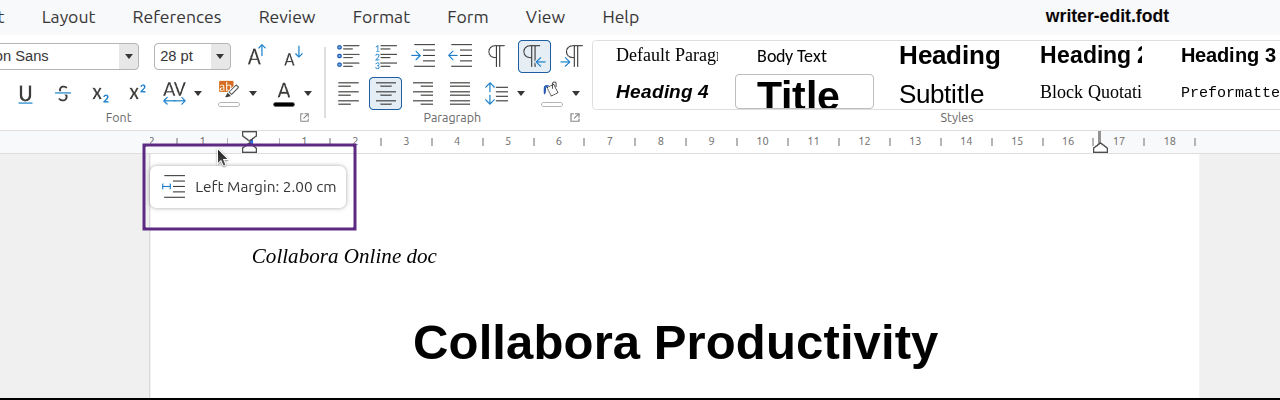
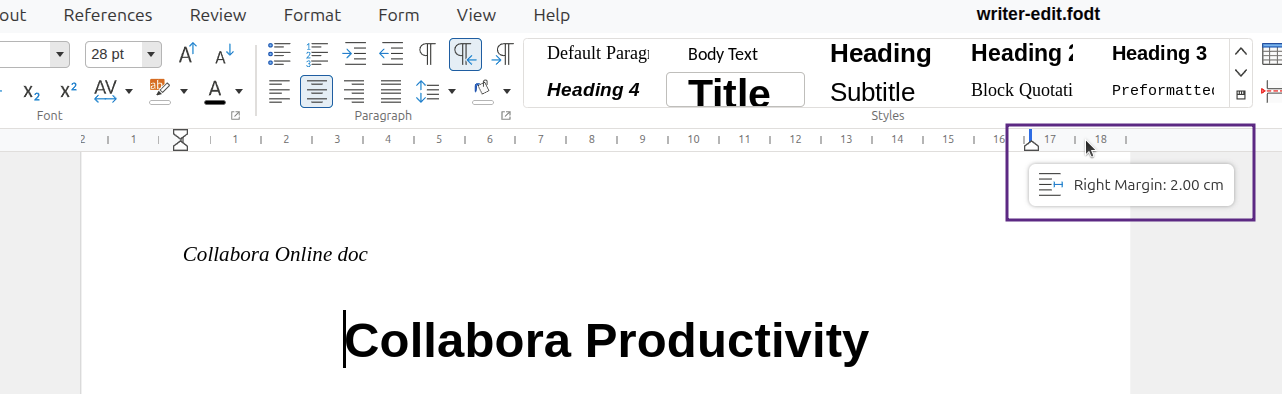
									<p class="western" align="left">The ruler just got a lot more user-friendly. Michael Meeks landed a new <span style="text-decoration: underline;"><a class="theme markdown__link" href="https://gerrit.collaboraoffice.com/c/online/+/2687" target="_blank" rel="noopener noreferrer">tooltip system for draggable ruler widgets</a></span> that makes it immediately obvious what you&#8217;re adjusting — no more guessing which handle controls what.</p><p class="western" align="left">Each tooltip now shows an <strong>icon and a live value</strong> that updates as you drag. Left margin, right margin, first-line indent, after-text indent — they all get distinct icons matching the sidebar, so you can tell at a glance what you&#8217;re looking at. The vertical ruler gets the same treatment, and all values display in centimetres to match the ruler ticks.</p>								</div>
				</div>
				<div class="elementor-element elementor-element-5bdabb5 elementor-widget elementor-widget-image" data-id="5bdabb5" data-element_type="widget" data-widget_type="image.default">
				<div class="elementor-widget-container">
												<figure class="wp-caption">
											<a href="https://www.collaboraonline.com/wp-content/uploads/2026/06/Week-7-001.png" data-elementor-open-lightbox="yes" data-elementor-lightbox-title="Week-7-001" data-e-action-hash="#elementor-action%3Aaction%3Dlightbox%26settings%3DeyJpZCI6NTk4NTMsInVybCI6Imh0dHBzOlwvXC9hZG1pbi5jb2xsYWJvcmFvbmxpbmUuY29tXC93cC1jb250ZW50XC91cGxvYWRzXC8yMDI2XC8wNlwvV2Vlay03LTAwMS5wbmcifQ%3D%3D">
							<img loading="lazy" decoding="async" width="1280" height="400" src="https://www.collaboraonline.com/wp-content/uploads/2026/06/Week-7-001.png" class="attachment-1536x1536 size-1536x1536 wp-image-59853" alt="" srcset="https://www.collaboraonline.com/wp-content/uploads/2026/06/Week-7-001.png 1280w, https://www.collaboraonline.com/wp-content/uploads/2026/06/Week-7-001-300x94.png 300w, https://www.collaboraonline.com/wp-content/uploads/2026/06/Week-7-001-1024x320.png 1024w, https://www.collaboraonline.com/wp-content/uploads/2026/06/Week-7-001-768x240.png 768w" sizes="auto, (max-width: 1280px) 100vw, 1280px" />								</a>
											<figcaption class="widget-image-caption wp-caption-text">Left Margin </figcaption>
										</figure>
									</div>
				</div>
				<div class="elementor-element elementor-element-05a47a2 elementor-widget elementor-widget-image" data-id="05a47a2" data-element_type="widget" data-widget_type="image.default">
				<div class="elementor-widget-container">
												<figure class="wp-caption">
											<a href="https://www.collaboraonline.com/wp-content/uploads/2026/06/Week-7-002.png" data-elementor-open-lightbox="yes" data-elementor-lightbox-title="Week-7-002" data-e-action-hash="#elementor-action%3Aaction%3Dlightbox%26settings%3DeyJpZCI6NTk4NjksInVybCI6Imh0dHBzOlwvXC9hZG1pbi5jb2xsYWJvcmFvbmxpbmUuY29tXC93cC1jb250ZW50XC91cGxvYWRzXC8yMDI2XC8wNlwvV2Vlay03LTAwMi5wbmcifQ%3D%3D">
							<img loading="lazy" decoding="async" width="1282" height="394" src="https://www.collaboraonline.com/wp-content/uploads/2026/06/Week-7-002.png" class="attachment-1536x1536 size-1536x1536 wp-image-59869" alt="" srcset="https://www.collaboraonline.com/wp-content/uploads/2026/06/Week-7-002.png 1282w, https://www.collaboraonline.com/wp-content/uploads/2026/06/Week-7-002-300x92.png 300w, https://www.collaboraonline.com/wp-content/uploads/2026/06/Week-7-002-1024x315.png 1024w, https://www.collaboraonline.com/wp-content/uploads/2026/06/Week-7-002-768x236.png 768w" sizes="auto, (max-width: 1282px) 100vw, 1282px" />								</a>
											<figcaption class="widget-image-caption wp-caption-text">Right Margin </figcaption>
										</figure>
									</div>
				</div>
				<div class="elementor-element elementor-element-87a789a elementor-widget elementor-widget-image" data-id="87a789a" data-element_type="widget" data-widget_type="image.default">
				<div class="elementor-widget-container">
												<figure class="wp-caption">
											<a href="https://www.collaboraonline.com/wp-content/uploads/2026/06/Week-7-003.png" data-elementor-open-lightbox="yes" data-elementor-lightbox-title="Week-7-003" data-e-action-hash="#elementor-action%3Aaction%3Dlightbox%26settings%3DeyJpZCI6NTk4NjUsInVybCI6Imh0dHBzOlwvXC9hZG1pbi5jb2xsYWJvcmFvbmxpbmUuY29tXC93cC1jb250ZW50XC91cGxvYWRzXC8yMDI2XC8wNlwvV2Vlay03LTAwMy5wbmcifQ%3D%3D">
							<img loading="lazy" decoding="async" width="1303" height="195" src="https://www.collaboraonline.com/wp-content/uploads/2026/06/Week-7-003.png" class="attachment-1536x1536 size-1536x1536 wp-image-59865" alt="" srcset="https://www.collaboraonline.com/wp-content/uploads/2026/06/Week-7-003.png 1303w, https://www.collaboraonline.com/wp-content/uploads/2026/06/Week-7-003-300x45.png 300w, https://www.collaboraonline.com/wp-content/uploads/2026/06/Week-7-003-1024x153.png 1024w, https://www.collaboraonline.com/wp-content/uploads/2026/06/Week-7-003-768x115.png 768w" sizes="auto, (max-width: 1303px) 100vw, 1303px" />								</a>
											<figcaption class="widget-image-caption wp-caption-text">Before Text Indent</figcaption>
										</figure>
									</div>
				</div>
				<div class="elementor-element elementor-element-4349203 elementor-widget elementor-widget-image" data-id="4349203" data-element_type="widget" data-widget_type="image.default">
				<div class="elementor-widget-container">
												<figure class="wp-caption">
											<a href="https://www.collaboraonline.com/wp-content/uploads/2026/06/Week-7-004.png" data-elementor-open-lightbox="yes" data-elementor-lightbox-title="Week-7-004" data-e-action-hash="#elementor-action%3Aaction%3Dlightbox%26settings%3DeyJpZCI6NTk4NjEsInVybCI6Imh0dHBzOlwvXC9hZG1pbi5jb2xsYWJvcmFvbmxpbmUuY29tXC93cC1jb250ZW50XC91cGxvYWRzXC8yMDI2XC8wNlwvV2Vlay03LTAwNC5wbmcifQ%3D%3D">
							<img loading="lazy" decoding="async" width="1303" height="195" src="https://www.collaboraonline.com/wp-content/uploads/2026/06/Week-7-004.png" class="attachment-1536x1536 size-1536x1536 wp-image-59861" alt="" srcset="https://www.collaboraonline.com/wp-content/uploads/2026/06/Week-7-004.png 1303w, https://www.collaboraonline.com/wp-content/uploads/2026/06/Week-7-004-300x45.png 300w, https://www.collaboraonline.com/wp-content/uploads/2026/06/Week-7-004-1024x153.png 1024w, https://www.collaboraonline.com/wp-content/uploads/2026/06/Week-7-004-768x115.png 768w" sizes="auto, (max-width: 1303px) 100vw, 1303px" />								</a>
											<figcaption class="widget-image-caption wp-caption-text">First Line Indicator</figcaption>
										</figure>
									</div>
				</div>
				<div class="elementor-element elementor-element-fbf3bb5 elementor-widget elementor-widget-image" data-id="fbf3bb5" data-element_type="widget" data-widget_type="image.default">
				<div class="elementor-widget-container">
												<figure class="wp-caption">
											<a href="https://www.collaboraonline.com/wp-content/uploads/2026/06/Week-7-005.png" data-elementor-open-lightbox="yes" data-elementor-lightbox-title="Week-7-005" data-e-action-hash="#elementor-action%3Aaction%3Dlightbox%26settings%3DeyJpZCI6NTk4NTcsInVybCI6Imh0dHBzOlwvXC9hZG1pbi5jb2xsYWJvcmFvbmxpbmUuY29tXC93cC1jb250ZW50XC91cGxvYWRzXC8yMDI2XC8wNlwvV2Vlay03LTAwNS5wbmcifQ%3D%3D">
							<img loading="lazy" decoding="async" width="1303" height="195" src="https://www.collaboraonline.com/wp-content/uploads/2026/06/Week-7-005.png" class="attachment-1536x1536 size-1536x1536 wp-image-59857" alt="" srcset="https://www.collaboraonline.com/wp-content/uploads/2026/06/Week-7-005.png 1303w, https://www.collaboraonline.com/wp-content/uploads/2026/06/Week-7-005-300x45.png 300w, https://www.collaboraonline.com/wp-content/uploads/2026/06/Week-7-005-1024x153.png 1024w, https://www.collaboraonline.com/wp-content/uploads/2026/06/Week-7-005-768x115.png 768w" sizes="auto, (max-width: 1303px) 100vw, 1303px" />								</a>
											<figcaption class="widget-image-caption wp-caption-text">After Text Indent</figcaption>
										</figure>
									</div>
				</div>
				<div class="elementor-element elementor-element-f2e3246 elementor-widget elementor-widget-heading" data-id="f2e3246" data-element_type="widget" data-widget_type="heading.default">
				<div class="elementor-widget-container">
					<h2 class="elementor-heading-title elementor-size-default">Design System: New Icon Compare Tool</h2>				</div>
				</div>
				<div class="elementor-element elementor-element-b0834b3 elementor-widget elementor-widget-text-editor" data-id="b0834b3" data-element_type="widget" data-widget_type="text-editor.default">
				<div class="elementor-widget-container">
									<p class="western" align="left">Pedro published a new <span style="color: #000080;"><u><a href="https://www.collaboraoffice.org/icon-compare/"><b>Icon Compare tool</b></a></u></span> on the design system site — making it easy to visually compare icon versions side-by-side. There&#8217;s also a companion script in the repo (<code class="western">scripts/icon-before-after.py</code>) for generating comparisons locally.</p><p class="western" align="left">The UX/UI Design Meeting this week also produced a detailed <strong>sidebar-to-notebookbar inventory</strong> — Raul catalogued every sidebar component that still needs to be ported or made available in the notebookbar, organized by context (text, image, shape, table, fontwork, formula). This gives contributors a clear map of what UI work remains.</p>								</div>
				</div>
				<div class="elementor-element elementor-element-0dfc88e elementor-widget elementor-widget-heading" data-id="0dfc88e" data-element_type="widget" data-widget_type="heading.default">
				<div class="elementor-widget-container">
					<h2 class="elementor-heading-title elementor-size-default">Build Documentation: Write Once, Sync Everywhere</h2>				</div>
				</div>
				<div class="elementor-element elementor-element-126246d elementor-widget elementor-widget-text-editor" data-id="126246d" data-element_type="widget" data-widget_type="text-editor.default">
				<div class="elementor-widget-container">
									<p class="western" align="left">Darshan built an automated <strong>README sync workflow</strong> — build instructions for Collabora Office (macOS, Linux, Windows, iOS, Android, and CODE) now live in the main repo and are automatically synced to the community website. No more maintaining two separate copies of the same documentation.</p>								</div>
				</div>
				<div class="elementor-element elementor-element-1e9a42a elementor-widget elementor-widget-heading" data-id="1e9a42a" data-element_type="widget" data-widget_type="heading.default">
				<div class="elementor-widget-container">
					<h2 class="elementor-heading-title elementor-size-default">What Developers Are Building</h2>				</div>
				</div>
				<div class="elementor-element elementor-element-846dee3 elementor-widget elementor-widget-text-editor" data-id="846dee3" data-element_type="widget" data-widget_type="text-editor.default">
				<div class="elementor-widget-container">
									<p class="western" align="left"><strong>Vector Rendering:</strong> Tomaž continues adding primitives to the JS renderer, backed by tests. He also removed the PNG fallback when saving SVG files into ODF — it&#8217;s been long enough that the fallback is no longer needed.</p>
<p class="western" align="left"><strong>HTML Paste from Dark Mode:</strong> Miklos improved Writer HTML paste to preserve background colors — specifically fixing paste from dark-mode Jitsi, where colors were being lost.</p>
<p class="western" align="left"><strong>Tracked Changes Undo:</strong> Attila&#8217;s fix for bullet numbering with tracked changes undo is now CI-green, including updated unit tests that previously tested the wrong behavior.</p>
<p class="western" align="left"><strong>Sectionpages Field Import:</strong> Attila implemented importing sectionpages fields as pageCountRange, with proper export back to MS file formats.</p>
<p class="western" align="left"><strong>Impress Selection Frames:</strong> Bayram submitted a patch to show selection frames for multiple selected drawing objects in Impress — improving visual feedback during editing.</p>
<p class="western" align="left"><strong>PageUp/PageDown in View Mode:</strong> Darshan made PageUp/PageDown work in read-only view mode — a small but practical improvement for document navigation.</p>
<p class="western" align="left"><strong>COOL Extension Documentation:</strong> Stephan is working on documentation for the COOL extension framework.</p>
<p class="western" align="left"><strong>Poco as Standard 3rd-Party Lib:</strong> Andras restructured the build so Poco is now built like other third-party engine libraries — cleaner and more consistent.</p>
<p class="western" align="left"><strong>Build System Exploration:</strong> Méven is experimenting with splitting large headers (<code class="western">Log.hpp</code>, <code class="western">Util.hpp</code>) to reduce unnecessary rebuilds, and exploring meson as a potential build system improvement.</p>								</div>
				</div>
				<div class="elementor-element elementor-element-6f5a43a elementor-widget elementor-widget-heading" data-id="6f5a43a" data-element_type="widget" data-widget_type="heading.default">
				<div class="elementor-widget-container">
					<h2 class="elementor-heading-title elementor-size-default">The Community in Action</h2>				</div>
				</div>
				<div class="elementor-element elementor-element-1dcb18b elementor-widget elementor-widget-text-editor" data-id="1dcb18b" data-element_type="widget" data-widget_type="text-editor.default">
				<div class="elementor-widget-container">
									<p class="western" align="left"><strong>Matrix is buzzing</strong> with real technical collaboration every day:</p>
<p class="western" align="left">Karthik&#8217;s <span style="color: #000080;"><u><a href="https://gerrit.collaboraoffice.com/c/online/+/4112">table style bug fix</a></u></span> got a public thank-you from Pedro. Samuel Mehrbrodt gave a <strong>JSX Introduction TTT talk</strong> — recorded and shared on YouTube. A new easy hack was filed to clean up remaining <code class="western">loleaflet</code> references in the codebase — a good first contribution for newcomers.</p>
<p class="western" align="left">On the forum, a community member (jacobb) asked for help with WOPI allow-list configuration, and Michael Meeks walked them through the setup step by step. That&#8217;s the kind of welcoming support that makes people stick around.</p>								</div>
				</div>
				<div class="elementor-element elementor-element-b199963 elementor-widget elementor-widget-heading" data-id="b199963" data-element_type="widget" data-widget_type="heading.default">
				<div class="elementor-widget-container">
					<h2 class="elementor-heading-title elementor-size-default">Community Calls</h2>				</div>
				</div>
				<div class="elementor-element elementor-element-d0e64b3 elementor-widget elementor-widget-text-editor" data-id="d0e64b3" data-element_type="widget" data-widget_type="text-editor.default">
				<div class="elementor-widget-container">
									<ul><li class="western"><strong>TC Meeting (June 10)</strong> — 10 attendees — CODE 26.04.1 release, crash testing, CI improvements, cpo:: namespace progress, platform test builds</li><li class="western"><strong>Collabora Online Weekly Meeting (June 11)</strong> — 10 attendees — CODE announcement, PR migration, Red-Green cycle, contributor updates</li><li class="western"><strong>UX/UI Design Meeting</strong> — sidebar inventory, Icon Compare tool, comments scroll view, contextual tabs</li></ul><p class="western" align="left">All minutes on the forum under <span style="color: #000080;"><u><a href="https://forum.collaboraonline.com/tag/meeting-minutes">meeting-minutes</a></u></span>.</p>								</div>
				</div>
				<div class="elementor-element elementor-element-f17ef72 elementor-widget elementor-widget-heading" data-id="f17ef72" data-element_type="widget" data-widget_type="heading.default">
				<div class="elementor-widget-container">
					<h2 class="elementor-heading-title elementor-size-default">Get Involved</h2>				</div>
				</div>
				<div class="elementor-element elementor-element-a84d4cc elementor-widget elementor-widget-text-editor" data-id="a84d4cc" data-element_type="widget" data-widget_type="text-editor.default">
				<div class="elementor-widget-container">
									<p class="western" align="left">Test builds are now available on every platform. The code is open, the community calls are open, and there&#8217;s plenty of work to pick up.</p><ul><li class="western"><strong>Try the latest builds:</strong> <span style="color: #000080;"><u><a href="https://www.collaboraoffice.com/downloads/CODA-Hd7wwbJWxm/">collaboraoffice.com/downloads/CODA-Hd7wwbJWxm/</a></u></span></li><li class="western"><strong>Community page:</strong> <span style="color: #000080;"><u><a href="https://collaboraonline.github.io/post/communicate/">collaboraonline.github.io/post/communicate/</a></u></span></li><li class="western"><strong>Design system:</strong> <span style="color: #000080;"><u><a href="https://www.collaboraoffice.org/design-system/">collaboraoffice.org/design-system</a></u></span></li><li class="western"><strong>Forum:</strong> <span style="color: #000080;"><u><a href="https://forum.collaboraonline.com/">forum.collaboraonline.com</a></u></span></li><li class="western"><strong>Chat on Matrix:</strong> <span style="color: #000080;"><u><a href="https://matrix.to/#/%23cool-dev:matrix.org">#cool-dev:matrix.org</a></u></span></li><li class="western"><strong>Browse open changes:</strong> <span style="color: #000080;"><u><a href="https://gerrit.collaboraoffice.com/q/status:open+-is:wip">gerrit.collaboraoffice.com</a></u></span></li></ul><p><br />See you in the code.</p><p class="western" align="left"> </p>								</div>
				</div>
					</div>
				</div>
				</div>
		<p>The post <a href="https://www.collaboraonline.com/blog/open-source-in-action-7/">Open Source in Action #7: CODE 26.04.1 Ships, 3,000 Merges Crossed, and Test Builds Everywhere</a> appeared first on <a href="https://www.collaboraonline.com/">Collabora Online and Collabora Office</a>.</p>
]]></content>
		
					<link rel="replies" type="text/html" href="https://www.collaboraonline.com/blog/open-source-in-action-7/#comments" thr:count="0" />
			<link rel="replies" type="application/atom+xml" href="https://www.collaboraonline.com/blog/open-source-in-action-7/feed/atom/" thr:count="0" />
			<thr:total>0</thr:total>
			</entry>
		<entry>
		<author>
			<name>Stephan Bergmann</name>
					</author>

		<title type="html"><![CDATA[Extending Collabora Online with iframe-hosted extensions]]></title>
		<link rel="alternate" type="text/html" href="https://www.collaboraonline.com/blog/extending-collabora-online-with-iframe-hosted-extensions/" />

		<id>https://www.collaboraonline.com/?p=59793</id>
		<updated>2026-06-19T14:54:00Z</updated>
		<published>2026-06-11T14:20:03Z</published>
		<category scheme="https://www.collaboraonline.com/" term="Developer Blog" />
		<summary type="html"><![CDATA[<p>An introduction to a still-experimental extension surface in Collabora Online: what an extension looks like on disk, how it shows up in the UI, and how it talks to the document running inside the kit. The extension framework described here is gated behind the experimental_features flag in coolwsd.xml. Treat it as “preview/API not frozen”: the [&#8230;]</p>
<p>The post <a href="https://www.collaboraonline.com/blog/extending-collabora-online-with-iframe-hosted-extensions/">Extending Collabora Online with iframe-hosted extensions</a> appeared first on <a href="https://www.collaboraonline.com/">Collabora Online and Collabora Office</a>.</p>
]]></summary>

					<content type="html" xml:base="https://www.collaboraonline.com/blog/extending-collabora-online-with-iframe-hosted-extensions/"><![CDATA[		<div data-elementor-type="wp-post" data-elementor-id="59793" class="elementor elementor-59793" data-elementor-post-type="post">
				<div class="elementor-element elementor-element-22bc778 e-flex e-con-boxed e-con e-parent" data-id="22bc778" data-element_type="container">
					<div class="e-con-inner">
				<div class="elementor-element elementor-element-3c67c84 elementor-author-box--avatar-yes elementor-author-box--name-yes elementor-author-box--biography-yes elementor-author-box--link-no elementor-widget elementor-widget-author-box" data-id="3c67c84" data-element_type="widget" data-widget_type="author-box.default">
				<div class="elementor-widget-container">
							<div class="elementor-author-box">
							<div  class="elementor-author-box__avatar">
					<img decoding="async" src="https://www.collaboraonline.com/wp-content/uploads/2026/03/Stephan-Bergmann-Headshot.jpg" alt="Picture of Stephan Bergmann" loading="lazy">
				</div>
			
			<div class="elementor-author-box__text">
									<div >
						<h4 class="elementor-author-box__name">
							Stephan Bergmann						</h4>
					</div>
				
									<div class="elementor-author-box__bio">
											</div>
				
							</div>
		</div>
						</div>
				</div>
				<div class="elementor-element elementor-element-ce1a528 elementor-widget elementor-widget-text-editor" data-id="ce1a528" data-element_type="widget" data-widget_type="text-editor.default">
				<div class="elementor-widget-container">
									<p><em>An introduction to a still-experimental extension surface in Collabora Online: what an extension looks like on disk, how it shows up in the UI, and how it talks to the document running inside the kit.</em></p>								</div>
				</div>
				<div class="elementor-element elementor-element-e310e8c elementor-widget elementor-widget-text-editor" data-id="e310e8c" data-element_type="widget" data-widget_type="text-editor.default">
				<div class="elementor-widget-container">
									<p>The extension framework described here is gated behind the experimental_features flag in coolwsd.xml. Treat it as “preview/API not frozen”: the format will reach 1.0 in a later release; until then the manifest is 0.1, deploys are manual, and the JavaScript surface in cool.js is still being shaped.</p>								</div>
				</div>
				<div class="elementor-element elementor-element-e53e051 elementor-widget elementor-widget-heading" data-id="e53e051" data-element_type="widget" data-widget_type="heading.default">
				<div class="elementor-widget-container">
					<h2 class="elementor-heading-title elementor-size-default">Anatomy of an extension</h2>				</div>
				</div>
				<div class="elementor-element elementor-element-ec4529d elementor-widget elementor-widget-text-editor" data-id="ec4529d" data-element_type="widget" data-widget_type="text-editor.default">
				<div class="elementor-widget-container">
									<p class="western">An extension is a directory dropped into the installed COOL’s browser/dist/extensions/. That’s all for now: Drop the directory in, restart coolwsd, and your document tabs grow an “Extensions” entry that lists whatever manifests the server found (and whose supports entries match the current document type).</p><p class="western">The minimum needed inside that directory:</p><p class="western">extensions/<br />└── com.example.my-first-extension/<br />    ├── manifest.json<br />    ├── icon.svg<br />    └── index.html</p><p class="western">The manifest is the bare minimum that COOL needs to identify and load your code. Version 0.1 of the format has just five keys:</p>								</div>
				</div>
				<div class="elementor-element elementor-element-2f2cb36 elementor-widget elementor-widget-code-highlight" data-id="2f2cb36" data-element_type="widget" data-widget_type="code-highlight.default">
				<div class="elementor-widget-container">
							<div class="prismjs-default copy-to-clipboard ">
			<pre data-line="" class="highlight-height language-javascript line-numbers">
				<code readonly="true" class="language-javascript">
					<xmp>{ 
    "manifestVersion": "0.1", 
    "name": "My first extension", 
    "entry": "index.html", 
    "icon": "icon.svg", 
    "supports": ["text", "spreadsheet", "presentation", "drawing"] 
} </xmp>
				</code>
			</pre>
		</div>
						</div>
				</div>
				<div class="elementor-element elementor-element-cb04af7 elementor-widget elementor-widget-text-editor" data-id="cb04af7" data-element_type="widget" data-widget_type="text-editor.default">
				<div class="elementor-widget-container">
									<ul><li>manifestVersion: literal string &#8220;0.1&#8221; for now. The server skips manifests it doesn’t recognise.</li><li>name: short, human-readable text shown wherever the user sees your extension (the Extensions notebookbar tab, the menubar submenu, the sidebar panel header).</li><li>entry: HTML file the iframe loads. Path is relative to the manifest’s directory.</li><li>icon: image displayed next to the name. Any browser-supported format (SVG, PNG, …). Again, path is relative to the manifest’s directory.</li><li>supports: which document types your extension applies to. Absent or empty means “all four”. Use this to e.g. hide a spreadsheet-only extension from Writer documents.</li></ul><p>The reverse-DNS directory name (com.example.my-first-extension) is what COOL uses internally as the extension ID. Pick a stable one; it’ll show up in URLs, dispatcher commands, and any future state COOL persists about the extension.</p>								</div>
				</div>
				<div class="elementor-element elementor-element-8f939d0 elementor-widget elementor-widget-heading" data-id="8f939d0" data-element_type="widget" data-widget_type="heading.default">
				<div class="elementor-widget-container">
					<h2 class="elementor-heading-title elementor-size-default">How it appears</h2>				</div>
				</div>
				<div class="elementor-element elementor-element-1df1c13 elementor-widget elementor-widget-text-editor" data-id="1df1c13" data-element_type="widget" data-widget_type="text-editor.default">
				<div class="elementor-widget-container">
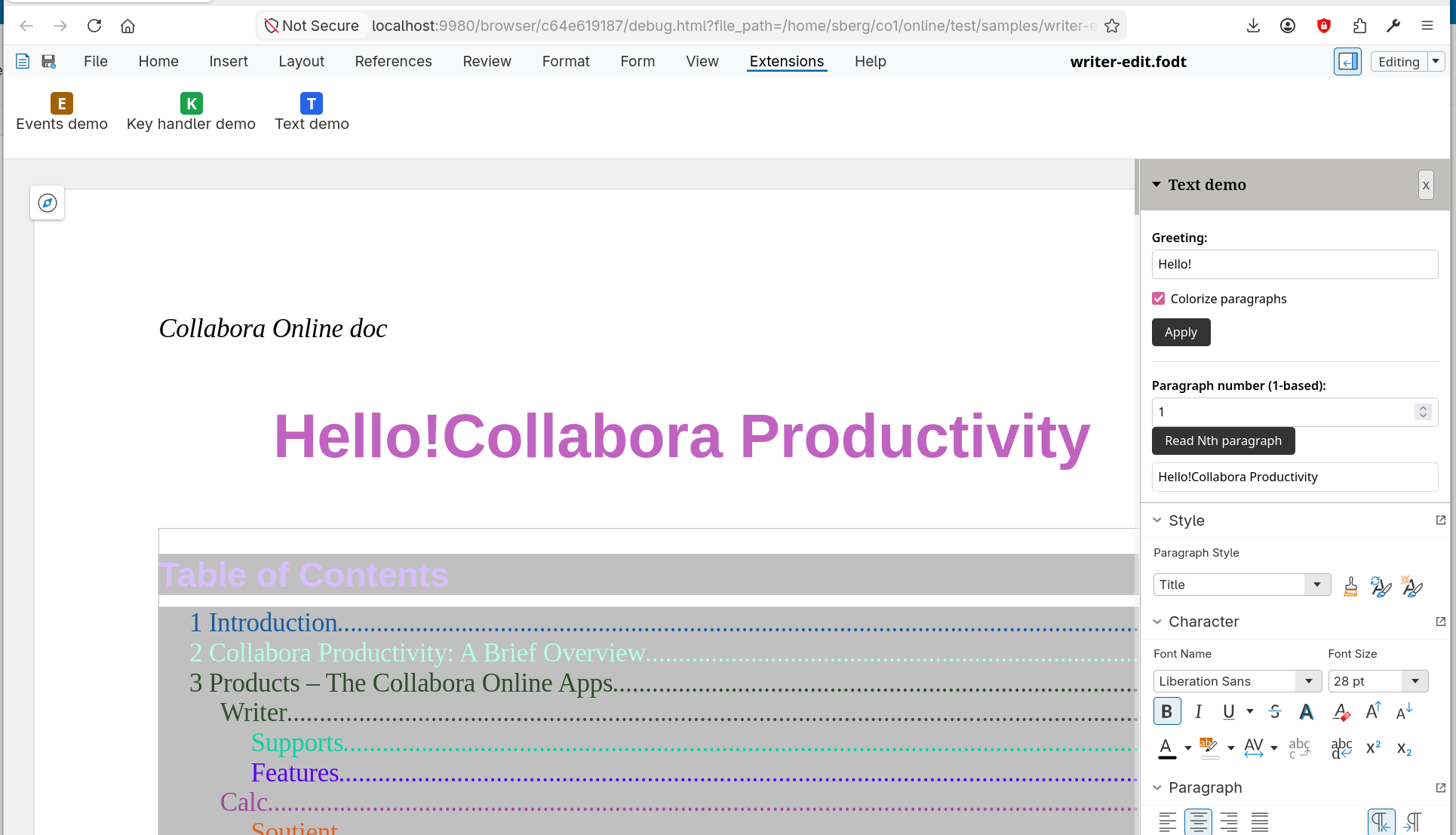
									<p class="western">After deploying an extension and reloading the document, the user sees three new entry points:</p><ul><li class="western">An <b>Extensions tab</b> at the end of the notebookbar’s tab row (in Tabbed View) with one large tile per extension: your name on top of your icon. Clicking it opens the extension.</li><li class="western">An <b>Extensions submenu</b> in the menubar (in Compact View), appearing just before Help, with one action per extension.</li><li class="western">A <b>foldable sidebar panel</b> that opens when the user clicks an extension entry. The panel sits above whatever core sidebar deck (Properties, Styles, …) is currently shown, so your UI and the document’s regular sidebar coexist instead of fighting for space.</li></ul><p class="western">The sidebar panel embeds your entry HTML in an iframe. The iframe is sandboxed (allow-scripts allow-same-origin allow-forms allow-popups), so your UI can use the full browser surface—React, fetch, IndexedDB, whatever you like—but it’s isolated from the document’s own JavaScript. The two sides only talk through the messaging helpers in cool.js (see below).</p><p class="western">A small “×” closer in the panel header runs a teardown handshake so your extension can detach any UNO listeners it registered before the iframe is removed. Re-opening the extension afterwards loads a fresh copy.</p>								</div>
				</div>
				<div class="elementor-element elementor-element-56bd751 elementor-widget elementor-widget-image" data-id="56bd751" data-element_type="widget" data-widget_type="image.default">
				<div class="elementor-widget-container">
																<a href="https://www.collaboraonline.com/wp-content/uploads/2026/06/extending-collabora-online-extension-001.png" data-elementor-open-lightbox="yes" data-elementor-lightbox-title="extending collabora online extension 001" data-e-action-hash="#elementor-action%3Aaction%3Dlightbox%26settings%3DeyJpZCI6NTk3OTgsInVybCI6Imh0dHBzOlwvXC9hZG1pbi5jb2xsYWJvcmFvbmxpbmUuY29tXC93cC1jb250ZW50XC91cGxvYWRzXC8yMDI2XC8wNlwvZXh0ZW5kaW5nLWNvbGxhYm9yYS1vbmxpbmUtZXh0ZW5zaW9uLTAwMS5wbmcifQ%3D%3D">
							<img loading="lazy" decoding="async" width="1536" height="881" src="https://www.collaboraonline.com/wp-content/uploads/2026/06/extending-collabora-online-extension-001-1536x881.png" class="attachment-1536x1536 size-1536x1536 wp-image-59798" alt="" srcset="https://www.collaboraonline.com/wp-content/uploads/2026/06/extending-collabora-online-extension-001-1536x881.png 1536w, https://www.collaboraonline.com/wp-content/uploads/2026/06/extending-collabora-online-extension-001-300x172.png 300w, https://www.collaboraonline.com/wp-content/uploads/2026/06/extending-collabora-online-extension-001-1024x587.png 1024w, https://www.collaboraonline.com/wp-content/uploads/2026/06/extending-collabora-online-extension-001-768x441.png 768w, https://www.collaboraonline.com/wp-content/uploads/2026/06/extending-collabora-online-extension-001.png 1930w" sizes="auto, (max-width: 1536px) 100vw, 1536px" />								</a>
															</div>
				</div>
				<div class="elementor-element elementor-element-cd0138a elementor-widget elementor-widget-heading" data-id="cd0138a" data-element_type="widget" data-widget_type="heading.default">
				<div class="elementor-widget-container">
					<h2 class="elementor-heading-title elementor-size-default">Talking to the document: cool.js</h2>				</div>
				</div>
				<div class="elementor-element elementor-element-05572c2 elementor-widget elementor-widget-text-editor" data-id="05572c2" data-element_type="widget" data-widget_type="text-editor.default">
				<div class="elementor-widget-container">
									<p class="western">The interesting half of writing an extension is doing things to the document the user is editing. COOL ships a small JavaScript helper at browser/dist/extensions/cool.js that the iframe loads via a relative script tag:</p><p class="western"><span style="color: #902000;">&lt;</span><span style="color: #007020;"><b>script</b></span><span style="color: #007020;"> src</span><span style="color: #666666;">=</span><span style="color: #4070a0;">&#8220;../cool.js&#8221;</span><span style="color: #902000;">&gt;&lt;/</span><span style="color: #007020;"><b>script</b></span><span style="color: #902000;">&gt;</span></p><p class="western">The helper exposes a cool global with two main entry points:</p><ol><li><p class="western">cool.callRemote(fn, &#8230;args) ships a self-contained JS function to the kit process running your document, executes it there in a JS-UNO context, and returns a Promise that resolves with the function’s return value (JSON-encoded over the wire).</p></li><li><p class="western">cool.document.on* property-assignment hooks for high-level document events (modifications, selection changes, comment add/change/remove). Assigning a function subscribes; assigning null unsubscribes.</p></li></ol>								</div>
				</div>
				<div class="elementor-element elementor-element-19519e6 elementor-widget elementor-widget-heading" data-id="19519e6" data-element_type="widget" data-widget_type="heading.default">
				<div class="elementor-widget-container">
					<h2 class="elementor-heading-title elementor-size-default">Executing code in the document</h2>				</div>
				</div>
				<div class="elementor-element elementor-element-0fa02cf elementor-widget elementor-widget-text-editor" data-id="0fa02cf" data-element_type="widget" data-widget_type="text-editor.default">
				<div class="elementor-widget-container">
									<p>The “text demo” extension included in COOL source code (and installed with make -C browser install-demo-extensions) is a good worked example. Its first button reads two iframe-side controls (a text input and a checkbox) and sends a remote function:</p>								</div>
				</div>
				<div class="elementor-element elementor-element-3da2833 elementor-widget elementor-widget-code-highlight" data-id="3da2833" data-element_type="widget" data-widget_type="code-highlight.default">
				<div class="elementor-widget-container">
							<div class="prismjs-default copy-to-clipboard ">
			<pre data-line="" class="highlight-height language-javascript line-numbers">
				<code readonly="true" class="language-javascript">
					<xmp>function apply() { 
    const greeting = document.getElementById('greeting').value; 
    const colorize = document.getElementById('colorize').checked; 
    cool.callRemote(function (greeting, colorize) { 
        const desktop 
            = uno.idl.com.sun.star.frame.Desktop.create(uno.componentContext); 
        const model = desktop.getCurrentFrame().getController().getModel(); 
        const text = model.getText(); 
        const cursor = text.createTextCursor(); 
        cursor.setString(greeting); 
        if (colorize) { 
            for (const para of text.createEnumeration()) { 
                const color = Math.floor(Math.random() * 0xffffff); 
                try { 
                    para.setPropertyValue('CharColor', color); 
                } catch (e) { 
                    console.log('caught:', e); 
                } 
            } 
        } 
    }, greeting, colorize); 
} </xmp>
				</code>
			</pre>
		</div>
						</div>
				</div>
				<div class="elementor-element elementor-element-b87da7b elementor-widget elementor-widget-text-editor" data-id="b87da7b" data-element_type="widget" data-widget_type="text-editor.default">
				<div class="elementor-widget-container">
									<p class="western"> A few things worth noting:</p><ul><li class="western">The remote function is <b>shipped as source text</b> via fn.toString() and re-evaluated on the kit side. It cannot close over any variable in the iframe’s scope—the iframe greeting and colorize get to the kit only because they’re passed as arguments after the function. Anything you want to use inside the remote function must come in through arguments, be a literal, or be on the uno global (which is the JS-UNO API the kit makes available).</li><li class="western">The arguments must be JSON-serialisable. You can pass strings, numbers, booleans, plain objects, arrays. You can’t pass a DOM element or a closure.</li><li class="western">Inside the remote function you get the full UNO API the kit exposes through QuickJS: effectively the same surface that Collabora Online and LibreOffice Basic/Python macros see. The example uses com.sun.star.frame.Desktop to reach the current model, then walks the document’s text just like a Basic macro would.</li></ul><p class="western">The second button shows the return-value path:</p>								</div>
				</div>
				<div class="elementor-element elementor-element-d63171b elementor-widget elementor-widget-code-highlight" data-id="d63171b" data-element_type="widget" data-widget_type="code-highlight.default">
				<div class="elementor-widget-container">
							<div class="prismjs-default copy-to-clipboard ">
			<pre data-line="" class="highlight-height language-javascript line-numbers">
				<code readonly="true" class="language-javascript">
					<xmp>function readNthParagraph() { 
    const n = parseInt(document.getElementById('paraN').value, 10); 
    cool.callRemote(function (n) { 
        const desktop 
            = uno.idl.com.sun.star.frame.Desktop.create(uno.componentContext); 
        const model = desktop.getCurrentFrame().getController().getModel(); 
        const en = model.getText().createEnumeration(); 
        for (let i = 1; i < n; i++) { 
            en.nextElement(); 
        } 
        return en.nextElement().getString(); 
    }, n).then(function (text) { 
        document.getElementById('readResult').textContent = text; 
    }).catch(function (err) { 
        document.getElementById('readResult').textContent = err.message; 
    }); 
} </xmp>
				</code>
			</pre>
		</div>
						</div>
				</div>
				<div class="elementor-element elementor-element-57ed230 elementor-widget elementor-widget-text-editor" data-id="57ed230" data-element_type="widget" data-widget_type="text-editor.default">
				<div class="elementor-widget-container">
									<p class="western">The remote function returns the Nth paragraph’s text, the iframe displays it. If the remote function throws (e.g. the paragraph doesn’t exist), the promise rejects and the .catch shows the error message.</p>								</div>
				</div>
				<div class="elementor-element elementor-element-3a585e3 elementor-widget elementor-widget-heading" data-id="3a585e3" data-element_type="widget" data-widget_type="heading.default">
				<div class="elementor-widget-container">
					<h2 class="elementor-heading-title elementor-size-default">Listening to document events</h2>				</div>
				</div>
				<div class="elementor-element elementor-element-69c50c7 elementor-widget elementor-widget-text-editor" data-id="69c50c7" data-element_type="widget" data-widget_type="text-editor.default">
				<div class="elementor-widget-container">
									<p class="western">For events that the document broadcasts, the iframe doesn’t have to set up listeners by hand. The cool.document object exposes property slots that wire up the underlying UNO listener for you:</p><ul><li class="western">cool.document.onModified fires whenever the document is modified (anything that flips the dirty bit).</li><li class="western">cool.document.onSelectionChanged fires when the selection moves.</li><li class="western">cool.document.onCommentAdded, onCommentChanged, onCommentRemoved fire when comments come and go, with the comment payload as the handler’s argument.</li></ul><p class="western">The “events demo” extension shipped with COOL uses all five to keep a live counter on the panel:</p>								</div>
				</div>
				<div class="elementor-element elementor-element-35c855e elementor-widget elementor-widget-code-highlight" data-id="35c855e" data-element_type="widget" data-widget_type="code-highlight.default">
				<div class="elementor-widget-container">
							<div class="prismjs-default copy-to-clipboard ">
			<pre data-line="" class="highlight-height language-javascript line-numbers">
				<code readonly="true" class="language-javascript">
					<xmp>let modCount = 0; 
let selCount = 0; 
const activeComments = new Set(); 

cool.document.onModified = function () { 
    modCount++; 
    refreshState(); 
}; 
cool.document.onSelectionChanged = function () { 
    selCount++; 
    refreshState(); 
}; 
cool.document.onCommentAdded = function (c) { 
    activeComments.add(c.id); 
    describeComment('added', c); 
    refreshState(); 
}; 
cool.document.onCommentChanged = function (c) { 
    activeComments.add(c.id); 
    describeComment('changed', c); 
    refreshState(); 
}; 
cool.document.onCommentRemoved = function (c) { 
    activeComments.delete(c.id); 
    describeComment('removed', c); 
    refreshState(); 
}; </xmp>
				</code>
			</pre>
		</div>
						</div>
				</div>
				<div class="elementor-element elementor-element-4af0a1e elementor-widget elementor-widget-text-editor" data-id="4af0a1e" data-element_type="widget" data-widget_type="text-editor.default">
				<div class="elementor-widget-container">
									<p class="western"> Assigning null to any of these properties unsubscribes the listener and tells the kit to detach. The teardown handshake on panel close also detaches everything still attached, so you don’t have to track listeners yourself.</p><p class="western">Under the hood onSelectionChanged and onModified go through a lower-level cool.attachListener on the corresponding UNO listener interfaces (com::sun::star::view::XSelectionChangeListener, com::sun::star::util::XModifyListener), whereas the comment slots piggyback on COOL’s existing comment-notification channel and deliver structured JSON payloads. If you need to listen on a UNO event that doesn’t yet have a property slot, you can also use cool.attachListener directly: it takes a UNO interface name plus an attach/detach/on spec object.</p>								</div>
				</div>
				<div class="elementor-element elementor-element-e4e0f93 elementor-widget elementor-widget-heading" data-id="e4e0f93" data-element_type="widget" data-widget_type="heading.default">
				<div class="elementor-widget-container">
					<h2 class="elementor-heading-title elementor-size-default">An evolving facade</h2>				</div>
				</div>
				<div class="elementor-element elementor-element-202658e elementor-widget elementor-widget-text-editor" data-id="202658e" data-element_type="widget" data-widget_type="text-editor.default">
				<div class="elementor-widget-container">
									<p class="western">Writing JS-UNO is powerful but verbose: every script starts with the same desktop/frame/controller/model walk, and uses stringly-typed property names like &#8216;ParaStyleName&#8217;, &#8216;NumberingStyleName&#8217;, &#8216;PageDescName&#8217;, &#8216;BreakType&#8217;. For extension authors coming from, say, Microsoft Word’s VSTO API, that’s a steep gradient compared to, say, range.set_Style(&#8220;List Bullet&#8221;). But cool.js is growing a facade over the JS-UNO surface to close that gap.</p>								</div>
				</div>
				<div class="elementor-element elementor-element-9af4989 elementor-widget elementor-widget-heading" data-id="9af4989" data-element_type="widget" data-widget_type="heading.default">
				<div class="elementor-widget-container">
					<h2 class="elementor-heading-title elementor-size-default">Where to go from here</h2>				</div>
				</div>
				<div class="elementor-element elementor-element-2ad60c6 elementor-widget elementor-widget-text-editor" data-id="2ad60c6" data-element_type="widget" data-widget_type="text-editor.default">
				<div class="elementor-widget-container">
									<ul><li><p class="western"><b>Read the existing demos.</b> browser/extensions/com.collaboraoffice .demo-text/ and browser/extensions/com.collaboraoffice .demo-events/ in the upstream tree are the two end-to-end examples this post drew from. Both are small enough to read in one sitting.</p></li><li><p class="western"><b>Try it locally.</b> Drop your extension directory into a built COOL’s browser/dist/extensions/, restart coolwsd, enable the experimental flag in your coolwsd.xml, and reload a document in the browser. The Extensions tab in the notebookbar (or Extensions submenu in the menubar) should show your extension’s name and icon.</p></li><li><p class="western"><b>Watch the manifest version.</b> 0.1 is intentionally minimal. Once we’ve shipped a few real extensions and learned what’s actually needed, the format will move to 1.0 with whatever fields turned out to matter.</p></li></ul><p class="western">Feedback on what’s working, what’s missing, and what feels awkward in the iframe surface is the most useful thing you can send our way while the design is still flexible.</p><p class="western"><a name="__RefHeading___Toc222_483815443"></a> And while the work concentrates on Collabora Online for now, the same extension mechanism should also work for the Collabora Desktop products.</p>								</div>
				</div>
					</div>
				</div>
				</div>
		<p>The post <a href="https://www.collaboraonline.com/blog/extending-collabora-online-with-iframe-hosted-extensions/">Extending Collabora Online with iframe-hosted extensions</a> appeared first on <a href="https://www.collaboraonline.com/">Collabora Online and Collabora Office</a>.</p>
]]></content>
		
					<link rel="replies" type="text/html" href="https://www.collaboraonline.com/blog/extending-collabora-online-with-iframe-hosted-extensions/#comments" thr:count="0" />
			<link rel="replies" type="application/atom+xml" href="https://www.collaboraonline.com/blog/extending-collabora-online-with-iframe-hosted-extensions/feed/atom/" thr:count="0" />
			<thr:total>0</thr:total>
			</entry>
		<entry>
		<author>
			<name>Richard Brock</name>
					</author>

		<title type="html"><![CDATA[Microsoft Office Online Server Ends 1 January 2027. Get the Self-Hosted Alternative Now]]></title>
		<link rel="alternate" type="text/html" href="https://www.collaboraonline.com/blog/microsoft-office-online-server-ends-1-january-2027-get-the-self-hosted-alternative-now/" />

		<id>https://www.collaboraonline.com/?p=59746</id>
		<updated>2026-06-19T14:54:00Z</updated>
		<published>2026-06-11T12:34:16Z</published>
		<category scheme="https://www.collaboraonline.com/" term="Case Study" /><category scheme="https://www.collaboraonline.com/" term="Collabora Office" /><category scheme="https://www.collaboraonline.com/" term="Collabora Online" /><category scheme="https://www.collaboraonline.com/" term="News" /><category scheme="https://www.collaboraonline.com/" term="Support" />
		<summary type="html"><![CDATA[<p>For many years, people worried about digital sovereignty in a Microsoft environment have used on-premise Sharepoint and the embedded Microsoft Office Online (MOO) editors to allow users to collaborate on internal documents with private or confidential data. However &#8211; Microsoft has announced that Office Online Server will reach end of support and retirement on 31 [&#8230;]</p>
<p>The post <a href="https://www.collaboraonline.com/blog/microsoft-office-online-server-ends-1-january-2027-get-the-self-hosted-alternative-now/">Microsoft Office Online Server Ends 1 January 2027. Get the Self-Hosted Alternative Now</a> appeared first on <a href="https://www.collaboraonline.com/">Collabora Online and Collabora Office</a>.</p>
]]></summary>

					<content type="html" xml:base="https://www.collaboraonline.com/blog/microsoft-office-online-server-ends-1-january-2027-get-the-self-hosted-alternative-now/"><![CDATA[		<div data-elementor-type="wp-post" data-elementor-id="59746" class="elementor elementor-59746" data-elementor-post-type="post">
				<div class="elementor-element elementor-element-0ab98ac e-flex e-con-boxed e-con e-parent" data-id="0ab98ac" data-element_type="container">
					<div class="e-con-inner">
				<div class="elementor-element elementor-element-5311894 elementor-widget elementor-widget-text-editor" data-id="5311894" data-element_type="widget" data-widget_type="text-editor.default">
				<div class="elementor-widget-container">
									<p>For many years, people worried about digital sovereignty in a Microsoft environment have used on-premise Sharepoint and the embedded Microsoft Office Online (MOO) editors to allow users to collaborate on internal documents with private or confidential data.</p><p>However &#8211; Microsoft has announced that <a href="https://techcommunity.microsoft.com/blog/officeeos/announcing-the-retirement-for-office-online-server/4462402" target="_blank" rel="noopener">Office Online Server will reach end of support and retirement on 31 December 2026</a> and users who want equivalent functionality will need to send their documents to Microsoft’s cloud. From 1 January 2027, organisations still using it will be running without security updates, bug fixes or technical support, in an era of increasingly aggressive AI driven cyber-attacks.</p><p>The good news is that for SharePoint environments, Collabora Online can provide an easy drop-in replacement: just install Collabora Online on a server, point SharePoint’s WOPI bindings at it, set the WOPI zone, and users can continue opening and editing their documents locally.</p>								</div>
				</div>
				<div class="elementor-element elementor-element-9b3e79a elementor-widget elementor-widget-image" data-id="9b3e79a" data-element_type="widget" data-widget_type="image.default">
				<div class="elementor-widget-container">
															<img loading="lazy" decoding="async" width="1536" height="725" src="https://www.collaboraonline.com/wp-content/uploads/2026/06/COOL-in-Sharepoint-1536x725.png" class="attachment-1536x1536 size-1536x1536 wp-image-59748" alt="" srcset="https://www.collaboraonline.com/wp-content/uploads/2026/06/COOL-in-Sharepoint-1536x725.png 1536w, https://www.collaboraonline.com/wp-content/uploads/2026/06/COOL-in-Sharepoint-300x142.png 300w, https://www.collaboraonline.com/wp-content/uploads/2026/06/COOL-in-Sharepoint-1024x483.png 1024w, https://www.collaboraonline.com/wp-content/uploads/2026/06/COOL-in-Sharepoint-768x362.png 768w, https://www.collaboraonline.com/wp-content/uploads/2026/06/COOL-in-Sharepoint-2048x966.png 2048w" sizes="auto, (max-width: 1536px) 100vw, 1536px" />															</div>
				</div>
				<div class="elementor-element elementor-element-b6c9b48 elementor-widget elementor-widget-heading" data-id="b6c9b48" data-element_type="widget" data-widget_type="heading.default">
				<div class="elementor-widget-container">
					<h2 class="elementor-heading-title elementor-size-default">A deadline — and a direction of travel</h2>				</div>
				</div>
				<div class="elementor-element elementor-element-8522d03 elementor-widget elementor-widget-text-editor" data-id="8522d03" data-element_type="widget" data-widget_type="text-editor.default">
				<div class="elementor-widget-container">
									<p>The end of Office Online Server is part of a wider direction of travel from Microsoft: away from self-hosted control and towards Microsoft hosted Office 365.</p><p>For some organisations, that may be acceptable. For many, it creates serious questions. Public sector bodies, regulated industries, sovereign cloud providers, managed service providers and anyone else who values privacy and GDPR compliance cannot move document collaboration deeper into Microsoft’s cloud. Indeed, this was why they originally chose MOO on premise.</p><p>As well as those with regulatory needs, many organisations are concerned about moving their data and getting further tied into the Microsoft ecosystem.</p>								</div>
				</div>
				<div class="elementor-element elementor-element-2fcd35d elementor-widget elementor-widget-heading" data-id="2fcd35d" data-element_type="widget" data-widget_type="heading.default">
				<div class="elementor-widget-container">
					<h2 class="elementor-heading-title elementor-size-default">Your customers still need document collaboration they control</h2>				</div>
				</div>
				<div class="elementor-element elementor-element-892a424 elementor-widget elementor-widget-text-editor" data-id="892a424" data-element_type="widget" data-widget_type="text-editor.default">
				<div class="elementor-widget-container">
									<p>For integrators and platform providers, the retirement of MOO creates both a challenge and an opportunity.</p><p>Namely &#8211; <strong>customers who rely on Office Online Server need a supported alternative today.</strong> Whether they are using it alongside SharePoint, or as part of a wider WOPI-based document workflow, with potentially complex templates, established business processes and existing storage platforms. Something good needs to fill the void.</p><p>Microsoft would of course like to steer these customers further into their steadily closing garden, but increasingly organisations are realising they need a solution that works with their infrastructure, not against it.</p><p>That is where Collabora Online comes to the rescue.</p>								</div>
				</div>
				<div class="elementor-element elementor-element-8216c9c elementor-widget elementor-widget-heading" data-id="8216c9c" data-element_type="widget" data-widget_type="heading.default">
				<div class="elementor-widget-container">
					<h2 class="elementor-heading-title elementor-size-default">Collabora Online: the flexible alternative</h2>				</div>
				</div>
				<div class="elementor-element elementor-element-d398cc1 elementor-widget elementor-widget-video" data-id="d398cc1" data-element_type="widget" data-settings="{&quot;youtube_url&quot;:&quot;https:\/\/youtu.be\/9Fgeh6GlLJY&quot;,&quot;video_type&quot;:&quot;youtube&quot;,&quot;controls&quot;:&quot;yes&quot;}" data-widget_type="video.default">
				<div class="elementor-widget-container">
							<div class="elementor-wrapper elementor-open-inline">
			<div class="elementor-video"></div>		</div>
						</div>
				</div>
				<div class="elementor-element elementor-element-71d33a6 elementor-widget elementor-widget-text-editor" data-id="71d33a6" data-element_type="widget" data-widget_type="text-editor.default">
				<div class="elementor-widget-container">
									<p>Self-hosted, fully cloud-based, or as a hybrid model, Collabora Online is a powerful, open-source online office suite for organisations and platforms that need document editing under their own control.</p><p>For many MOO use cases, Collabora Online acts as a drop-in, WOPI-compatible alternative. Existing storage platforms can remain in place. Users can continue opening and editing their docx’s, xlsx’s and pptx’s in the browser.</p><p>Collabora Online is a natural fit for integrators, hosting providers, platform vendors and service providers who need to give their customers a credible path beyond Office Online Server.</p><p><b>With Collabora Online, you have:</b></p><ul><li><strong>Self-hosted and private cloud deployment:</strong><ul><li>Keep document editing within infrastructure the customer controls.</li></ul></li><li><strong>Open-source foundations:</strong><ul><li>Avoid replacing one closed dependency with another.</li></ul></li><li><strong>Data sovereignty:</strong><ul><li>When you need strong control over where documents are stored, processed and edited.</li></ul></li><li><strong>Integration with existing platforms:</strong><ul><li>Use our WOPI-like integration and connect document editing to established storage, permissions and workflows.</li></ul></li><li><strong>Support for Microsoft Office file formats:</strong><ul><li>Allow users to continue working with familiar DOCX, XLSX and PPTX documents in the browser.</li></ul></li><li><strong>Enjoy the improved features of Collabora Online:</strong><ul><li>Not just all of this, but there are many improvements that you can discover and enjoy in Collabora Online.</li></ul></li></ul>								</div>
				</div>
				<div class="elementor-element elementor-element-e6aa3f3 elementor-widget elementor-widget-image" data-id="e6aa3f3" data-element_type="widget" data-widget_type="image.default">
				<div class="elementor-widget-container">
												<figure class="wp-caption">
											<a href="https://www.collaboraonline.com/wp-content/uploads/2026/06/Differences-word-browser-desktop.png" data-elementor-open-lightbox="yes" data-elementor-lightbox-title="Differences word browser desktop" data-e-action-hash="#elementor-action%3Aaction%3Dlightbox%26settings%3DeyJpZCI6NTk3NTgsInVybCI6Imh0dHBzOlwvXC9hZG1pbi5jb2xsYWJvcmFvbmxpbmUuY29tXC93cC1jb250ZW50XC91cGxvYWRzXC8yMDI2XC8wNlwvRGlmZmVyZW5jZXMtd29yZC1icm93c2VyLWRlc2t0b3AucG5nIn0%3D">
							<img loading="lazy" decoding="async" width="1530" height="1060" src="https://www.collaboraonline.com/wp-content/uploads/2026/06/Differences-word-browser-desktop.png" class="attachment-1536x1536 size-1536x1536 wp-image-59758" alt="" srcset="https://www.collaboraonline.com/wp-content/uploads/2026/06/Differences-word-browser-desktop.png 1530w, https://www.collaboraonline.com/wp-content/uploads/2026/06/Differences-word-browser-desktop-300x208.png 300w, https://www.collaboraonline.com/wp-content/uploads/2026/06/Differences-word-browser-desktop-1024x709.png 1024w, https://www.collaboraonline.com/wp-content/uploads/2026/06/Differences-word-browser-desktop-768x532.png 768w" sizes="auto, (max-width: 1530px) 100vw, 1530px" />								</a>
											<figcaption class="widget-image-caption wp-caption-text">Basic edits, or fully-features browser-based editing with Collabora Online. You choose!</figcaption>
										</figure>
									</div>
				</div>
				<div class="elementor-element elementor-element-13d84ff elementor-widget elementor-widget-heading" data-id="13d84ff" data-element_type="widget" data-widget_type="heading.default">
				<div class="elementor-widget-container">
					<h2 class="elementor-heading-title elementor-size-default">A strong fit for SharePoint and WOPI-based workflows</h2>				</div>
				</div>
				<div class="elementor-element elementor-element-415531e elementor-widget elementor-widget-text-editor" data-id="415531e" data-element_type="widget" data-widget_type="text-editor.default">
				<div class="elementor-widget-container">
									<p>The retirement of Office Online Server is a reminder that digital sovereignty depends on more than storage location. It depends on the whole document stack: the file formats, the editing layer, the integration points, the support model and the long-term roadmap.</p><p>Microsoft&#8217;s direction is clear: the future of their office stack lives in the Microsoft 365 cloud, and the on-premises editing story is ending with Office Online Server. For customers comfortable with that trajectory, the path is well-signposted. But for those whose regulatory environment, data residency obligations, or long-term strategy requires a self-hosted option, following Microsoft into the cloud isn&#8217;t a choice they can make. Fortunately for anyone who has questions about handing the keys to their whole stack (<span style="text-decoration: underline;"><a href="https://www.collaboraonline.com/blog/who-has-the-keys-to-your-data/" target="_blank" rel="noopener">literally?</a></span>) to one external vendor, there is a credible, supported alternative.</p>								</div>
				</div>
				<div class="elementor-element elementor-element-a47088d elementor-widget elementor-widget-heading" data-id="a47088d" data-element_type="widget" data-widget_type="heading.default">
				<div class="elementor-widget-container">
					<h2 class="elementor-heading-title elementor-size-default">Make Collabora Online your solution</h2>				</div>
				</div>
				<div class="elementor-element elementor-element-6d78d96 elementor-widget elementor-widget-text-editor" data-id="6d78d96" data-element_type="widget" data-widget_type="text-editor.default">
				<div class="elementor-widget-container">
									<p>If you have a looming MOO problem, now is the time to act. Audit your current OOS dependencies, and get in touch – we&#8217;d love to help you with a demo or integration support.</p><p>We can also provide a stop-gap solution for your requirements here, but beware: you may fall in love with a better, truly open solution, and end up in a fresh and exciting digitally sovereign world &#8211; which will ultimately free you from ever being forced to make such a change again.</p><p>Microsoft’s Office Online Server may be retiring, but self-hosted document collaboration does not have to. <strong>Keep online document editing under your control with Collabora Online.</strong></p>								</div>
				</div>
					</div>
				</div>
		<div class="elementor-element elementor-element-7b2c32a e-flex e-con-boxed e-con e-parent" data-id="7b2c32a" data-element_type="container">
					<div class="e-con-inner">
				<div class="elementor-element elementor-element-06714e2 elementor-align-center elementor-invisible elementor-widget elementor-widget-button" data-id="06714e2" data-element_type="widget" data-settings="{&quot;_animation&quot;:&quot;fadeIn&quot;,&quot;_animation_delay&quot;:400}" data-widget_type="button.default">
				<div class="elementor-widget-container">
									<div class="elementor-button-wrapper">
					<a class="elementor-button elementor-button-link elementor-size-sm" href="/demo/">
						<span class="elementor-button-content-wrapper">
									<span class="elementor-button-text">Try it Now</span>
					</span>
					</a>
				</div>
								</div>
				</div>
					</div>
				</div>
		<div class="elementor-element elementor-element-742f383 e-flex e-con-boxed e-con e-parent" data-id="742f383" data-element_type="container">
					<div class="e-con-inner">
				<div class="elementor-element elementor-element-764d285 elementor-widget elementor-widget-heading" data-id="764d285" data-element_type="widget" data-widget_type="heading.default">
				<div class="elementor-widget-container">
					<h2 class="elementor-heading-title elementor-size-default">How do I integrate Collabora Online with SharePoint?</h2>				</div>
				</div>
				<div class="elementor-element elementor-element-c72befc elementor-widget elementor-widget-text-editor" data-id="c72befc" data-element_type="widget" data-widget_type="text-editor.default">
				<div class="elementor-widget-container">
									<p>Once you have installed Collabora Online on a server, in most cases, you can just set the WOPI Bindings in SharePoint to bind to Collabora Online. In the SharePoint Management Shell, it is a two step process. For more details please view <span style="text-decoration: underline;"><a href="https://sdk.collaboraonline.com/docs/integrations/sharepoint.html">our documentation here</a></span>.</p>								</div>
				</div>
				<div class="elementor-element elementor-element-cae3c8c elementor-widget elementor-widget-heading" data-id="cae3c8c" data-element_type="widget" data-widget_type="heading.default">
				<div class="elementor-widget-container">
					<h2 class="elementor-heading-title elementor-size-default">1. Set the WOPI bindings inpowershell with:</h2>				</div>
				</div>
				<div class="elementor-element elementor-element-5dac905 elementor-widget elementor-widget-text-editor" data-id="5dac905" data-element_type="widget" data-widget_type="text-editor.default">
				<div class="elementor-widget-container">
									<p><span style="font-family: Liberation Mono, monospace;">New-SPWOPIBinding -ServerName cool-server-name.example.com:port</span></p><p>(replace <span style="font-family: Liberation Mono, monospace;">cool-server-name.example.com</span> with the host name of the Collabora Online server, and <span style="font-family: Liberation Mono, monospace;">port</span> with the port number, that is 9980 by default.</p>								</div>
				</div>
				<div class="elementor-element elementor-element-dad273c elementor-widget elementor-widget-heading" data-id="dad273c" data-element_type="widget" data-widget_type="heading.default">
				<div class="elementor-widget-container">
					<h2 class="elementor-heading-title elementor-size-default">2. Set the WOPI Zone with</h2>				</div>
				</div>
				<div class="elementor-element elementor-element-ad94a00 elementor-widget elementor-widget-text-editor" data-id="ad94a00" data-element_type="widget" data-widget_type="text-editor.default">
				<div class="elementor-widget-container">
									<p><span style="font-family: Liberation Mono, monospace;">Set-SPWOPIZone -Zone &#8220;external-https&#8221;</span>.</p>								</div>
				</div>
				<div class="elementor-element elementor-element-0e837e9 elementor-widget elementor-widget-heading" data-id="0e837e9" data-element_type="widget" data-widget_type="heading.default">
				<div class="elementor-widget-container">
					<h2 class="elementor-heading-title elementor-size-default">3. Prepare to be liberated ...</h2>				</div>
				</div>
					</div>
				</div>
				</div>
		<p>The post <a href="https://www.collaboraonline.com/blog/microsoft-office-online-server-ends-1-january-2027-get-the-self-hosted-alternative-now/">Microsoft Office Online Server Ends 1 January 2027. Get the Self-Hosted Alternative Now</a> appeared first on <a href="https://www.collaboraonline.com/">Collabora Online and Collabora Office</a>.</p>
]]></content>
		
					<link rel="replies" type="text/html" href="https://www.collaboraonline.com/blog/microsoft-office-online-server-ends-1-january-2027-get-the-self-hosted-alternative-now/#comments" thr:count="0" />
			<link rel="replies" type="application/atom+xml" href="https://www.collaboraonline.com/blog/microsoft-office-online-server-ends-1-january-2027-get-the-self-hosted-alternative-now/feed/atom/" thr:count="0" />
			<thr:total>0</thr:total>
			</entry>
		<entry>
		<author>
			<name>Miklos Vajna</name>
					</author>

		<title type="html"><![CDATA[Your documents now speak AI — fluently]]></title>
		<link rel="alternate" type="text/html" href="https://www.collaboraonline.com/blog/your-documents-now-speak-ai-fluently/" />

		<id>https://www.collaboraonline.com/?p=59787</id>
		<updated>2026-06-19T14:54:01Z</updated>
		<published>2026-06-10T13:39:00Z</published>
		<category scheme="https://www.collaboraonline.com/" term="Developer Blog" />
		<summary type="html"><![CDATA[<p>Collabora Online Writer can now read and write Markdown for any text document Collabora Online Writer has just learned a new file format. From the 25.04.8 release, it can export any text document it opens (DOCX, ODT, the old binary DOC, RTF, HTML and more) to Markdown, and then import the result back. The conversion [&#8230;]</p>
<p>The post <a href="https://www.collaboraonline.com/blog/your-documents-now-speak-ai-fluently/">Your documents now speak AI — fluently</a> appeared first on <a href="https://www.collaboraonline.com/">Collabora Online and Collabora Office</a>.</p>
]]></summary>

					<content type="html" xml:base="https://www.collaboraonline.com/blog/your-documents-now-speak-ai-fluently/"><![CDATA[		<div data-elementor-type="wp-post" data-elementor-id="59787" class="elementor elementor-59787" data-elementor-post-type="post">
				<div class="elementor-element elementor-element-6d705c3 e-flex e-con-boxed e-con e-parent" data-id="6d705c3" data-element_type="container">
					<div class="e-con-inner">
				<div class="elementor-element elementor-element-33b227e elementor-author-box--avatar-yes elementor-author-box--name-yes elementor-author-box--biography-yes elementor-author-box--link-no elementor-widget elementor-widget-author-box" data-id="33b227e" data-element_type="widget" data-widget_type="author-box.default">
				<div class="elementor-widget-container">
							<div class="elementor-author-box">
							<div  class="elementor-author-box__avatar">
					<img decoding="async" src="https://www.collaboraonline.com/wp-content/uploads/2024/05/Miklos-1-scaled-e1714748539150-300x300.jpg" alt="Picture of Miklos Vajna" loading="lazy">
				</div>
			
			<div class="elementor-author-box__text">
									<div >
						<h4 class="elementor-author-box__name">
							Miklos Vajna						</h4>
					</div>
				
									<div class="elementor-author-box__bio">
											</div>
				
							</div>
		</div>
						</div>
				</div>
				<div class="elementor-element elementor-element-d3fbfb4 elementor-widget elementor-widget-heading" data-id="d3fbfb4" data-element_type="widget" data-widget_type="heading.default">
				<div class="elementor-widget-container">
					<h2 class="elementor-heading-title elementor-size-default">Collabora Online Writer can now read and write Markdown for any text document</h2>				</div>
				</div>
				<div class="elementor-element elementor-element-c058533 elementor-widget elementor-widget-text-editor" data-id="c058533" data-element_type="widget" data-widget_type="text-editor.default">
				<div class="elementor-widget-container">
									<p>Collabora Online Writer has just learned a new file format. From the 25.04.8 release, it can export any text document it opens (DOCX, ODT, the old binary DOC, RTF, HTML and more) to Markdown, and then import the result back. The conversion is lossless enough for the round trip to be practical, not just a one-way street.</p><p>That sounds like a small technical convenience. It is actually the bridge between two worlds that have been frustratingly far apart: the world of finished, beautifully formatted documents that people share, and the world of plain-text AI assistants that are happiest when they can just read and rewrite words.</p>								</div>
				</div>
				<div class="elementor-element elementor-element-ad83d36 elementor-widget elementor-widget-heading" data-id="ad83d36" data-element_type="widget" data-widget_type="heading.default">
				<div class="elementor-widget-container">
					<h2 class="elementor-heading-title elementor-size-default">What you can now do</h2>				</div>
				</div>
				<div class="elementor-element elementor-element-aa363a1 elementor-widget elementor-widget-text-editor" data-id="aa363a1" data-element_type="widget" data-widget_type="text-editor.default">
				<div class="elementor-widget-container">
									<p class="western" align="left">Pick a document: a contract, a report, a meeting summary. Drop it into your favorite AI assistant via the Markdown export. Whatever comes back, get it back into Writer using the Markdown import and Writer turns it into a real document again, ready to review. This enables a number of use-cases:</p>

<ul>
 	<li>
<p class="western" align="left"><span style="font-size: medium;"><span lang="en-US"><b>Translate a 30-page report.</b></span></span> Send the Markdown to an AI translator, get a clean translation back, and re-import without losing your headings, lists or tables.</p>
</li>
 	<li>
<p class="western" align="left"><span style="font-size: medium;"><span lang="en-US"><b>Change the tone.</b></span></span> Have a draft that reads too unfriendly for a customer email, or not enough professional for a business meeting? Ask the AI to rephrase, then bring the polished text back into Writer.</p>
</li>
 	<li>
<p class="western" align="left"><span style="font-size: medium;"><span lang="en-US"><b>Get a summary you can actually share.</b></span></span> Turn a long contract or research paper into a one-page summary, then transfer it to Writer to add your branding, comments and signatures.</p>
</li>
</ul>								</div>
				</div>
				<div class="elementor-element elementor-element-fb655b1 elementor-widget elementor-widget-heading" data-id="fb655b1" data-element_type="widget" data-widget_type="heading.default">
				<div class="elementor-widget-container">
					<h2 class="elementor-heading-title elementor-size-default">Why this matters</h2>				</div>
				</div>
				<div class="elementor-element elementor-element-a212aa1 elementor-widget elementor-widget-text-editor" data-id="a212aa1" data-element_type="widget" data-widget_type="text-editor.default">
				<div class="elementor-widget-container">
									<p>Until now, getting an AI to help you with a real-world document meant copying text out of it, losing the formatting, fixing what the AI broke, and pasting it back: often into a different tool than the one your team actually uses. It was the kind of friction that quietly puts people off using AI at all.</p><p>With Markdown round-trip built in, the workflow becomes almost invisible. You stay in the editor you already share with your colleagues, the AI gets the clean input it needs, and your documents keep their structure. The collaborative review, the change tracking, the final polish: all of it still happens where it should, inside Collabora Online.</p><p>In short: your office suite and your AI tools finally talk to each other: you get to keep working the way you always have, only faster.</p>								</div>
				</div>
					</div>
				</div>
				</div>
		<p>The post <a href="https://www.collaboraonline.com/blog/your-documents-now-speak-ai-fluently/">Your documents now speak AI — fluently</a> appeared first on <a href="https://www.collaboraonline.com/">Collabora Online and Collabora Office</a>.</p>
]]></content>
		
					<link rel="replies" type="text/html" href="https://www.collaboraonline.com/blog/your-documents-now-speak-ai-fluently/#comments" thr:count="0" />
			<link rel="replies" type="application/atom+xml" href="https://www.collaboraonline.com/blog/your-documents-now-speak-ai-fluently/feed/atom/" thr:count="0" />
			<thr:total>0</thr:total>
			</entry>
		<entry>
		<author>
			<name>Richard Brock</name>
					</author>

		<title type="html"><![CDATA[CODE 26.04 Release]]></title>
		<link rel="alternate" type="text/html" href="https://www.collaboraonline.com/blog/code-26-04-release/" />

		<id>https://www.collaboraonline.com/?p=59037</id>
		<updated>2026-06-19T14:54:01Z</updated>
		<published>2026-06-08T09:13:41Z</published>
		<category scheme="https://www.collaboraonline.com/" term="CODE" /><category scheme="https://www.collaboraonline.com/" term="Features" /><category scheme="https://www.collaboraonline.com/" term="Releases" />
		<summary type="html"><![CDATA[<p>The next major release of Collabora Online Development Edition is here! This release brings major improvements with AI-assisted workflows, new editing features, smarter document review, ever-improving document interoperability, accessibility, and of course everyday user experience. Writer gains smarter review tools, Markdown workflows, easier style access and better navigation for long documents. Calc adds per-user sheet [&#8230;]</p>
<p>The post <a href="https://www.collaboraonline.com/blog/code-26-04-release/">CODE 26.04 Release</a> appeared first on <a href="https://www.collaboraonline.com/">Collabora Online and Collabora Office</a>.</p>
]]></summary>

					<content type="html" xml:base="https://www.collaboraonline.com/blog/code-26-04-release/"><![CDATA[		<div data-elementor-type="wp-post" data-elementor-id="59037" class="elementor elementor-59037" data-elementor-post-type="post">
				<div class="elementor-element elementor-element-d993fd8 e-flex e-con-boxed e-con e-parent" data-id="d993fd8" data-element_type="container">
					<div class="e-con-inner">
				<div class="elementor-element elementor-element-e2dbf74 elementor-widget elementor-widget-heading" data-id="e2dbf74" data-element_type="widget" data-widget_type="heading.default">
				<div class="elementor-widget-container">
					<h2 class="elementor-heading-title elementor-size-default">The next major release of Collabora Online Development Edition is here! </h2>				</div>
				</div>
				<div class="elementor-element elementor-element-6deb715 elementor-widget elementor-widget-text-editor" data-id="6deb715" data-element_type="widget" data-widget_type="text-editor.default">
				<div class="elementor-widget-container">
									<p>This release brings major improvements with AI-assisted workflows, new editing features, smarter document review, ever-improving document interoperability, accessibility, and of course everyday user experience.</p><p>Writer gains smarter review tools, Markdown workflows, easier style access and better navigation for long documents. Calc adds per-user sheet views, more modern functions, table styles, calculated pivot functions with improved filtering and dropdown behaviour. Impress continues to improve collaborative presenting, introduces slides section support, and gets better font embedding. The wider user interface benefits from accessibility work, more flexible dark mode, better settings, sharper PDF rendering, and more flexible document opening behaviour.</p><p>Whether you are a developer or open-source enthusiast, using CODE at home or in a small team, CODE 26.04 is packed with improvements that make document editing more capable, more intuitive, and more flexible. Let’s dive into what’s new.</p>								</div>
				</div>
		<div class="elementor-element elementor-element-5501d48 e-con-full e-flex e-con e-child" data-id="5501d48" data-element_type="container">
				<div class="elementor-element elementor-element-54ea4e2 elementor-widget elementor-widget-button" data-id="54ea4e2" data-element_type="widget" data-widget_type="button.default">
				<div class="elementor-widget-container">
									<div class="elementor-button-wrapper">
					<a class="elementor-button elementor-button-link elementor-size-sm elementor-animation-grow" href="https://www.collaboraonline.com/demo">
						<span class="elementor-button-content-wrapper">
									<span class="elementor-button-text">Try the FREE Demo</span>
					</span>
					</a>
				</div>
								</div>
				</div>
				<div class="elementor-element elementor-element-35fc606 elementor-widget elementor-widget-button" data-id="35fc606" data-element_type="widget" data-widget_type="button.default">
				<div class="elementor-widget-container">
									<div class="elementor-button-wrapper">
					<a class="elementor-button elementor-button-link elementor-size-sm elementor-animation-grow" href="https://www.collaboraoffice.org/">
						<span class="elementor-button-content-wrapper">
									<span class="elementor-button-text">Get Involved!</span>
					</span>
					</a>
				</div>
								</div>
				</div>
				</div>
				<div class="elementor-element elementor-element-76085ac elementor-widget elementor-widget-image" data-id="76085ac" data-element_type="widget" data-widget_type="image.default">
				<div class="elementor-widget-container">
																<a href="https://www.collaboraonline.com/wp-content/uploads/2026/05/CODE-26.04-Demo-Cover-002.png" data-elementor-open-lightbox="yes" data-elementor-lightbox-title="CODE 26.04 Demo Cover 002" data-e-action-hash="#elementor-action%3Aaction%3Dlightbox%26settings%3DeyJpZCI6NTkwMzksInVybCI6Imh0dHBzOlwvXC9hZG1pbi5jb2xsYWJvcmFvbmxpbmUuY29tXC93cC1jb250ZW50XC91cGxvYWRzXC8yMDI2XC8wNVwvQ09ERS0yNi4wNC1EZW1vLUNvdmVyLTAwMi5wbmcifQ%3D%3D">
							<img loading="lazy" decoding="async" width="1536" height="864" src="https://www.collaboraonline.com/wp-content/uploads/2026/05/CODE-26.04-Demo-Cover-002-1536x864.png" class="attachment-1536x1536 size-1536x1536 wp-image-59039" alt="" srcset="https://www.collaboraonline.com/wp-content/uploads/2026/05/CODE-26.04-Demo-Cover-002-1536x864.png 1536w, https://www.collaboraonline.com/wp-content/uploads/2026/05/CODE-26.04-Demo-Cover-002-300x169.png 300w, https://www.collaboraonline.com/wp-content/uploads/2026/05/CODE-26.04-Demo-Cover-002-1024x576.png 1024w, https://www.collaboraonline.com/wp-content/uploads/2026/05/CODE-26.04-Demo-Cover-002-768x432.png 768w, https://www.collaboraonline.com/wp-content/uploads/2026/05/CODE-26.04-Demo-Cover-002.png 1920w" sizes="auto, (max-width: 1536px) 100vw, 1536px" />								</a>
															</div>
				</div>
				<div class="elementor-element elementor-element-4329520 elementor-widget elementor-widget-heading" data-id="4329520" data-element_type="widget" data-widget_type="heading.default">
				<div class="elementor-widget-container">
					<h2 class="elementor-heading-title elementor-size-default">Smarter workflows. Powerful data. AI integration.</h2>				</div>
				</div>
				<div class="elementor-element elementor-element-bf8f136 elementor-widget elementor-widget-text-editor" data-id="bf8f136" data-element_type="widget" data-widget_type="text-editor.default">
				<div class="elementor-widget-container">
									<p><em>Collabora Online Development Edition is perfect for small teams, home users, and early adopters looking to explore the latest capabilities. While ideal for testing and development, it is not intended for production environments as it often includes exciting new, but less mature features for people to play with. </em></p><p><em>Once thoroughly tested in CODE, new features are moved to Collabora Online (COOL), Collabora Productivity’s open source document editing and collaboration solution with professional service-level agreements (SLA) and technical support. COOL is designed for integration into an organisation’s infrastructure and integrated into many partner collaborative platforms. COOL 26.04 will be available in the coming weeks. </em></p>								</div>
				</div>
					</div>
				</div>
		<div class="elementor-element elementor-element-3dbede8 e-flex e-con-boxed e-con e-parent" data-id="3dbede8" data-element_type="container">
					<div class="e-con-inner">
				<div class="elementor-element elementor-element-93a7da7 elementor-toc--minimized-on-tablet elementor-widget elementor-widget-table-of-contents" data-id="93a7da7" data-element_type="widget" data-settings="{&quot;headings_by_tags&quot;:[&quot;h1&quot;,&quot;h2&quot;],&quot;container&quot;:&quot;.toc&quot;,&quot;exclude_headings_by_selector&quot;:[],&quot;no_headings_message&quot;:&quot;No headings were found on this page.&quot;,&quot;marker_view&quot;:&quot;numbers&quot;,&quot;minimize_box&quot;:&quot;yes&quot;,&quot;minimized_on&quot;:&quot;tablet&quot;,&quot;hierarchical_view&quot;:&quot;yes&quot;,&quot;min_height&quot;:{&quot;unit&quot;:&quot;px&quot;,&quot;size&quot;:&quot;&quot;,&quot;sizes&quot;:[]},&quot;min_height_tablet&quot;:{&quot;unit&quot;:&quot;px&quot;,&quot;size&quot;:&quot;&quot;,&quot;sizes&quot;:[]},&quot;min_height_mobile&quot;:{&quot;unit&quot;:&quot;px&quot;,&quot;size&quot;:&quot;&quot;,&quot;sizes&quot;:[]}}" data-widget_type="table-of-contents.default">
				<div class="elementor-widget-container">
									<div class="elementor-toc__header">
						<h2 class="elementor-toc__header-title">
				New to try in 26.04			</h2>
										<div class="elementor-toc__toggle-button elementor-toc__toggle-button--expand" role="button" tabindex="0" aria-controls="elementor-toc__93a7da7" aria-expanded="true" aria-label="Open table of contents"><svg aria-hidden="true" class="e-font-icon-svg e-fas-chevron-down" viewBox="0 0 448 512" xmlns="http://www.w3.org/2000/svg"><path d="M207.029 381.476L12.686 187.132c-9.373-9.373-9.373-24.569 0-33.941l22.667-22.667c9.357-9.357 24.522-9.375 33.901-.04L224 284.505l154.745-154.021c9.379-9.335 24.544-9.317 33.901.04l22.667 22.667c9.373 9.373 9.373 24.569 0 33.941L240.971 381.476c-9.373 9.372-24.569 9.372-33.942 0z"></path></svg></div>
				<div class="elementor-toc__toggle-button elementor-toc__toggle-button--collapse" role="button" tabindex="0" aria-controls="elementor-toc__93a7da7" aria-expanded="true" aria-label="Close table of contents"><svg aria-hidden="true" class="e-font-icon-svg e-fas-chevron-up" viewBox="0 0 448 512" xmlns="http://www.w3.org/2000/svg"><path d="M240.971 130.524l194.343 194.343c9.373 9.373 9.373 24.569 0 33.941l-22.667 22.667c-9.357 9.357-24.522 9.375-33.901.04L224 227.495 69.255 381.516c-9.379 9.335-24.544 9.317-33.901-.04l-22.667-22.667c-9.373-9.373-9.373-24.569 0-33.941L207.03 130.525c9.372-9.373 24.568-9.373 33.941-.001z"></path></svg></div>
					</div>
				<div id="elementor-toc__93a7da7" class="elementor-toc__body">
			<div class="elementor-toc__spinner-container">
				<svg class="elementor-toc__spinner eicon-animation-spin e-font-icon-svg e-eicon-loading" aria-hidden="true" viewBox="0 0 1000 1000" xmlns="http://www.w3.org/2000/svg"><path d="M500 975V858C696 858 858 696 858 500S696 142 500 142 142 304 142 500H25C25 237 238 25 500 25S975 237 975 500 763 975 500 975Z"></path></svg>			</div>
		</div>
						</div>
				</div>
					</div>
				</div>
		<div class="elementor-element elementor-element-cd4600d toc e-flex e-con-boxed e-con e-parent" data-id="cd4600d" data-element_type="container" data-settings="{&quot;background_background&quot;:&quot;classic&quot;}">
					<div class="e-con-inner">
				<div class="elementor-element elementor-element-5af9155 elementor-widget elementor-widget-heading" data-id="5af9155" data-element_type="widget" data-widget_type="heading.default">
				<div class="elementor-widget-container">
					<h1 class="elementor-heading-title elementor-size-default">Smarter Writing, Review &amp; Document Workflows</h1>				</div>
				</div>
					</div>
				</div>
		<div class="elementor-element elementor-element-98f6b80 toc e-flex e-con-boxed e-con e-parent" data-id="98f6b80" data-element_type="container">
					<div class="e-con-inner">
				<div class="elementor-element elementor-element-b99c7ab elementor-widget elementor-widget-heading" data-id="b99c7ab" data-element_type="widget" data-widget_type="heading.default">
				<div class="elementor-widget-container">
					<h2 class="elementor-heading-title elementor-size-default">AI Integration in Writer</h2>				</div>
				</div>
				<div class="elementor-element elementor-element-d1c7f37 elementor-widget elementor-widget-text-editor" data-id="d1c7f37" data-element_type="widget" data-widget_type="text-editor.default">
				<div class="elementor-widget-container">
									<p>Writer now benefits from new AI-powered assistance, helping users with tasks such as text suggestions, improvements, and other writing-oriented workflows. This opens the door to faster drafting, easier refinement, and more efficient document creation directly within Collabora Online.</p><p>Whether you are polishing internal reports, improving clarity in customer-facing documents, or simply trying to work faster, an AI integration makes Writer more helpful without taking you out of your document workflow.</p>								</div>
				</div>
				<div class="elementor-element elementor-element-5c1fc70 elementor-widget elementor-widget-image" data-id="5c1fc70" data-element_type="widget" data-widget_type="image.default">
				<div class="elementor-widget-container">
																<a href="https://www.collaboraonline.com/wp-content/uploads/2026/05/Writer-AI-scaled.png" data-elementor-open-lightbox="yes" data-elementor-lightbox-title="Writer AI" data-e-action-hash="#elementor-action%3Aaction%3Dlightbox%26settings%3DeyJpZCI6NTkzMzQsInVybCI6Imh0dHBzOlwvXC9hZG1pbi5jb2xsYWJvcmFvbmxpbmUuY29tXC93cC1jb250ZW50XC91cGxvYWRzXC8yMDI2XC8wNVwvV3JpdGVyLUFJLXNjYWxlZC5wbmcifQ%3D%3D">
							<img loading="lazy" decoding="async" width="1536" height="864" src="https://www.collaboraonline.com/wp-content/uploads/2026/05/Writer-AI-1536x864.png" class="attachment-1536x1536 size-1536x1536 wp-image-59334" alt="" srcset="https://www.collaboraonline.com/wp-content/uploads/2026/05/Writer-AI-1536x864.png 1536w, https://www.collaboraonline.com/wp-content/uploads/2026/05/Writer-AI-300x169.png 300w, https://www.collaboraonline.com/wp-content/uploads/2026/05/Writer-AI-1024x576.png 1024w, https://www.collaboraonline.com/wp-content/uploads/2026/05/Writer-AI-768x432.png 768w, https://www.collaboraonline.com/wp-content/uploads/2026/05/Writer-AI-2048x1152.png 2048w" sizes="auto, (max-width: 1536px) 100vw, 1536px" />								</a>
															</div>
				</div>
					</div>
				</div>
		<div class="elementor-element elementor-element-fb00f11 toc e-flex e-con-boxed e-con e-parent" data-id="fb00f11" data-element_type="container">
					<div class="e-con-inner">
				<div class="elementor-element elementor-element-d3e2711 elementor-widget elementor-widget-heading" data-id="d3e2711" data-element_type="widget" data-widget_type="heading.default">
				<div class="elementor-widget-container">
					<h2 class="elementor-heading-title elementor-size-default">Compare Writer Documents – Richer document comparison for serious review workflows</h2>				</div>
				</div>
				<div class="elementor-element elementor-element-4c2066c elementor-widget elementor-widget-text-editor" data-id="4c2066c" data-element_type="widget" data-widget_type="text-editor.default">
				<div class="elementor-widget-container">
									<p>Reviewing changes between document versions is now much more powerful. Users can easily compare the current document with an earlier version, from server or as local document, and view insertions, deletions, moved text, images, and tables as colour-coded redlines, complete with author and date details.</p><p>This makes it far easier to understand what changed, who changed it, and when, especially in contracts, policy documents, technical documentation, and other high-value review processes.</p><p>Changes between versions of a document can be viewed either side-by-side, or using the standard tracked changes dialog.</p>								</div>
				</div>
				<div class="elementor-element elementor-element-d1d4ef5 elementor-widget elementor-widget-image" data-id="d1d4ef5" data-element_type="widget" data-widget_type="image.default">
				<div class="elementor-widget-container">
																<a href="https://www.collaboraonline.com/wp-content/uploads/2026/05/Writer-Document-Comparison-scaled.png" data-elementor-open-lightbox="yes" data-elementor-lightbox-title="Writer Document Comparison" data-e-action-hash="#elementor-action%3Aaction%3Dlightbox%26settings%3DeyJpZCI6NTkzMzgsInVybCI6Imh0dHBzOlwvXC9hZG1pbi5jb2xsYWJvcmFvbmxpbmUuY29tXC93cC1jb250ZW50XC91cGxvYWRzXC8yMDI2XC8wNVwvV3JpdGVyLURvY3VtZW50LUNvbXBhcmlzb24tc2NhbGVkLnBuZyJ9">
							<img loading="lazy" decoding="async" width="1536" height="864" src="https://www.collaboraonline.com/wp-content/uploads/2026/05/Writer-Document-Comparison-1536x864.png" class="attachment-1536x1536 size-1536x1536 wp-image-59338" alt="" srcset="https://www.collaboraonline.com/wp-content/uploads/2026/05/Writer-Document-Comparison-1536x864.png 1536w, https://www.collaboraonline.com/wp-content/uploads/2026/05/Writer-Document-Comparison-300x169.png 300w, https://www.collaboraonline.com/wp-content/uploads/2026/05/Writer-Document-Comparison-1024x576.png 1024w, https://www.collaboraonline.com/wp-content/uploads/2026/05/Writer-Document-Comparison-768x432.png 768w, https://www.collaboraonline.com/wp-content/uploads/2026/05/Writer-Document-Comparison-2048x1152.png 2048w" sizes="auto, (max-width: 1536px) 100vw, 1536px" />								</a>
															</div>
				</div>
					</div>
				</div>
		<div class="elementor-element elementor-element-b5693bc toc e-flex e-con-boxed e-con e-parent" data-id="b5693bc" data-element_type="container">
					<div class="e-con-inner">
				<div class="elementor-element elementor-element-81d37fe elementor-widget elementor-widget-heading" data-id="81d37fe" data-element_type="widget" data-widget_type="heading.default">
				<div class="elementor-widget-container">
					<h2 class="elementor-heading-title elementor-size-default">Multi-Page View in Writer – Easier navigation across long documents</h2>				</div>
				</div>
				<div class="elementor-element elementor-element-609c9aa elementor-widget elementor-widget-text-editor" data-id="609c9aa" data-element_type="widget" data-widget_type="text-editor.default">
				<div class="elementor-widget-container">
									<p>Long-document editing and review is now more comfortable with Multi-Page View in Writer. By showing two pages side-by-side, this feature makes it easier to navigate, review layout, and understand document structure at a glance.</p><p>Whether working on reports, manuals, or complex formatted documents, users can now move through content more naturally and with better context.</p>								</div>
				</div>
				<div class="elementor-element elementor-element-4eb66d5 elementor-widget elementor-widget-image" data-id="4eb66d5" data-element_type="widget" data-widget_type="image.default">
				<div class="elementor-widget-container">
																<a href="https://www.collaboraonline.com/wp-content/uploads/2026/05/Multi-Page-View-001-scaled.png" data-elementor-open-lightbox="yes" data-elementor-lightbox-title="Multi Page View 001" data-e-action-hash="#elementor-action%3Aaction%3Dlightbox%26settings%3DeyJpZCI6NTkwNTksInVybCI6Imh0dHBzOlwvXC9hZG1pbi5jb2xsYWJvcmFvbmxpbmUuY29tXC93cC1jb250ZW50XC91cGxvYWRzXC8yMDI2XC8wNVwvTXVsdGktUGFnZS1WaWV3LTAwMS1zY2FsZWQucG5nIn0%3D">
							<img loading="lazy" decoding="async" width="1536" height="960" src="https://www.collaboraonline.com/wp-content/uploads/2026/05/Multi-Page-View-001-1536x960.png" class="attachment-1536x1536 size-1536x1536 wp-image-59059" alt="" srcset="https://www.collaboraonline.com/wp-content/uploads/2026/05/Multi-Page-View-001-1536x960.png 1536w, https://www.collaboraonline.com/wp-content/uploads/2026/05/Multi-Page-View-001-300x188.png 300w, https://www.collaboraonline.com/wp-content/uploads/2026/05/Multi-Page-View-001-1024x640.png 1024w, https://www.collaboraonline.com/wp-content/uploads/2026/05/Multi-Page-View-001-768x480.png 768w, https://www.collaboraonline.com/wp-content/uploads/2026/05/Multi-Page-View-001-2048x1280.png 2048w" sizes="auto, (max-width: 1536px) 100vw, 1536px" />								</a>
															</div>
				</div>
					</div>
				</div>
		<div class="elementor-element elementor-element-32965df toc e-flex e-con-boxed e-con e-parent" data-id="32965df" data-element_type="container">
					<div class="e-con-inner">
				<div class="elementor-element elementor-element-776eb2a elementor-widget elementor-widget-heading" data-id="776eb2a" data-element_type="widget" data-widget_type="heading.default">
				<div class="elementor-widget-container">
					<h2 class="elementor-heading-title elementor-size-default">Redesigned Comment Cards – Clearer, more modern collaboration</h2>				</div>
				</div>
				<div class="elementor-element elementor-element-f22b236 elementor-widget elementor-widget-text-editor" data-id="f22b236" data-element_type="widget" data-widget_type="text-editor.default">
				<div class="elementor-widget-container">
									<p>Comments have been refreshed with a more modern and readable card design, making it easier to interact with comments, or see at a glance which questions have been resolved.</p><p>For teams spending long periods reviewing shared documents, these small usability improvements matter. Better comment presentation means less friction, less visual clutter, and a smoother review experience overall.</p>								</div>
				</div>
				<div class="elementor-element elementor-element-44db0d8 elementor-widget elementor-widget-image" data-id="44db0d8" data-element_type="widget" data-widget_type="image.default">
				<div class="elementor-widget-container">
																<a href="https://www.collaboraonline.com/wp-content/uploads/2026/06/Writer-Redesigned-Comment-Cards-1-scaled.png" data-elementor-open-lightbox="yes" data-elementor-lightbox-title="Writer Redesigned Comment Cards" data-e-action-hash="#elementor-action%3Aaction%3Dlightbox%26settings%3DeyJpZCI6NTkzNDYsInVybCI6Imh0dHBzOlwvXC9hZG1pbi5jb2xsYWJvcmFvbmxpbmUuY29tXC93cC1jb250ZW50XC91cGxvYWRzXC8yMDI2XC8wNlwvV3JpdGVyLVJlZGVzaWduZWQtQ29tbWVudC1DYXJkcy0xLXNjYWxlZC5wbmcifQ%3D%3D">
							<img loading="lazy" decoding="async" width="1536" height="864" src="https://www.collaboraonline.com/wp-content/uploads/2026/06/Writer-Redesigned-Comment-Cards-1-1536x864.png" class="attachment-1536x1536 size-1536x1536 wp-image-59346" alt="" srcset="https://www.collaboraonline.com/wp-content/uploads/2026/06/Writer-Redesigned-Comment-Cards-1-1536x864.png 1536w, https://www.collaboraonline.com/wp-content/uploads/2026/06/Writer-Redesigned-Comment-Cards-1-300x169.png 300w, https://www.collaboraonline.com/wp-content/uploads/2026/06/Writer-Redesigned-Comment-Cards-1-1024x576.png 1024w, https://www.collaboraonline.com/wp-content/uploads/2026/06/Writer-Redesigned-Comment-Cards-1-768x432.png 768w, https://www.collaboraonline.com/wp-content/uploads/2026/06/Writer-Redesigned-Comment-Cards-1-2048x1152.png 2048w" sizes="auto, (max-width: 1536px) 100vw, 1536px" />								</a>
															</div>
				</div>
					</div>
				</div>
		<div class="elementor-element elementor-element-4d38cdc toc e-flex e-con-boxed e-con e-parent" data-id="4d38cdc" data-element_type="container">
					<div class="e-con-inner">
				<div class="elementor-element elementor-element-3d98929 elementor-widget elementor-widget-heading" data-id="3d98929" data-element_type="widget" data-widget_type="heading.default">
				<div class="elementor-widget-container">
					<h2 class="elementor-heading-title elementor-size-default">Smarter Writer Change Tracking &amp; Reinstate Improvements</h2>				</div>
				</div>
				<div class="elementor-element elementor-element-574b0c4 elementor-widget elementor-widget-text-editor" data-id="574b0c4" data-element_type="widget" data-widget_type="text-editor.default">
				<div class="elementor-widget-container">
									<p>Tracked changes are now more intelligent and robust, especially where edits depend on one another. This improves reliability in more demanding review workflows, where accepting or rejecting one change can affect others nearby.</p><p>Together with reinstate improvements, this makes review cycles more predictable and better suited to real-world collaborative editing.</p>								</div>
				</div>
				<div class="elementor-element elementor-element-de0ed41 elementor-widget elementor-widget-image" data-id="de0ed41" data-element_type="widget" data-widget_type="image.default">
				<div class="elementor-widget-container">
																<a href="https://www.collaboraonline.com/wp-content/uploads/2026/06/Writer-Tracked-Changes-Reinstate-scaled.png" data-elementor-open-lightbox="yes" data-elementor-lightbox-title="Writer Tracked Changes Reinstate" data-e-action-hash="#elementor-action%3Aaction%3Dlightbox%26settings%3DeyJpZCI6NTkzNTAsInVybCI6Imh0dHBzOlwvXC9hZG1pbi5jb2xsYWJvcmFvbmxpbmUuY29tXC93cC1jb250ZW50XC91cGxvYWRzXC8yMDI2XC8wNlwvV3JpdGVyLVRyYWNrZWQtQ2hhbmdlcy1SZWluc3RhdGUtc2NhbGVkLnBuZyJ9">
							<img loading="lazy" decoding="async" width="1536" height="864" src="https://www.collaboraonline.com/wp-content/uploads/2026/06/Writer-Tracked-Changes-Reinstate-1536x864.png" class="attachment-1536x1536 size-1536x1536 wp-image-59350" alt="" srcset="https://www.collaboraonline.com/wp-content/uploads/2026/06/Writer-Tracked-Changes-Reinstate-1536x864.png 1536w, https://www.collaboraonline.com/wp-content/uploads/2026/06/Writer-Tracked-Changes-Reinstate-300x169.png 300w, https://www.collaboraonline.com/wp-content/uploads/2026/06/Writer-Tracked-Changes-Reinstate-1024x576.png 1024w, https://www.collaboraonline.com/wp-content/uploads/2026/06/Writer-Tracked-Changes-Reinstate-768x432.png 768w, https://www.collaboraonline.com/wp-content/uploads/2026/06/Writer-Tracked-Changes-Reinstate-2048x1152.png 2048w" sizes="auto, (max-width: 1536px) 100vw, 1536px" />								</a>
															</div>
				</div>
					</div>
				</div>
		<div class="elementor-element elementor-element-45983da toc e-flex e-con-boxed e-con e-parent" data-id="45983da" data-element_type="container">
					<div class="e-con-inner">
				<div class="elementor-element elementor-element-cdde9d7 elementor-widget elementor-widget-heading" data-id="cdde9d7" data-element_type="widget" data-widget_type="heading.default">
				<div class="elementor-widget-container">
					<h2 class="elementor-heading-title elementor-size-default">Writer Review Toolbar Reorganisation – Better access to key review actions</h2>				</div>
				</div>
				<div class="elementor-element elementor-element-ec3112c elementor-widget elementor-widget-text-editor" data-id="ec3112c" data-element_type="widget" data-widget_type="text-editor.default">
				<div class="elementor-widget-container">
									<p>The Review tab has been reworked, while command buttons were added for new features, important actions such as comments and spellcheck are easier to reach and behave better in tighter toolbar space.</p><p>It is a practical but important improvement: the tools people need most during review are now easier to find, faster to use, and better organised across screen sizes.</p>								</div>
				</div>
				<div class="elementor-element elementor-element-6f05c69 elementor-widget elementor-widget-image" data-id="6f05c69" data-element_type="widget" data-widget_type="image.default">
				<div class="elementor-widget-container">
																<a href="https://www.collaboraonline.com/wp-content/uploads/2026/06/Writer-Review-Toolbar-scaled.png" data-elementor-open-lightbox="yes" data-elementor-lightbox-title="Writer Review Toolbar" data-e-action-hash="#elementor-action%3Aaction%3Dlightbox%26settings%3DeyJpZCI6NTkzNTQsInVybCI6Imh0dHBzOlwvXC9hZG1pbi5jb2xsYWJvcmFvbmxpbmUuY29tXC93cC1jb250ZW50XC91cGxvYWRzXC8yMDI2XC8wNlwvV3JpdGVyLVJldmlldy1Ub29sYmFyLXNjYWxlZC5wbmcifQ%3D%3D">
							<img loading="lazy" decoding="async" width="1536" height="640" src="https://www.collaboraonline.com/wp-content/uploads/2026/06/Writer-Review-Toolbar-1536x640.png" class="attachment-1536x1536 size-1536x1536 wp-image-59354" alt="" srcset="https://www.collaboraonline.com/wp-content/uploads/2026/06/Writer-Review-Toolbar-1536x640.png 1536w, https://www.collaboraonline.com/wp-content/uploads/2026/06/Writer-Review-Toolbar-300x125.png 300w, https://www.collaboraonline.com/wp-content/uploads/2026/06/Writer-Review-Toolbar-1024x427.png 1024w, https://www.collaboraonline.com/wp-content/uploads/2026/06/Writer-Review-Toolbar-768x320.png 768w, https://www.collaboraonline.com/wp-content/uploads/2026/06/Writer-Review-Toolbar-2048x853.png 2048w" sizes="auto, (max-width: 1536px) 100vw, 1536px" />								</a>
															</div>
				</div>
					</div>
				</div>
		<div class="elementor-element elementor-element-590a2e8 toc e-flex e-con-boxed e-con e-parent" data-id="590a2e8" data-element_type="container">
					<div class="e-con-inner">
				<div class="elementor-element elementor-element-e295e65 elementor-widget elementor-widget-heading" data-id="e295e65" data-element_type="widget" data-widget_type="heading.default">
				<div class="elementor-widget-container">
					<h2 class="elementor-heading-title elementor-size-default">Writer Navigator Search – Faster movement through complex documents</h2>				</div>
				</div>
				<div class="elementor-element elementor-element-652c4fd elementor-widget elementor-widget-text-editor" data-id="652c4fd" data-element_type="widget" data-widget_type="text-editor.default">
				<div class="elementor-widget-container">
									<p>The Writer Navigator now includes search, showing all results and making it much quicker to jump around long or structured documents.</p><p>For users working with headings, sections, objects, or large reports, this turns the Navigator into a more powerful tool for orientation and movement rather than just a static outline.</p>								</div>
				</div>
				<div class="elementor-element elementor-element-7bc71c1 elementor-widget elementor-widget-image" data-id="7bc71c1" data-element_type="widget" data-widget_type="image.default">
				<div class="elementor-widget-container">
																<a href="https://www.collaboraonline.com/wp-content/uploads/2026/06/Writer-Navigator-Search-scaled.png" data-elementor-open-lightbox="yes" data-elementor-lightbox-title="Writer Navigator Search" data-e-action-hash="#elementor-action%3Aaction%3Dlightbox%26settings%3DeyJpZCI6NTkzNTgsInVybCI6Imh0dHBzOlwvXC9hZG1pbi5jb2xsYWJvcmFvbmxpbmUuY29tXC93cC1jb250ZW50XC91cGxvYWRzXC8yMDI2XC8wNlwvV3JpdGVyLU5hdmlnYXRvci1TZWFyY2gtc2NhbGVkLnBuZyJ9">
							<img loading="lazy" decoding="async" width="1536" height="864" src="https://www.collaboraonline.com/wp-content/uploads/2026/06/Writer-Navigator-Search-1536x864.png" class="attachment-1536x1536 size-1536x1536 wp-image-59358" alt="" srcset="https://www.collaboraonline.com/wp-content/uploads/2026/06/Writer-Navigator-Search-1536x864.png 1536w, https://www.collaboraonline.com/wp-content/uploads/2026/06/Writer-Navigator-Search-300x169.png 300w, https://www.collaboraonline.com/wp-content/uploads/2026/06/Writer-Navigator-Search-1024x576.png 1024w, https://www.collaboraonline.com/wp-content/uploads/2026/06/Writer-Navigator-Search-768x432.png 768w, https://www.collaboraonline.com/wp-content/uploads/2026/06/Writer-Navigator-Search-2048x1152.png 2048w" sizes="auto, (max-width: 1536px) 100vw, 1536px" />								</a>
															</div>
				</div>
					</div>
				</div>
		<div class="elementor-element elementor-element-b86dd6a toc e-flex e-con-boxed e-con e-parent" data-id="b86dd6a" data-element_type="container">
					<div class="e-con-inner">
				<div class="elementor-element elementor-element-1f327f4 elementor-widget elementor-widget-heading" data-id="1f327f4" data-element_type="widget" data-widget_type="heading.default">
				<div class="elementor-widget-container">
					<h2 class="elementor-heading-title elementor-size-default">Writer Style Sidebar Previews – More visual control over formatting</h2>				</div>
				</div>
				<div class="elementor-element elementor-element-5748959 elementor-widget elementor-widget-text-editor" data-id="5748959" data-element_type="widget" data-widget_type="text-editor.default">
				<div class="elementor-widget-container">
									<p>The style sidebar now provides richer previews instead of a simple scrolling list. This makes it easier to identify and apply the right style quickly, especially in documents with many different styles.</p><p>For anyone trying to keep formatting consistent across a document, better previews help reduce guesswork and improve confidence. Users can create new styles based on a selection or other style and reuse them in the document.</p>								</div>
				</div>
				<div class="elementor-element elementor-element-f47f596 elementor-widget elementor-widget-image" data-id="f47f596" data-element_type="widget" data-widget_type="image.default">
				<div class="elementor-widget-container">
																<a href="https://www.collaboraonline.com/wp-content/uploads/2026/06/Writer-Style-Sidebar-Previews-scaled.png" data-elementor-open-lightbox="yes" data-elementor-lightbox-title="Writer Style Sidebar Previews" data-e-action-hash="#elementor-action%3Aaction%3Dlightbox%26settings%3DeyJpZCI6NTkzNjIsInVybCI6Imh0dHBzOlwvXC9hZG1pbi5jb2xsYWJvcmFvbmxpbmUuY29tXC93cC1jb250ZW50XC91cGxvYWRzXC8yMDI2XC8wNlwvV3JpdGVyLVN0eWxlLVNpZGViYXItUHJldmlld3Mtc2NhbGVkLnBuZyJ9">
							<img loading="lazy" decoding="async" width="1536" height="864" src="https://www.collaboraonline.com/wp-content/uploads/2026/06/Writer-Style-Sidebar-Previews-1536x864.png" class="attachment-1536x1536 size-1536x1536 wp-image-59362" alt="" srcset="https://www.collaboraonline.com/wp-content/uploads/2026/06/Writer-Style-Sidebar-Previews-1536x864.png 1536w, https://www.collaboraonline.com/wp-content/uploads/2026/06/Writer-Style-Sidebar-Previews-300x169.png 300w, https://www.collaboraonline.com/wp-content/uploads/2026/06/Writer-Style-Sidebar-Previews-1024x576.png 1024w, https://www.collaboraonline.com/wp-content/uploads/2026/06/Writer-Style-Sidebar-Previews-768x432.png 768w, https://www.collaboraonline.com/wp-content/uploads/2026/06/Writer-Style-Sidebar-Previews-2048x1152.png 2048w" sizes="auto, (max-width: 1536px) 100vw, 1536px" />								</a>
															</div>
				</div>
					</div>
				</div>
		<div class="elementor-element elementor-element-d5b371c toc e-flex e-con-boxed e-con e-parent" data-id="d5b371c" data-element_type="container">
					<div class="e-con-inner">
				<div class="elementor-element elementor-element-a4be1ee elementor-widget elementor-widget-heading" data-id="a4be1ee" data-element_type="widget" data-widget_type="heading.default">
				<div class="elementor-widget-container">
					<h2 class="elementor-heading-title elementor-size-default">Markdown Support</h2>				</div>
				</div>
				<div class="elementor-element elementor-element-00d1e21 elementor-widget elementor-widget-text-editor" data-id="00d1e21" data-element_type="widget" data-widget_type="text-editor.default">
				<div class="elementor-widget-container">
									<p>Writer now supports Markdown import and export, making it easier to move between document editing and documentation-oriented workflows. This is especially useful for users working across publishing, technical writing, developer documentation, or mixed office and text-based environments. It is also extremely useful for including AI generated styled text, which is often in Markdown format.</p>								</div>
				</div>
				<div class="elementor-element elementor-element-c8a3bb1 elementor-widget elementor-widget-image" data-id="c8a3bb1" data-element_type="widget" data-widget_type="image.default">
				<div class="elementor-widget-container">
																<a href="https://www.collaboraonline.com/wp-content/uploads/2026/06/Markdown-export-1.png" data-elementor-open-lightbox="yes" data-elementor-lightbox-title="Markdown export" data-e-action-hash="#elementor-action%3Aaction%3Dlightbox%26settings%3DeyJpZCI6NTk2NzIsInVybCI6Imh0dHBzOlwvXC9hZG1pbi5jb2xsYWJvcmFvbmxpbmUuY29tXC93cC1jb250ZW50XC91cGxvYWRzXC8yMDI2XC8wNlwvTWFya2Rvd24tZXhwb3J0LTEucG5nIn0%3D">
							<img loading="lazy" decoding="async" width="1536" height="795" src="https://www.collaboraonline.com/wp-content/uploads/2026/06/Markdown-export-1-1536x795.png" class="attachment-1536x1536 size-1536x1536 wp-image-59672" alt="" srcset="https://www.collaboraonline.com/wp-content/uploads/2026/06/Markdown-export-1-1536x795.png 1536w, https://www.collaboraonline.com/wp-content/uploads/2026/06/Markdown-export-1-300x155.png 300w, https://www.collaboraonline.com/wp-content/uploads/2026/06/Markdown-export-1-1024x530.png 1024w, https://www.collaboraonline.com/wp-content/uploads/2026/06/Markdown-export-1-768x397.png 768w, https://www.collaboraonline.com/wp-content/uploads/2026/06/Markdown-export-1-2048x1060.png 2048w" sizes="auto, (max-width: 1536px) 100vw, 1536px" />								</a>
															</div>
				</div>
				<div class="elementor-element elementor-element-492dd50 elementor-widget elementor-widget-text-editor" data-id="492dd50" data-element_type="widget" data-widget_type="text-editor.default">
				<div class="elementor-widget-container">
									<p>Markdown conversion can also now use a template document, giving API and SDK users more control over the styles of branded and structured output. This is a particularly useful improvement for integrators and developers building automated document workflows, where consistent layout and styling matter just as much as the content itself.</p><p>It also makes it extremely easy to apply lots of the power of Collabora Office&#8217;s document layout functionality to the problem of printing beautiful Markdown.</p>								</div>
				</div>
					</div>
				</div>
		<div class="elementor-element elementor-element-acf20ca toc e-flex e-con-boxed e-con e-parent" data-id="acf20ca" data-element_type="container">
					<div class="e-con-inner">
				<div class="elementor-element elementor-element-368a850 elementor-widget elementor-widget-heading" data-id="368a850" data-element_type="widget" data-widget_type="heading.default">
				<div class="elementor-widget-container">
					<h2 class="elementor-heading-title elementor-size-default">PDFs with Comments as annotations or in margin</h2>				</div>
				</div>
				<div class="elementor-element elementor-element-6117ed5 elementor-widget elementor-widget-text-editor" data-id="6117ed5" data-element_type="widget" data-widget_type="text-editor.default">
				<div class="elementor-widget-container">
									<p>In addition to creating a PDF with comments as annotations, PDF export in Writer now supports including comments in the margin, which is especially useful in review and approval workflows, or when printing hard copies.</p><p>Instead of losing discussion context at export time, users can now carry comments through into the PDF when needed for external review, sign-off, or archiving.</p>								</div>
				</div>
				<div class="elementor-element elementor-element-cda83aa elementor-widget elementor-widget-image" data-id="cda83aa" data-element_type="widget" data-widget_type="image.default">
				<div class="elementor-widget-container">
																<a href="https://www.collaboraonline.com/wp-content/uploads/2026/06/Writer-PDF-Comment-Annotations-scaled.png" data-elementor-open-lightbox="yes" data-elementor-lightbox-title="Writer PDF Comment Annotations" data-e-action-hash="#elementor-action%3Aaction%3Dlightbox%26settings%3DeyJpZCI6NTkzNjYsInVybCI6Imh0dHBzOlwvXC9hZG1pbi5jb2xsYWJvcmFvbmxpbmUuY29tXC93cC1jb250ZW50XC91cGxvYWRzXC8yMDI2XC8wNlwvV3JpdGVyLVBERi1Db21tZW50LUFubm90YXRpb25zLXNjYWxlZC5wbmcifQ%3D%3D">
							<img loading="lazy" decoding="async" width="1536" height="864" src="https://www.collaboraonline.com/wp-content/uploads/2026/06/Writer-PDF-Comment-Annotations-1536x864.png" class="attachment-1536x1536 size-1536x1536 wp-image-59366" alt="" srcset="https://www.collaboraonline.com/wp-content/uploads/2026/06/Writer-PDF-Comment-Annotations-1536x864.png 1536w, https://www.collaboraonline.com/wp-content/uploads/2026/06/Writer-PDF-Comment-Annotations-300x169.png 300w, https://www.collaboraonline.com/wp-content/uploads/2026/06/Writer-PDF-Comment-Annotations-1024x576.png 1024w, https://www.collaboraonline.com/wp-content/uploads/2026/06/Writer-PDF-Comment-Annotations-768x432.png 768w, https://www.collaboraonline.com/wp-content/uploads/2026/06/Writer-PDF-Comment-Annotations-2048x1152.png 2048w" sizes="auto, (max-width: 1536px) 100vw, 1536px" />								</a>
															</div>
				</div>
					</div>
				</div>
		<div class="elementor-element elementor-element-d5a9c85 toc e-flex e-con-boxed e-con e-parent" data-id="d5a9c85" data-element_type="container">
					<div class="e-con-inner">
				<div class="elementor-element elementor-element-9310526 elementor-widget elementor-widget-heading" data-id="9310526" data-element_type="widget" data-widget_type="heading.default">
				<div class="elementor-widget-container">
					<h2 class="elementor-heading-title elementor-size-default">Review Mode – Controlled review without broader editing</h2>				</div>
				</div>
				<div class="elementor-element elementor-element-e570b1b elementor-widget elementor-widget-text-editor" data-id="e570b1b" data-element_type="widget" data-widget_type="text-editor.default">
				<div class="elementor-widget-container">
									<p>Building on the earlier UserCanOnlyComment mode, a new WOPI UserCanOnlyManageRedlines property introduces a restricted workflow where users can accept or reject tracked changes without broader editing access.</p><p>This gives integrators more flexibility when designing controlled review environments, especially where organisations need tight editing boundaries but still want reviewers to help move documents toward approval.</p>								</div>
				</div>
					</div>
				</div>
		<div class="elementor-element elementor-element-4760ab1 toc e-flex e-con-boxed e-con e-parent" data-id="4760ab1" data-element_type="container">
					<div class="e-con-inner">
				<div class="elementor-element elementor-element-5a570c5 elementor-widget elementor-widget-heading" data-id="5a570c5" data-element_type="widget" data-widget_type="heading.default">
				<div class="elementor-widget-container">
					<h2 class="elementor-heading-title elementor-size-default">Better Screen Space Usage</h2>				</div>
				</div>
				<div class="elementor-element elementor-element-32c92e4 elementor-widget elementor-widget-text-editor" data-id="32c92e4" data-element_type="widget" data-widget_type="text-editor.default">
				<div class="elementor-widget-container">
									<p>Default document position and zoom level are now more flexible and calculated to use screen space more effectively, taking into account also Navigator, Sidebar and comments.</p><p>That means less wasted space, better defaults, and a more comfortable first impression when opening documents across different devices and display sizes.</p>								</div>
				</div>
				<div class="elementor-element elementor-element-13a6a9e elementor-widget elementor-widget-image" data-id="13a6a9e" data-element_type="widget" data-widget_type="image.default">
				<div class="elementor-widget-container">
																<a href="https://www.collaboraonline.com/wp-content/uploads/2026/05/Screen-space-usage-001.png" data-elementor-open-lightbox="yes" data-elementor-lightbox-title="Screen space usage 001" data-e-action-hash="#elementor-action%3Aaction%3Dlightbox%26settings%3DeyJpZCI6NTkxODIsInVybCI6Imh0dHBzOlwvXC9hZG1pbi5jb2xsYWJvcmFvbmxpbmUuY29tXC93cC1jb250ZW50XC91cGxvYWRzXC8yMDI2XC8wNVwvU2NyZWVuLXNwYWNlLXVzYWdlLTAwMS5wbmcifQ%3D%3D">
							<img loading="lazy" decoding="async" width="675" height="325" src="https://www.collaboraonline.com/wp-content/uploads/2026/05/Screen-space-usage-001.png" class="attachment-1536x1536 size-1536x1536 wp-image-59182" alt="" srcset="https://www.collaboraonline.com/wp-content/uploads/2026/05/Screen-space-usage-001.png 675w, https://www.collaboraonline.com/wp-content/uploads/2026/05/Screen-space-usage-001-300x144.png 300w" sizes="auto, (max-width: 675px) 100vw, 675px" />								</a>
															</div>
				</div>
					</div>
				</div>
		<div class="elementor-element elementor-element-edcf98a toc e-flex e-con-boxed e-con e-parent" data-id="edcf98a" data-element_type="container">
					<div class="e-con-inner">
				<div class="elementor-element elementor-element-f0504c0 elementor-widget elementor-widget-heading" data-id="f0504c0" data-element_type="widget" data-widget_type="heading.default">
				<div class="elementor-widget-container">
					<h1 class="elementor-heading-title elementor-size-default">More Powerful Spreadsheets &amp; Data Workflows</h1>				</div>
				</div>
					</div>
				</div>
		<div class="elementor-element elementor-element-06d3da2 toc e-flex e-con-boxed e-con e-parent" data-id="06d3da2" data-element_type="container">
					<div class="e-con-inner">
				<div class="elementor-element elementor-element-bf10627 elementor-widget elementor-widget-heading" data-id="bf10627" data-element_type="widget" data-widget_type="heading.default">
				<div class="elementor-widget-container">
					<h2 class="elementor-heading-title elementor-size-default">AI Integration in Calc</h2>				</div>
				</div>
				<div class="elementor-element elementor-element-66396c9 elementor-widget elementor-widget-text-editor" data-id="66396c9" data-element_type="widget" data-widget_type="text-editor.default">
				<div class="elementor-widget-container">
									<p>Calc now also benefits from AI-powered assistance, helping with tasks such as analysing spreadsheet data and troubleshooting formula errors.</p><p>For users dealing with complex spreadsheets, this can make formula work less intimidating and data analysis more approachable, especially for occasional spreadsheet users who still need powerful results.</p>								</div>
				</div>
				<div class="elementor-element elementor-element-c1450e5 elementor-widget elementor-widget-image" data-id="c1450e5" data-element_type="widget" data-widget_type="image.default">
				<div class="elementor-widget-container">
																<a href="https://www.collaboraonline.com/wp-content/uploads/2026/06/Calc-AI-Integration-scaled.png" data-elementor-open-lightbox="yes" data-elementor-lightbox-title="Calc AI Integration" data-e-action-hash="#elementor-action%3Aaction%3Dlightbox%26settings%3DeyJpZCI6NTkzNzAsInVybCI6Imh0dHBzOlwvXC9hZG1pbi5jb2xsYWJvcmFvbmxpbmUuY29tXC93cC1jb250ZW50XC91cGxvYWRzXC8yMDI2XC8wNlwvQ2FsYy1BSS1JbnRlZ3JhdGlvbi1zY2FsZWQucG5nIn0%3D">
							<img loading="lazy" decoding="async" width="1536" height="864" src="https://www.collaboraonline.com/wp-content/uploads/2026/06/Calc-AI-Integration-1536x864.png" class="attachment-1536x1536 size-1536x1536 wp-image-59370" alt="" srcset="https://www.collaboraonline.com/wp-content/uploads/2026/06/Calc-AI-Integration-1536x864.png 1536w, https://www.collaboraonline.com/wp-content/uploads/2026/06/Calc-AI-Integration-300x169.png 300w, https://www.collaboraonline.com/wp-content/uploads/2026/06/Calc-AI-Integration-1024x576.png 1024w, https://www.collaboraonline.com/wp-content/uploads/2026/06/Calc-AI-Integration-768x432.png 768w, https://www.collaboraonline.com/wp-content/uploads/2026/06/Calc-AI-Integration-2048x1152.png 2048w" sizes="auto, (max-width: 1536px) 100vw, 1536px" />								</a>
															</div>
				</div>
					</div>
				</div>
		<div class="elementor-element elementor-element-1e53aa5 toc e-flex e-con-boxed e-con e-parent" data-id="1e53aa5" data-element_type="container">
					<div class="e-con-inner">
				<div class="elementor-element elementor-element-47b8170 elementor-widget elementor-widget-heading" data-id="47b8170" data-element_type="widget" data-widget_type="heading.default">
				<div class="elementor-widget-container">
					<h2 class="elementor-heading-title elementor-size-default">Per-User Spreadsheet View</h2>				</div>
				</div>
				<div class="elementor-element elementor-element-8a50b1a elementor-widget elementor-widget-text-editor" data-id="8a50b1a" data-element_type="widget" data-widget_type="text-editor.default">
				<div class="elementor-widget-container">
									<p>It is now possible for individual users working collaboratively on shared spreadsheets to create their own sheet view and apply filters or see columns or rows according to their own preferences, without affecting others. This enables teams to work collaboratively on spreadsheets filtering for different variables at the same time, without disrupting someone else’s workflow.</p>								</div>
				</div>
				<div class="elementor-element elementor-element-496d3c7 elementor-widget elementor-widget-image" data-id="496d3c7" data-element_type="widget" data-widget_type="image.default">
				<div class="elementor-widget-container">
																<a href="https://www.collaboraonline.com/wp-content/uploads/2026/06/Calc-Per-User-Sheet-View-scaled.png" data-elementor-open-lightbox="yes" data-elementor-lightbox-title="Calc Per User Sheet View" data-e-action-hash="#elementor-action%3Aaction%3Dlightbox%26settings%3DeyJpZCI6NTkzNzQsInVybCI6Imh0dHBzOlwvXC9hZG1pbi5jb2xsYWJvcmFvbmxpbmUuY29tXC93cC1jb250ZW50XC91cGxvYWRzXC8yMDI2XC8wNlwvQ2FsYy1QZXItVXNlci1TaGVldC1WaWV3LXNjYWxlZC5wbmcifQ%3D%3D">
							<img loading="lazy" decoding="async" width="1536" height="864" src="https://www.collaboraonline.com/wp-content/uploads/2026/06/Calc-Per-User-Sheet-View-1536x864.png" class="attachment-1536x1536 size-1536x1536 wp-image-59374" alt="" srcset="https://www.collaboraonline.com/wp-content/uploads/2026/06/Calc-Per-User-Sheet-View-1536x864.png 1536w, https://www.collaboraonline.com/wp-content/uploads/2026/06/Calc-Per-User-Sheet-View-300x169.png 300w, https://www.collaboraonline.com/wp-content/uploads/2026/06/Calc-Per-User-Sheet-View-1024x576.png 1024w, https://www.collaboraonline.com/wp-content/uploads/2026/06/Calc-Per-User-Sheet-View-768x432.png 768w, https://www.collaboraonline.com/wp-content/uploads/2026/06/Calc-Per-User-Sheet-View-2048x1152.png 2048w" sizes="auto, (max-width: 1536px) 100vw, 1536px" />								</a>
															</div>
				</div>
					</div>
				</div>
		<div class="elementor-element elementor-element-63693c9 toc e-flex e-con-boxed e-con e-parent" data-id="63693c9" data-element_type="container">
					<div class="e-con-inner">
				<div class="elementor-element elementor-element-86a817d elementor-widget elementor-widget-heading" data-id="86a817d" data-element_type="widget" data-widget_type="heading.default">
				<div class="elementor-widget-container">
					<h2 class="elementor-heading-title elementor-size-default">Spreadsheeting: handle formula errors elegantly</h2>				</div>
				</div>
				<div class="elementor-element elementor-element-7473192 elementor-widget elementor-widget-text-editor" data-id="7473192" data-element_type="widget" data-widget_type="text-editor.default">
				<div class="elementor-widget-container">
									<p>To help users diagnose and fix formula errors, a floating exclamation mark now appears next to cells with any errors, opening a menu with different options to help users to inspect, edit and fix the formula.</p>								</div>
				</div>
				<div class="elementor-element elementor-element-eaefa03 elementor-widget elementor-widget-image" data-id="eaefa03" data-element_type="widget" data-widget_type="image.default">
				<div class="elementor-widget-container">
																<a href="https://www.collaboraonline.com/wp-content/uploads/2026/06/Calc-Diagnose-Formula-Errors-scaled.png" data-elementor-open-lightbox="yes" data-elementor-lightbox-title="Calc Diagnose Formula Errors" data-e-action-hash="#elementor-action%3Aaction%3Dlightbox%26settings%3DeyJpZCI6NTkzNzgsInVybCI6Imh0dHBzOlwvXC9hZG1pbi5jb2xsYWJvcmFvbmxpbmUuY29tXC93cC1jb250ZW50XC91cGxvYWRzXC8yMDI2XC8wNlwvQ2FsYy1EaWFnbm9zZS1Gb3JtdWxhLUVycm9ycy1zY2FsZWQucG5nIn0%3D">
							<img loading="lazy" decoding="async" width="1536" height="864" src="https://www.collaboraonline.com/wp-content/uploads/2026/06/Calc-Diagnose-Formula-Errors-1536x864.png" class="attachment-1536x1536 size-1536x1536 wp-image-59378" alt="" srcset="https://www.collaboraonline.com/wp-content/uploads/2026/06/Calc-Diagnose-Formula-Errors-1536x864.png 1536w, https://www.collaboraonline.com/wp-content/uploads/2026/06/Calc-Diagnose-Formula-Errors-300x169.png 300w, https://www.collaboraonline.com/wp-content/uploads/2026/06/Calc-Diagnose-Formula-Errors-1024x576.png 1024w, https://www.collaboraonline.com/wp-content/uploads/2026/06/Calc-Diagnose-Formula-Errors-768x432.png 768w, https://www.collaboraonline.com/wp-content/uploads/2026/06/Calc-Diagnose-Formula-Errors-2048x1152.png 2048w" sizes="auto, (max-width: 1536px) 100vw, 1536px" />								</a>
															</div>
				</div>
					</div>
				</div>
		<div class="elementor-element elementor-element-734964e toc e-flex e-con-boxed e-con e-parent" data-id="734964e" data-element_type="container">
					<div class="e-con-inner">
				<div class="elementor-element elementor-element-f4b84fd elementor-widget elementor-widget-heading" data-id="f4b84fd" data-element_type="widget" data-widget_type="heading.default">
				<div class="elementor-widget-container">
					<h2 class="elementor-heading-title elementor-size-default">Pivot Tables Calculated Values</h2>				</div>
				</div>
				<div class="elementor-element elementor-element-48570d9 elementor-widget elementor-widget-text-editor" data-id="48570d9" data-element_type="widget" data-widget_type="text-editor.default">
				<div class="elementor-widget-container">
									<p>Pivot tables aren’t new, but 26.04 introduces support for calculated values in Calc pivot tables, adding an easy way to deal with pivot tables where the desired values may not be in the spreadsheet directly, but those values can be calculated from the spreadsheet data.</p><p>This means users are now able to create calculated columns in the pivot table.</p>								</div>
				</div>
				<div class="elementor-element elementor-element-cef45d1 elementor-widget elementor-widget-image" data-id="cef45d1" data-element_type="widget" data-widget_type="image.default">
				<div class="elementor-widget-container">
																<a href="https://www.collaboraonline.com/wp-content/uploads/2026/06/Calc-Pivot-Tables-Calculated-Field-scaled.png" data-elementor-open-lightbox="yes" data-elementor-lightbox-title="Calc Pivot Tables Calculated Field" data-e-action-hash="#elementor-action%3Aaction%3Dlightbox%26settings%3DeyJpZCI6NTkzODIsInVybCI6Imh0dHBzOlwvXC9hZG1pbi5jb2xsYWJvcmFvbmxpbmUuY29tXC93cC1jb250ZW50XC91cGxvYWRzXC8yMDI2XC8wNlwvQ2FsYy1QaXZvdC1UYWJsZXMtQ2FsY3VsYXRlZC1GaWVsZC1zY2FsZWQucG5nIn0%3D">
							<img loading="lazy" decoding="async" width="1536" height="864" src="https://www.collaboraonline.com/wp-content/uploads/2026/06/Calc-Pivot-Tables-Calculated-Field-1536x864.png" class="attachment-1536x1536 size-1536x1536 wp-image-59382" alt="" srcset="https://www.collaboraonline.com/wp-content/uploads/2026/06/Calc-Pivot-Tables-Calculated-Field-1536x864.png 1536w, https://www.collaboraonline.com/wp-content/uploads/2026/06/Calc-Pivot-Tables-Calculated-Field-300x169.png 300w, https://www.collaboraonline.com/wp-content/uploads/2026/06/Calc-Pivot-Tables-Calculated-Field-1024x576.png 1024w, https://www.collaboraonline.com/wp-content/uploads/2026/06/Calc-Pivot-Tables-Calculated-Field-768x432.png 768w, https://www.collaboraonline.com/wp-content/uploads/2026/06/Calc-Pivot-Tables-Calculated-Field-2048x1152.png 2048w" sizes="auto, (max-width: 1536px) 100vw, 1536px" />								</a>
															</div>
				</div>
					</div>
				</div>
		<div class="elementor-element elementor-element-7e3ea04 toc e-flex e-con-boxed e-con e-parent" data-id="7e3ea04" data-element_type="container">
					<div class="e-con-inner">
				<div class="elementor-element elementor-element-03ea8f6 elementor-widget elementor-widget-heading" data-id="03ea8f6" data-element_type="widget" data-widget_type="heading.default">
				<div class="elementor-widget-container">
					<h2 class="elementor-heading-title elementor-size-default">Calc Table Styles – Faster formatting, better interop</h2>				</div>
				</div>
				<div class="elementor-element elementor-element-bda27b7 elementor-widget elementor-widget-text-editor" data-id="bda27b7" data-element_type="widget" data-widget_type="text-editor.default">
				<div class="elementor-widget-container">
									<p>Calc now includes ready-made table styles with light, medium, dark, and custom themes, including options like banded rows, headers, and totals.</p><p>This not only speeds up formatting but also improves interoperability with other editors for .xlsx files, helping spreadsheets preserve expected table styling more accurately across environments.</p><p><em>Work is under way to fully support this feature also for .ods files.</em></p>								</div>
				</div>
				<div class="elementor-element elementor-element-edbfb88 elementor-widget elementor-widget-image" data-id="edbfb88" data-element_type="widget" data-widget_type="image.default">
				<div class="elementor-widget-container">
																<a href="https://www.collaboraonline.com/wp-content/uploads/2026/06/Calc-Table-Styles-scaled.png" data-elementor-open-lightbox="yes" data-elementor-lightbox-title="Calc Table Styles" data-e-action-hash="#elementor-action%3Aaction%3Dlightbox%26settings%3DeyJpZCI6NTkzODYsInVybCI6Imh0dHBzOlwvXC9hZG1pbi5jb2xsYWJvcmFvbmxpbmUuY29tXC93cC1jb250ZW50XC91cGxvYWRzXC8yMDI2XC8wNlwvQ2FsYy1UYWJsZS1TdHlsZXMtc2NhbGVkLnBuZyJ9">
							<img loading="lazy" decoding="async" width="1536" height="864" src="https://www.collaboraonline.com/wp-content/uploads/2026/06/Calc-Table-Styles-1536x864.png" class="attachment-1536x1536 size-1536x1536 wp-image-59386" alt="" srcset="https://www.collaboraonline.com/wp-content/uploads/2026/06/Calc-Table-Styles-1536x864.png 1536w, https://www.collaboraonline.com/wp-content/uploads/2026/06/Calc-Table-Styles-300x169.png 300w, https://www.collaboraonline.com/wp-content/uploads/2026/06/Calc-Table-Styles-1024x576.png 1024w, https://www.collaboraonline.com/wp-content/uploads/2026/06/Calc-Table-Styles-768x432.png 768w, https://www.collaboraonline.com/wp-content/uploads/2026/06/Calc-Table-Styles-2048x1152.png 2048w" sizes="auto, (max-width: 1536px) 100vw, 1536px" />								</a>
															</div>
				</div>
					</div>
				</div>
		<div class="elementor-element elementor-element-f3ea46d toc e-flex e-con-boxed e-con e-parent" data-id="f3ea46d" data-element_type="container">
					<div class="e-con-inner">
				<div class="elementor-element elementor-element-b9c087d elementor-widget elementor-widget-heading" data-id="b9c087d" data-element_type="widget" data-widget_type="heading.default">
				<div class="elementor-widget-container">
					<h2 class="elementor-heading-title elementor-size-default">Smarter Dropdown Lists in Calc</h2>				</div>
				</div>
				<div class="elementor-element elementor-element-76b8b75 elementor-widget elementor-widget-text-editor" data-id="76b8b75" data-element_type="widget" data-widget_type="text-editor.default">
				<div class="elementor-widget-container">
									<p>Dropdown list controls in spreadsheets have been improved to behave more intuitively.</p><p>These kinds of small interaction improvements add up quickly in spreadsheet work, especially when forms, validation, or structured data entry are involved.</p>								</div>
				</div>
				<div class="elementor-element elementor-element-04313f8 elementor-widget elementor-widget-image" data-id="04313f8" data-element_type="widget" data-widget_type="image.default">
				<div class="elementor-widget-container">
																<a href="https://www.collaboraonline.com/wp-content/uploads/2026/06/Calc-Dropdown-Lists-scaled.png" data-elementor-open-lightbox="yes" data-elementor-lightbox-title="Calc Dropdown Lists" data-e-action-hash="#elementor-action%3Aaction%3Dlightbox%26settings%3DeyJpZCI6NTkzOTAsInVybCI6Imh0dHBzOlwvXC9hZG1pbi5jb2xsYWJvcmFvbmxpbmUuY29tXC93cC1jb250ZW50XC91cGxvYWRzXC8yMDI2XC8wNlwvQ2FsYy1Ecm9wZG93bi1MaXN0cy1zY2FsZWQucG5nIn0%3D">
							<img loading="lazy" decoding="async" width="1536" height="864" src="https://www.collaboraonline.com/wp-content/uploads/2026/06/Calc-Dropdown-Lists-1536x864.png" class="attachment-1536x1536 size-1536x1536 wp-image-59390" alt="" srcset="https://www.collaboraonline.com/wp-content/uploads/2026/06/Calc-Dropdown-Lists-1536x864.png 1536w, https://www.collaboraonline.com/wp-content/uploads/2026/06/Calc-Dropdown-Lists-300x169.png 300w, https://www.collaboraonline.com/wp-content/uploads/2026/06/Calc-Dropdown-Lists-1024x576.png 1024w, https://www.collaboraonline.com/wp-content/uploads/2026/06/Calc-Dropdown-Lists-768x432.png 768w, https://www.collaboraonline.com/wp-content/uploads/2026/06/Calc-Dropdown-Lists-2048x1152.png 2048w" sizes="auto, (max-width: 1536px) 100vw, 1536px" />								</a>
															</div>
				</div>
					</div>
				</div>
		<div class="elementor-element elementor-element-8942579 toc e-flex e-con-boxed e-con e-parent" data-id="8942579" data-element_type="container">
					<div class="e-con-inner">
				<div class="elementor-element elementor-element-d02ce01 elementor-widget elementor-widget-heading" data-id="d02ce01" data-element_type="widget" data-widget_type="heading.default">
				<div class="elementor-widget-container">
					<h2 class="elementor-heading-title elementor-size-default">New Calc Functions – More modern spreadsheet capability</h2>				</div>
				</div>
				<div class="elementor-element elementor-element-d2d482e elementor-widget elementor-widget-text-editor" data-id="d2d482e" data-element_type="widget" data-widget_type="text-editor.default">
				<div class="elementor-widget-container">
									<p>Calc adds newer spreadsheet functions including CHOOSECOLS, CHOOSEROWS, DROP, EXPAND, HSTACK, TAKE, TEXTAFTER. TEXTBEFORE, TEXTSPLIT, TOCOL, TOROW, VSTACK, WRAPCOLS, WRAPROWS.</p><p>These functions make it easier to reshape, extract, and work with data in more modern ways, while also improving compatibility with spreadsheets created elsewhere.</p>								</div>
				</div>
				<div class="elementor-element elementor-element-e71575a elementor-widget elementor-widget-image" data-id="e71575a" data-element_type="widget" data-widget_type="image.default">
				<div class="elementor-widget-container">
																<a href="https://www.collaboraonline.com/wp-content/uploads/2026/06/Calc-New-Functions-scaled.png" data-elementor-open-lightbox="yes" data-elementor-lightbox-title="Calc New Functions" data-e-action-hash="#elementor-action%3Aaction%3Dlightbox%26settings%3DeyJpZCI6NTkzOTQsInVybCI6Imh0dHBzOlwvXC9hZG1pbi5jb2xsYWJvcmFvbmxpbmUuY29tXC93cC1jb250ZW50XC91cGxvYWRzXC8yMDI2XC8wNlwvQ2FsYy1OZXctRnVuY3Rpb25zLXNjYWxlZC5wbmcifQ%3D%3D">
							<img loading="lazy" decoding="async" width="1536" height="864" src="https://www.collaboraonline.com/wp-content/uploads/2026/06/Calc-New-Functions-1536x864.png" class="attachment-1536x1536 size-1536x1536 wp-image-59394" alt="" srcset="https://www.collaboraonline.com/wp-content/uploads/2026/06/Calc-New-Functions-1536x864.png 1536w, https://www.collaboraonline.com/wp-content/uploads/2026/06/Calc-New-Functions-300x169.png 300w, https://www.collaboraonline.com/wp-content/uploads/2026/06/Calc-New-Functions-1024x576.png 1024w, https://www.collaboraonline.com/wp-content/uploads/2026/06/Calc-New-Functions-768x432.png 768w, https://www.collaboraonline.com/wp-content/uploads/2026/06/Calc-New-Functions-2048x1152.png 2048w" sizes="auto, (max-width: 1536px) 100vw, 1536px" />								</a>
															</div>
				</div>
					</div>
				</div>
		<div class="elementor-element elementor-element-3c9eb64 toc e-flex e-con-boxed e-con e-parent" data-id="3c9eb64" data-element_type="container">
					<div class="e-con-inner">
				<div class="elementor-element elementor-element-0e30a2c elementor-widget elementor-widget-heading" data-id="0e30a2c" data-element_type="widget" data-widget_type="heading.default">
				<div class="elementor-widget-container">
					<h2 class="elementor-heading-title elementor-size-default">JSON-Based CSV Conversion API</h2>				</div>
				</div>
				<div class="elementor-element elementor-element-797170b elementor-widget elementor-widget-text-editor" data-id="797170b" data-element_type="widget" data-widget_type="text-editor.default">
				<div class="elementor-widget-container">
									<p>A new JSON-driven CSV conversion API gives integrators a cleaner, more structured way to handle CSV conversion workflows and thus fixing high number token issues.</p><p>For developers building integrations or automation pipelines, this should make CSV handling more predictable and easier to control.</p>								</div>
				</div>
					</div>
				</div>
		<div class="elementor-element elementor-element-7150b30 toc e-flex e-con-boxed e-con e-parent" data-id="7150b30" data-element_type="container">
					<div class="e-con-inner">
				<div class="elementor-element elementor-element-346cbd9 elementor-widget elementor-widget-heading" data-id="346cbd9" data-element_type="widget" data-widget_type="heading.default">
				<div class="elementor-widget-container">
					<h2 class="elementor-heading-title elementor-size-default">Improved Copy and Paste from Array Formula Results</h2>				</div>
				</div>
				<div class="elementor-element elementor-element-d9d3f03 elementor-widget elementor-widget-text-editor" data-id="d9d3f03" data-element_type="widget" data-widget_type="text-editor.default">
				<div class="elementor-widget-container">
									<p>Copying and pasting result values from selected array formula cell ranges now works more naturally, without requiring the whole range to be selected first, so long as at least one origin cell is included.</p><p>It is a subtle but welcome improvement that makes everyday spreadsheet editing feel less rigid and more intuitive.</p>								</div>
				</div>
					</div>
				</div>
		<div class="elementor-element elementor-element-916ed1e toc e-flex e-con-boxed e-con e-parent" data-id="916ed1e" data-element_type="container">
					<div class="e-con-inner">
				<div class="elementor-element elementor-element-f802fe2 elementor-widget elementor-widget-heading" data-id="f802fe2" data-element_type="widget" data-widget_type="heading.default">
				<div class="elementor-widget-container">
					<h2 class="elementor-heading-title elementor-size-default">Coloured tabs</h2>				</div>
				</div>
				<div class="elementor-element elementor-element-0543e8c elementor-widget elementor-widget-text-editor" data-id="0543e8c" data-element_type="widget" data-widget_type="text-editor.default">
				<div class="elementor-widget-container">
									<p>You can now right-click a sheet tab, choose Tab Colour, and assign a colour. This is saved in the file and remains interoperable, so the coloured tabs can be read by other software and imported from third-party files.</p>								</div>
				</div>
				<div class="elementor-element elementor-element-5e49fd6 elementor-widget elementor-widget-image" data-id="5e49fd6" data-element_type="widget" data-widget_type="image.default">
				<div class="elementor-widget-container">
																<a href="https://www.collaboraonline.com/wp-content/uploads/2026/05/Calc-tab-colour-002.png" data-elementor-open-lightbox="yes" data-elementor-lightbox-title="Calc tab colour 002" data-e-action-hash="#elementor-action%3Aaction%3Dlightbox%26settings%3DeyJpZCI6NTkyMzksInVybCI6Imh0dHBzOlwvXC9hZG1pbi5jb2xsYWJvcmFvbmxpbmUuY29tXC93cC1jb250ZW50XC91cGxvYWRzXC8yMDI2XC8wNVwvQ2FsYy10YWItY29sb3VyLTAwMi5wbmcifQ%3D%3D">
							<img loading="lazy" decoding="async" width="941" height="469" src="https://www.collaboraonline.com/wp-content/uploads/2026/05/Calc-tab-colour-002.png" class="attachment-1536x1536 size-1536x1536 wp-image-59239" alt="" srcset="https://www.collaboraonline.com/wp-content/uploads/2026/05/Calc-tab-colour-002.png 941w, https://www.collaboraonline.com/wp-content/uploads/2026/05/Calc-tab-colour-002-300x150.png 300w, https://www.collaboraonline.com/wp-content/uploads/2026/05/Calc-tab-colour-002-768x383.png 768w" sizes="auto, (max-width: 941px) 100vw, 941px" />								</a>
															</div>
				</div>
					</div>
				</div>
		<div class="elementor-element elementor-element-544b567 toc e-flex e-con-boxed e-con e-parent" data-id="544b567" data-element_type="container">
					<div class="e-con-inner">
				<div class="elementor-element elementor-element-93c4e18 elementor-widget elementor-widget-heading" data-id="93c4e18" data-element_type="widget" data-widget_type="heading.default">
				<div class="elementor-widget-container">
					<h1 class="elementor-heading-title elementor-size-default">Better Presentations &amp; File Fidelity</h1>				</div>
				</div>
					</div>
				</div>
		<div class="elementor-element elementor-element-03303c2 toc e-flex e-con-boxed e-con e-parent" data-id="03303c2" data-element_type="container">
					<div class="e-con-inner">
				<div class="elementor-element elementor-element-3229c5e elementor-widget elementor-widget-heading" data-id="3229c5e" data-element_type="widget" data-widget_type="heading.default">
				<div class="elementor-widget-container">
					<h2 class="elementor-heading-title elementor-size-default">AI Integration in Impress</h2>				</div>
				</div>
				<div class="elementor-element elementor-element-706bdc8 elementor-widget elementor-widget-text-editor" data-id="706bdc8" data-element_type="widget" data-widget_type="text-editor.default">
				<div class="elementor-widget-container">
									<p>AI support in Impress helps users create presentations more efficiently, from early research through to slide preparation. It can help verify and summarise information, convert paragraphs into presentable bullet points, and turn rough ideas into clearer presentation content that is easier to shape into slides.</p><p>This is especially useful when starting from longer source material such as reports, notes, or briefing documents, making it faster to build structured, audience-friendly presentations while leaving the final review and design decisions in the hands of the presenter.</p>								</div>
				</div>
				<div class="elementor-element elementor-element-4ddcfa1 elementor-widget elementor-widget-image" data-id="4ddcfa1" data-element_type="widget" data-widget_type="image.default">
				<div class="elementor-widget-container">
																<a href="https://www.collaboraonline.com/wp-content/uploads/2026/06/Impress-AI-Integration-scaled.png" data-elementor-open-lightbox="yes" data-elementor-lightbox-title="Impress AI Integration" data-e-action-hash="#elementor-action%3Aaction%3Dlightbox%26settings%3DeyJpZCI6NTkzOTgsInVybCI6Imh0dHBzOlwvXC9hZG1pbi5jb2xsYWJvcmFvbmxpbmUuY29tXC93cC1jb250ZW50XC91cGxvYWRzXC8yMDI2XC8wNlwvSW1wcmVzcy1BSS1JbnRlZ3JhdGlvbi1zY2FsZWQucG5nIn0%3D">
							<img loading="lazy" decoding="async" width="1536" height="864" src="https://www.collaboraonline.com/wp-content/uploads/2026/06/Impress-AI-Integration-1536x864.png" class="attachment-1536x1536 size-1536x1536 wp-image-59398" alt="" srcset="https://www.collaboraonline.com/wp-content/uploads/2026/06/Impress-AI-Integration-1536x864.png 1536w, https://www.collaboraonline.com/wp-content/uploads/2026/06/Impress-AI-Integration-300x169.png 300w, https://www.collaboraonline.com/wp-content/uploads/2026/06/Impress-AI-Integration-1024x576.png 1024w, https://www.collaboraonline.com/wp-content/uploads/2026/06/Impress-AI-Integration-768x432.png 768w, https://www.collaboraonline.com/wp-content/uploads/2026/06/Impress-AI-Integration-2048x1152.png 2048w" sizes="auto, (max-width: 1536px) 100vw, 1536px" />								</a>
															</div>
				</div>
					</div>
				</div>
		<div class="elementor-element elementor-element-214ff06 toc e-flex e-con-boxed e-con e-parent" data-id="214ff06" data-element_type="container">
					<div class="e-con-inner">
				<div class="elementor-element elementor-element-d131a1a elementor-widget elementor-widget-heading" data-id="d131a1a" data-element_type="widget" data-widget_type="heading.default">
				<div class="elementor-widget-container">
					<h2 class="elementor-heading-title elementor-size-default">Present to All / Follow-Me Slideshows – More reliable collaborative presenting</h2>				</div>
				</div>
				<div class="elementor-element elementor-element-63d7bf5 elementor-widget elementor-widget-text-editor" data-id="63d7bf5" data-element_type="widget" data-widget_type="text-editor.default">
				<div class="elementor-widget-container">
									<p>Collaborative presentations are now more interactive. The presenter starts a presentation, and it can automatically begin for the viewers. Their view will update automatically as the presenter steps to the next slides. If a viewer wants, they can stop the follow mode and independently scroll back within the presentation (asynchronous mode). This enables presentation viewers to check back through slideshows for information they may have missed or want to reference quickly, before returning to the presenter’s view. The presentation viewer cannot go ahead of the leader.</p><p>For classrooms, remote training, guided walk-throughs, or just regular boardroom presentations, this means a more advanced presentation experience for all.</p>								</div>
				</div>
				<div class="elementor-element elementor-element-ded7bfa elementor-widget elementor-widget-image" data-id="ded7bfa" data-element_type="widget" data-widget_type="image.default">
				<div class="elementor-widget-container">
																<a href="https://www.collaboraonline.com/wp-content/uploads/2026/06/Impress-Present-to-All-scaled.png" data-elementor-open-lightbox="yes" data-elementor-lightbox-title="Impress Present to All" data-e-action-hash="#elementor-action%3Aaction%3Dlightbox%26settings%3DeyJpZCI6NTk0MDIsInVybCI6Imh0dHBzOlwvXC9hZG1pbi5jb2xsYWJvcmFvbmxpbmUuY29tXC93cC1jb250ZW50XC91cGxvYWRzXC8yMDI2XC8wNlwvSW1wcmVzcy1QcmVzZW50LXRvLUFsbC1zY2FsZWQucG5nIn0%3D">
							<img loading="lazy" decoding="async" width="1536" height="864" src="https://www.collaboraonline.com/wp-content/uploads/2026/06/Impress-Present-to-All-1536x864.png" class="attachment-1536x1536 size-1536x1536 wp-image-59402" alt="" srcset="https://www.collaboraonline.com/wp-content/uploads/2026/06/Impress-Present-to-All-1536x864.png 1536w, https://www.collaboraonline.com/wp-content/uploads/2026/06/Impress-Present-to-All-300x169.png 300w, https://www.collaboraonline.com/wp-content/uploads/2026/06/Impress-Present-to-All-1024x576.png 1024w, https://www.collaboraonline.com/wp-content/uploads/2026/06/Impress-Present-to-All-768x432.png 768w, https://www.collaboraonline.com/wp-content/uploads/2026/06/Impress-Present-to-All-2048x1152.png 2048w" sizes="auto, (max-width: 1536px) 100vw, 1536px" />								</a>
															</div>
				</div>
					</div>
				</div>
		<div class="elementor-element elementor-element-b850249 toc e-flex e-con-boxed e-con e-parent" data-id="b850249" data-element_type="container">
					<div class="e-con-inner">
				<div class="elementor-element elementor-element-a5cab6f elementor-widget elementor-widget-heading" data-id="a5cab6f" data-element_type="widget" data-widget_type="heading.default">
				<div class="elementor-widget-container">
					<h2 class="elementor-heading-title elementor-size-default">Multiple Slide Sizes in One Presentation</h2>				</div>
				</div>
				<div class="elementor-element elementor-element-8133f21 elementor-widget elementor-widget-text-editor" data-id="8133f21" data-element_type="widget" data-widget_type="text-editor.default">
				<div class="elementor-widget-container">
									<p>Presentations can now contain slides of different sizes in the same file. This gives users more flexibility in building mixed-format presentations, especially where content from different sources, templates, or display formats needs to live together.</p><p>This is especially useful when viewing complex PDFs that contain mixed page sizes, where preserving the original layout matters – rather than forcing everything into a single uniform format.</p>								</div>
				</div>
				<div class="elementor-element elementor-element-d0baa11 elementor-widget elementor-widget-image" data-id="d0baa11" data-element_type="widget" data-widget_type="image.default">
				<div class="elementor-widget-container">
																<a href="https://www.collaboraonline.com/wp-content/uploads/2026/06/Impress-Multiple-Slide-Sizes-2-scaled.png" data-elementor-open-lightbox="yes" data-elementor-lightbox-title="Impress Multiple Slide Sizes" data-e-action-hash="#elementor-action%3Aaction%3Dlightbox%26settings%3DeyJpZCI6NTk0MTQsInVybCI6Imh0dHBzOlwvXC9hZG1pbi5jb2xsYWJvcmFvbmxpbmUuY29tXC93cC1jb250ZW50XC91cGxvYWRzXC8yMDI2XC8wNlwvSW1wcmVzcy1NdWx0aXBsZS1TbGlkZS1TaXplcy0yLXNjYWxlZC5wbmcifQ%3D%3D">
							<img loading="lazy" decoding="async" width="1536" height="864" src="https://www.collaboraonline.com/wp-content/uploads/2026/06/Impress-Multiple-Slide-Sizes-2-1536x864.png" class="attachment-1536x1536 size-1536x1536 wp-image-59414" alt="" srcset="https://www.collaboraonline.com/wp-content/uploads/2026/06/Impress-Multiple-Slide-Sizes-2-1536x864.png 1536w, https://www.collaboraonline.com/wp-content/uploads/2026/06/Impress-Multiple-Slide-Sizes-2-300x169.png 300w, https://www.collaboraonline.com/wp-content/uploads/2026/06/Impress-Multiple-Slide-Sizes-2-1024x576.png 1024w, https://www.collaboraonline.com/wp-content/uploads/2026/06/Impress-Multiple-Slide-Sizes-2-768x432.png 768w, https://www.collaboraonline.com/wp-content/uploads/2026/06/Impress-Multiple-Slide-Sizes-2-2048x1152.png 2048w" sizes="auto, (max-width: 1536px) 100vw, 1536px" />								</a>
															</div>
				</div>
					</div>
				</div>
		<div class="elementor-element elementor-element-2c02c2f toc e-flex e-con-boxed e-con e-parent" data-id="2c02c2f" data-element_type="container">
					<div class="e-con-inner">
				<div class="elementor-element elementor-element-4c379de elementor-widget elementor-widget-heading" data-id="4c379de" data-element_type="widget" data-widget_type="heading.default">
				<div class="elementor-widget-container">
					<h2 class="elementor-heading-title elementor-size-default">Slide Grouping into Sections</h2>				</div>
				</div>
				<div class="elementor-element elementor-element-64c0c69 elementor-widget elementor-widget-text-editor" data-id="64c0c69" data-element_type="widget" data-widget_type="text-editor.default">
				<div class="elementor-widget-container">
									<p>ODP presentations now support overview pages, enabling a more flexible presentation structure with slides organized into sections.</p><p>This can be useful for navigation, summaries, and more dynamic presentation design, particularly in longer or more complex slide decks.</p>								</div>
				</div>
				<div class="elementor-element elementor-element-0b06682 elementor-widget elementor-widget-image" data-id="0b06682" data-element_type="widget" data-widget_type="image.default">
				<div class="elementor-widget-container">
																<a href="https://www.collaboraonline.com/wp-content/uploads/2026/06/Impress-Slide-Grouping-Sections-scaled.png" data-elementor-open-lightbox="yes" data-elementor-lightbox-title="Impress Slide Grouping Sections" data-e-action-hash="#elementor-action%3Aaction%3Dlightbox%26settings%3DeyJpZCI6NTk0MTgsInVybCI6Imh0dHBzOlwvXC9hZG1pbi5jb2xsYWJvcmFvbmxpbmUuY29tXC93cC1jb250ZW50XC91cGxvYWRzXC8yMDI2XC8wNlwvSW1wcmVzcy1TbGlkZS1Hcm91cGluZy1TZWN0aW9ucy1zY2FsZWQucG5nIn0%3D">
							<img loading="lazy" decoding="async" width="1536" height="864" src="https://www.collaboraonline.com/wp-content/uploads/2026/06/Impress-Slide-Grouping-Sections-1536x864.png" class="attachment-1536x1536 size-1536x1536 wp-image-59418" alt="" srcset="https://www.collaboraonline.com/wp-content/uploads/2026/06/Impress-Slide-Grouping-Sections-1536x864.png 1536w, https://www.collaboraonline.com/wp-content/uploads/2026/06/Impress-Slide-Grouping-Sections-300x169.png 300w, https://www.collaboraonline.com/wp-content/uploads/2026/06/Impress-Slide-Grouping-Sections-1024x576.png 1024w, https://www.collaboraonline.com/wp-content/uploads/2026/06/Impress-Slide-Grouping-Sections-768x432.png 768w, https://www.collaboraonline.com/wp-content/uploads/2026/06/Impress-Slide-Grouping-Sections-2048x1152.png 2048w" sizes="auto, (max-width: 1536px) 100vw, 1536px" />								</a>
															</div>
				</div>
					</div>
				</div>
		<div class="elementor-element elementor-element-fc0bd50 toc e-flex e-con-boxed e-con e-parent" data-id="fc0bd50" data-element_type="container">
					<div class="e-con-inner">
				<div class="elementor-element elementor-element-6884aa3 elementor-widget elementor-widget-heading" data-id="6884aa3" data-element_type="widget" data-widget_type="heading.default">
				<div class="elementor-widget-container">
					<h1 class="elementor-heading-title elementor-size-default">User Experience, Accessibility &amp; Platform Improvements</h1>				</div>
				</div>
					</div>
				</div>
		<div class="elementor-element elementor-element-a62aad6 toc e-flex e-con-boxed e-con e-parent" data-id="a62aad6" data-element_type="container">
					<div class="e-con-inner">
				<div class="elementor-element elementor-element-4818d07 elementor-widget elementor-widget-heading" data-id="4818d07" data-element_type="widget" data-widget_type="heading.default">
				<div class="elementor-widget-container">
					<h2 class="elementor-heading-title elementor-size-default">Accessibility</h2>				</div>
				</div>
				<div class="elementor-element elementor-element-2b0c278 elementor-widget elementor-widget-text-editor" data-id="2b0c278" data-element_type="widget" data-widget_type="text-editor.default">
				<div class="elementor-widget-container">
									<p>We have made significant accessibility improvements so that users relying on screen readers, keyboard navigation, or other assistive technologies can work more effectively with documents. This more recently has led to our BITV 2.0 certification by the German accessibility regulator.</p><ul><li>Colour pickers, line style selectors, numbering options, bullet choosers, and special character dialogs &#8211; previously invisible to screen readers &#8211; now announce each item individually, allow arrow key navigation, and respond to keyboard selection.</li><li>Across dozens of dialogs in Writer, Calc, Impress, and shared settings, form controls like spinfields, dropdowns, and checkboxes now have proper labels read aloud by screen readers, so users hear descriptive text like &#8220;Width&#8221; or &#8220;Font size&#8221; instead of just a raw number.</li><li>Buttons with ambiguous names have been further clarified so users can distinguish between actions without guessing.</li><li>Keyboard-only users can now navigate toolbars, sidebars, grids, trees, radio groups, and tab panels entirely without a mouse, with consistent arrow key and tab behaviour throughout. Focus no longer jumps unexpectedly between the sidebar and open dialogs, and comment editing is fully keyboard-accessible.</li><li>An automated testing framework also now validates every dialog, sidebar, and toolbar for correct labels, roles, and keyboard behaviour, catching regressions before they reach users.</li></ul><p>Together, these changes mean that users of assistive technology can access more of the features mouse-and-keyboard users enjoy &#8211; picking colours, formatting text, inserting content, navigating document structure, and configuring settings &#8211; with proper announcements, logical focus order, and reliable keyboard control throughout.</p><p><a href="https://www.collaboraonline.com/accessibility/">See here for more information about our accessibility</a>.</p>								</div>
				</div>
					</div>
				</div>
		<div class="elementor-element elementor-element-2d39ef2 toc e-flex e-con-boxed e-con e-parent" data-id="2d39ef2" data-element_type="container">
					<div class="e-con-inner">
				<div class="elementor-element elementor-element-c032de7 elementor-widget elementor-widget-heading" data-id="c032de7" data-element_type="widget" data-widget_type="heading.default">
				<div class="elementor-widget-container">
					<h2 class="elementor-heading-title elementor-size-default">Interop</h2>				</div>
				</div>
				<div class="elementor-element elementor-element-cb74bbd elementor-widget elementor-widget-text-editor" data-id="cb74bbd" data-element_type="widget" data-widget_type="text-editor.default">
				<div class="elementor-widget-container">
									<p>We continue to make great progress in improving our already excellent OOXML file format interoperability, ensuring documents created with Microsoft Office can be opened, rendered, saved, and then returned to a Microsoft Office work environment without loss in data or functionality. This includes implementing new features, and making changes to our rendering engine to stay in line with Microsoft’s behaviour.</p><p>Over the past year we have been focusing on validity testing of about 243,000 documents, spreadsheets and presentations in various formats converted to the corresponding OOXML format, with the goal of getting to zero. The following chart shows the progress over the last few months for text documents and presentations.</p>								</div>
				</div>
				<div class="elementor-element elementor-element-93ec69e elementor-widget elementor-widget-image" data-id="93ec69e" data-element_type="widget" data-widget_type="image.default">
				<div class="elementor-widget-container">
															<img loading="lazy" decoding="async" width="800" height="445" src="https://www.collaboraonline.com/wp-content/uploads/2026/05/Interop-burndown-1024x570.png" class="attachment-large size-large wp-image-59305" alt="" srcset="https://www.collaboraonline.com/wp-content/uploads/2026/05/Interop-burndown-1024x570.png 1024w, https://www.collaboraonline.com/wp-content/uploads/2026/05/Interop-burndown-300x167.png 300w, https://www.collaboraonline.com/wp-content/uploads/2026/05/Interop-burndown-768x428.png 768w, https://www.collaboraonline.com/wp-content/uploads/2026/05/Interop-burndown-1536x855.png 1536w, https://www.collaboraonline.com/wp-content/uploads/2026/05/Interop-burndown-2048x1140.png 2048w" sizes="auto, (max-width: 800px) 100vw, 800px" />															</div>
				</div>
				<div class="elementor-element elementor-element-e3aaca1 elementor-widget elementor-widget-text-editor" data-id="e3aaca1" data-element_type="widget" data-widget_type="text-editor.default">
				<div class="elementor-widget-container">
									<p>Arguments suggesting that because we encourage usage of ODF, we must therefore not be appropriate for use with .docx or .xlsx are poor and don’t stand up to scrutiny. Just because we’re great at ODF doesn’t stop us being great at interop too!</p>								</div>
				</div>
					</div>
				</div>
		<div class="elementor-element elementor-element-d368982 toc e-flex e-con-boxed e-con e-parent" data-id="d368982" data-element_type="container">
					<div class="e-con-inner">
				<div class="elementor-element elementor-element-7e02e9c elementor-widget elementor-widget-heading" data-id="7e02e9c" data-element_type="widget" data-widget_type="heading.default">
				<div class="elementor-widget-container">
					<h2 class="elementor-heading-title elementor-size-default">Menu Bar Grouping and Tooltips</h2>				</div>
				</div>
				<div class="elementor-element elementor-element-35a126e elementor-widget elementor-widget-text-editor" data-id="35a126e" data-element_type="widget" data-widget_type="text-editor.default">
				<div class="elementor-widget-container">
									<p>Notebookbar tabs and overflow behaviour have been improved with better grouping, labels, and dropdown handling to better fit the screen.</p><p>This helps the interface stay clearer and more usable, especially as features continue to grow, and users work on varying screens sizes.</p><p>Additionally, notebookbar tabs now have tooltips to describe more clearly what a feature does.</p>								</div>
				</div>
				<div class="elementor-element elementor-element-615eb58 elementor-widget elementor-widget-image" data-id="615eb58" data-element_type="widget" data-widget_type="image.default">
				<div class="elementor-widget-container">
																<a href="https://www.collaboraonline.com/wp-content/uploads/2026/05/Tooltip-001.png" data-elementor-open-lightbox="yes" data-elementor-lightbox-title="Tooltip 001" data-e-action-hash="#elementor-action%3Aaction%3Dlightbox%26settings%3DeyJpZCI6NTkyODIsInVybCI6Imh0dHBzOlwvXC9hZG1pbi5jb2xsYWJvcmFvbmxpbmUuY29tXC93cC1jb250ZW50XC91cGxvYWRzXC8yMDI2XC8wNVwvVG9vbHRpcC0wMDEucG5nIn0%3D">
							<img loading="lazy" decoding="async" width="815" height="378" src="https://www.collaboraonline.com/wp-content/uploads/2026/05/Tooltip-001.png" class="attachment-1536x1536 size-1536x1536 wp-image-59282" alt="" srcset="https://www.collaboraonline.com/wp-content/uploads/2026/05/Tooltip-001.png 815w, https://www.collaboraonline.com/wp-content/uploads/2026/05/Tooltip-001-300x139.png 300w, https://www.collaboraonline.com/wp-content/uploads/2026/05/Tooltip-001-768x356.png 768w" sizes="auto, (max-width: 815px) 100vw, 815px" />								</a>
															</div>
				</div>
					</div>
				</div>
		<div class="elementor-element elementor-element-dd26346 toc e-flex e-con-boxed e-con e-parent" data-id="dd26346" data-element_type="container">
					<div class="e-con-inner">
				<div class="elementor-element elementor-element-4e7d52b elementor-widget elementor-widget-heading" data-id="4e7d52b" data-element_type="widget" data-widget_type="heading.default">
				<div class="elementor-widget-container">
					<h2 class="elementor-heading-title elementor-size-default">In-App Settings Dialog</h2>				</div>
				</div>
				<div class="elementor-element elementor-element-ded6bed elementor-widget elementor-widget-text-editor" data-id="ded6bed" data-element_type="widget" data-widget_type="text-editor.default">
				<div class="elementor-widget-container">
									<p>An in-app settings dialog has been added, meaning users can edit application settings usually found in the EFSS administration settings directly from the document editor interface, avoiding having to go to the integrator’s interface.</p><p>That means less hunting for dictionary, document signing, display and dark mode settings, easier changing of AI model settings, and a smoother overall experience when configuring the editor.</p>								</div>
				</div>
				<div class="elementor-element elementor-element-a34177b elementor-widget elementor-widget-image" data-id="a34177b" data-element_type="widget" data-widget_type="image.default">
				<div class="elementor-widget-container">
															<img loading="lazy" decoding="async" width="800" height="500" src="https://www.collaboraonline.com/wp-content/uploads/2026/05/In-app-settings-dialog-001-1024x640.png" class="attachment-large size-large wp-image-59286" alt="" srcset="https://www.collaboraonline.com/wp-content/uploads/2026/05/In-app-settings-dialog-001-1024x640.png 1024w, https://www.collaboraonline.com/wp-content/uploads/2026/05/In-app-settings-dialog-001-300x188.png 300w, https://www.collaboraonline.com/wp-content/uploads/2026/05/In-app-settings-dialog-001-768x480.png 768w, https://www.collaboraonline.com/wp-content/uploads/2026/05/In-app-settings-dialog-001-1536x960.png 1536w, https://www.collaboraonline.com/wp-content/uploads/2026/05/In-app-settings-dialog-001-2048x1280.png 2048w" sizes="auto, (max-width: 800px) 100vw, 800px" />															</div>
				</div>
					</div>
				</div>
		<div class="elementor-element elementor-element-9fddb9e toc e-flex e-con-boxed e-con e-parent" data-id="9fddb9e" data-element_type="container">
					<div class="e-con-inner">
				<div class="elementor-element elementor-element-73eab09 elementor-widget elementor-widget-heading" data-id="73eab09" data-element_type="widget" data-widget_type="heading.default">
				<div class="elementor-widget-container">
					<h2 class="elementor-heading-title elementor-size-default">View Mode as Default</h2>				</div>
				</div>
				<div class="elementor-element elementor-element-28ab228 elementor-widget elementor-widget-text-editor" data-id="28ab228" data-element_type="widget" data-widget_type="text-editor.default">
				<div class="elementor-widget-container">
									<p>If needed, documents can now initially open in view mode for selected file types, with users switching to editing mode if needed.</p><p>This gives administrators and integrators more control over default document behaviour, which is especially useful for minimising accidental changes to files without entirely locking documents down.</p>								</div>
				</div>
					</div>
				</div>
		<div class="elementor-element elementor-element-1d311f7 toc e-flex e-con-boxed e-con e-parent" data-id="1d311f7" data-element_type="container">
					<div class="e-con-inner">
				<div class="elementor-element elementor-element-6f476fc elementor-widget elementor-widget-heading" data-id="6f476fc" data-element_type="widget" data-widget_type="heading.default">
				<div class="elementor-widget-container">
					<h2 class="elementor-heading-title elementor-size-default">Filter Fonts by Typing</h2>				</div>
				</div>
				<div class="elementor-element elementor-element-e3b5b72 elementor-widget elementor-widget-text-editor" data-id="e3b5b72" data-element_type="widget" data-widget_type="text-editor.default">
				<div class="elementor-widget-container">
									<p>In the Tabbed UI, users can now filter fonts by typing part of the font name directly into the font dropdown.</p><p>It is a simple quality-of-life improvement, but one that saves time constantly for anyone working with formatting.</p>								</div>
				</div>
				<div class="elementor-element elementor-element-16d4f4c elementor-widget elementor-widget-image" data-id="16d4f4c" data-element_type="widget" data-widget_type="image.default">
				<div class="elementor-widget-container">
																<a href="https://www.collaboraonline.com/wp-content/uploads/2026/05/Filter-fonts-001.png" data-elementor-open-lightbox="yes" data-elementor-lightbox-title="Filter fonts 001" data-e-action-hash="#elementor-action%3Aaction%3Dlightbox%26settings%3DeyJpZCI6NTkyOTAsInVybCI6Imh0dHBzOlwvXC9hZG1pbi5jb2xsYWJvcmFvbmxpbmUuY29tXC93cC1jb250ZW50XC91cGxvYWRzXC8yMDI2XC8wNVwvRmlsdGVyLWZvbnRzLTAwMS5wbmcifQ%3D%3D">
							<img loading="lazy" decoding="async" width="1417" height="827" src="https://www.collaboraonline.com/wp-content/uploads/2026/05/Filter-fonts-001.png" class="attachment-1536x1536 size-1536x1536 wp-image-59290" alt="" srcset="https://www.collaboraonline.com/wp-content/uploads/2026/05/Filter-fonts-001.png 1417w, https://www.collaboraonline.com/wp-content/uploads/2026/05/Filter-fonts-001-300x175.png 300w, https://www.collaboraonline.com/wp-content/uploads/2026/05/Filter-fonts-001-1024x598.png 1024w, https://www.collaboraonline.com/wp-content/uploads/2026/05/Filter-fonts-001-768x448.png 768w" sizes="auto, (max-width: 1417px) 100vw, 1417px" />								</a>
															</div>
				</div>
					</div>
				</div>
		<div class="elementor-element elementor-element-da16b7b toc e-flex e-con-boxed e-con e-parent" data-id="da16b7b" data-element_type="container">
					<div class="e-con-inner">
				<div class="elementor-element elementor-element-c2de3ee elementor-widget elementor-widget-heading" data-id="c2de3ee" data-element_type="widget" data-widget_type="heading.default">
				<div class="elementor-widget-container">
					<h2 class="elementor-heading-title elementor-size-default">OOXML Templates Open for Editing</h2>				</div>
				</div>
				<div class="elementor-element elementor-element-c855964 elementor-widget elementor-widget-text-editor" data-id="c855964" data-element_type="widget" data-widget_type="text-editor.default">
				<div class="elementor-widget-container">
									<p>OOXML file format templates that previously opened read-only can now open in editing mode.</p><p>This improves template-based workflows and removes an unnecessary barrier for users working in mixed-format environments.</p>								</div>
				</div>
					</div>
				</div>
		<div class="elementor-element elementor-element-9a4c07a toc e-flex e-con-boxed e-con e-parent" data-id="9a4c07a" data-element_type="container">
					<div class="e-con-inner">
				<div class="elementor-element elementor-element-6ea1e52 elementor-widget elementor-widget-heading" data-id="6ea1e52" data-element_type="widget" data-widget_type="heading.default">
				<div class="elementor-widget-container">
					<h2 class="elementor-heading-title elementor-size-default">PDF View-Dependent Re-rendering – Sharper zoom, smarter memory use</h2>				</div>
				</div>
				<div class="elementor-element elementor-element-3b6005a elementor-widget elementor-widget-text-editor" data-id="3b6005a" data-element_type="widget" data-widget_type="text-editor.default">
				<div class="elementor-widget-container">
									<p>PDF rendering now adapts to zoom level, keeping the view sharp when zooming in while using memory more efficiently when zooming out.</p><p>This improves the experience of working with PDFs in the browser, making navigation and inspection smoother without wasting server resources.</p>								</div>
				</div>
					</div>
				</div>
		<div class="elementor-element elementor-element-e926e70 toc e-flex e-con-boxed e-con e-parent" data-id="e926e70" data-element_type="container">
					<div class="e-con-inner">
				<div class="elementor-element elementor-element-3fc1d53 elementor-widget elementor-widget-heading" data-id="3fc1d53" data-element_type="widget" data-widget_type="heading.default">
				<div class="elementor-widget-container">
					<h2 class="elementor-heading-title elementor-size-default">Toggle Status Bar Visibility</h2>				</div>
				</div>
				<div class="elementor-element elementor-element-1524858 elementor-widget elementor-widget-text-editor" data-id="1524858" data-element_type="widget" data-widget_type="text-editor.default">
				<div class="elementor-widget-container">
									<p>To provide users with more control over their interface, we implemented a right-click context menu in the status bar to allow users to manually show/hide specific indicators based on their preferences.</p>								</div>
				</div>
				<div class="elementor-element elementor-element-214bef9 elementor-widget elementor-widget-image" data-id="214bef9" data-element_type="widget" data-widget_type="image.default">
				<div class="elementor-widget-container">
																<a href="https://www.collaboraonline.com/wp-content/uploads/2026/05/Toggle-status-bar-001.png" data-elementor-open-lightbox="yes" data-elementor-lightbox-title="Toggle status bar 001" data-e-action-hash="#elementor-action%3Aaction%3Dlightbox%26settings%3DeyJpZCI6NTkyOTQsInVybCI6Imh0dHBzOlwvXC9hZG1pbi5jb2xsYWJvcmFvbmxpbmUuY29tXC93cC1jb250ZW50XC91cGxvYWRzXC8yMDI2XC8wNVwvVG9nZ2xlLXN0YXR1cy1iYXItMDAxLnBuZyJ9">
							<img loading="lazy" decoding="async" width="562" height="359" src="https://www.collaboraonline.com/wp-content/uploads/2026/05/Toggle-status-bar-001.png" class="attachment-1536x1536 size-1536x1536 wp-image-59294" alt="" srcset="https://www.collaboraonline.com/wp-content/uploads/2026/05/Toggle-status-bar-001.png 562w, https://www.collaboraonline.com/wp-content/uploads/2026/05/Toggle-status-bar-001-300x192.png 300w" sizes="auto, (max-width: 562px) 100vw, 562px" />								</a>
															</div>
				</div>
					</div>
				</div>
		<div class="elementor-element elementor-element-893b693 toc e-flex e-con-boxed e-con e-parent" data-id="893b693" data-element_type="container">
					<div class="e-con-inner">
				<div class="elementor-element elementor-element-cd9127f elementor-widget elementor-widget-heading" data-id="cd9127f" data-element_type="widget" data-widget_type="heading.default">
				<div class="elementor-widget-container">
					<h2 class="elementor-heading-title elementor-size-default">Save Images from Docs</h2>				</div>
				</div>
				<div class="elementor-element elementor-element-2c4c2ab elementor-widget elementor-widget-text-editor" data-id="2c4c2ab" data-element_type="widget" data-widget_type="text-editor.default">
				<div class="elementor-widget-container">
									<p>In 26.04, you can quickly and easily download graphics from documents. Simply right click an image, and choose to save it. This is useful in many cases where documents are to be ‘transposed’ into a new medium, for example uploading blog posts with images onto a website.</p>								</div>
				</div>
				<div class="elementor-element elementor-element-3b3edc4 elementor-widget elementor-widget-image" data-id="3b3edc4" data-element_type="widget" data-widget_type="image.default">
				<div class="elementor-widget-container">
																<a href="https://www.collaboraonline.com/wp-content/uploads/2026/05/Save-image-001.png" data-elementor-open-lightbox="yes" data-elementor-lightbox-title="Save image 001" data-e-action-hash="#elementor-action%3Aaction%3Dlightbox%26settings%3DeyJpZCI6NTkyOTgsInVybCI6Imh0dHBzOlwvXC9hZG1pbi5jb2xsYWJvcmFvbmxpbmUuY29tXC93cC1jb250ZW50XC91cGxvYWRzXC8yMDI2XC8wNVwvU2F2ZS1pbWFnZS0wMDEucG5nIn0%3D">
							<img loading="lazy" decoding="async" width="1238" height="613" src="https://www.collaboraonline.com/wp-content/uploads/2026/05/Save-image-001.png" class="attachment-1536x1536 size-1536x1536 wp-image-59298" alt="" srcset="https://www.collaboraonline.com/wp-content/uploads/2026/05/Save-image-001.png 1238w, https://www.collaboraonline.com/wp-content/uploads/2026/05/Save-image-001-300x149.png 300w, https://www.collaboraonline.com/wp-content/uploads/2026/05/Save-image-001-1024x507.png 1024w, https://www.collaboraonline.com/wp-content/uploads/2026/05/Save-image-001-768x380.png 768w" sizes="auto, (max-width: 1238px) 100vw, 1238px" />								</a>
															</div>
				</div>
					</div>
				</div>
		<div class="elementor-element elementor-element-d53ee1b toc e-flex e-con-boxed e-con e-parent" data-id="d53ee1b" data-element_type="container">
					<div class="e-con-inner">
				<div class="elementor-element elementor-element-c39bdf5 elementor-widget elementor-widget-heading" data-id="c39bdf5" data-element_type="widget" data-widget_type="heading.default">
				<div class="elementor-widget-container">
					<h1 class="elementor-heading-title elementor-size-default">Summary</h1>				</div>
				</div>
				<div class="elementor-element elementor-element-09c7192 elementor-widget elementor-widget-text-editor" data-id="09c7192" data-element_type="widget" data-widget_type="text-editor.default">
				<div class="elementor-widget-container">
									<p>From AI-assisted writing and spreadsheet analysis to stronger review workflows, better presentation fidelity, and a more polished interface, this release brings together practical usability wins, meaningful interoperability improvements, and new tools for both end users and integrators.</p><p>Try out CODE 26.04 today, explore the new features, and let us know what you think. Your feedback helps shape the future of open-source, privacy-focused office collaboration.</p>								</div>
				</div>
		<div class="elementor-element elementor-element-6333cf9 e-con-full e-flex e-con e-child" data-id="6333cf9" data-element_type="container">
				<div class="elementor-element elementor-element-72bca90 elementor-widget elementor-widget-button" data-id="72bca90" data-element_type="widget" data-widget_type="button.default">
				<div class="elementor-widget-container">
									<div class="elementor-button-wrapper">
					<a class="elementor-button elementor-button-link elementor-size-sm elementor-animation-grow" href="https://www.collaboraonline.com/code/#learnmorecode">
						<span class="elementor-button-content-wrapper">
									<span class="elementor-button-text">Try CODE Now</span>
					</span>
					</a>
				</div>
								</div>
				</div>
				<div class="elementor-element elementor-element-5e83517 elementor-widget elementor-widget-button" data-id="5e83517" data-element_type="widget" data-widget_type="button.default">
				<div class="elementor-widget-container">
									<div class="elementor-button-wrapper">
					<a class="elementor-button elementor-button-link elementor-size-sm elementor-animation-grow" href="https://www.collaboraoffice.org/">
						<span class="elementor-button-content-wrapper">
									<span class="elementor-button-text">Get Involved!</span>
					</span>
					</a>
				</div>
								</div>
				</div>
				</div>
					</div>
				</div>
		<div class="elementor-element elementor-element-cc80b6e toc e-flex e-con-boxed e-con e-parent" data-id="cc80b6e" data-element_type="container">
					<div class="e-con-inner">
				<div class="elementor-element elementor-element-962b77d elementor-widget elementor-widget-heading" data-id="962b77d" data-element_type="widget" data-widget_type="heading.default">
				<div class="elementor-widget-container">
					<h1 class="elementor-heading-title elementor-size-default">Community</h1>				</div>
				</div>
				<div class="elementor-element elementor-element-d4f81d1 elementor-widget elementor-widget-text-editor" data-id="d4f81d1" data-element_type="widget" data-widget_type="text-editor.default">
				<div class="elementor-widget-container">
									<p>Collabora has invested significantly in bringing a host of new features and functionality to this latest release and contributes a vast majority of the Collabora Online code. However, we want to acknowledge all of our friends and colleagues in the wider community who helped to contribute not only to this, but also to all the historic contributors to the underlying technology upon which CODE and Collabora Online are built. This all contributes to our mission to “Make Open Source Rock”, while also being a sustainable, growing business.</p><p>All of our code is open source and available to the public on <a href="https://www.collaboraoffice.org/" target="_blank" rel="noopener">our Gerrit server</a>. Join the Collabora Online Community, take part in easy hacks and discussions in the forum.</p><p>CODE 26.04 is built upon the code commits up to LibreOffice 25.8 and LibreOffice 26.2.</p>								</div>
				</div>
					</div>
				</div>
		<div class="elementor-element elementor-element-4f5b7c2 toc e-flex e-con-boxed e-con e-parent" data-id="4f5b7c2" data-element_type="container">
					<div class="e-con-inner">
				<div class="elementor-element elementor-element-3eb691f elementor-widget elementor-widget-heading" data-id="3eb691f" data-element_type="widget" data-widget_type="heading.default">
				<div class="elementor-widget-container">
					<h1 class="elementor-heading-title elementor-size-default">About Collabora Productivity</h1>				</div>
				</div>
				<div class="elementor-element elementor-element-c7b84d6 elementor-widget elementor-widget-text-editor" data-id="c7b84d6" data-element_type="widget" data-widget_type="text-editor.default">
				<div class="elementor-widget-container">
									<p>Collabora Productivity delivers Collabora Office, a business-hardened, open-source office suite providing seamless document editing and collaboration across web, desktop, and mobile platforms. By supporting all major file formats and integrating directly into your own infrastructure, it ensures total data sovereignty and GDPR compliance for modern distributed teams. Backed by the largest team of Open Source Office productivity engineers globally, Collabora Productivity, alongside a global network of trusted partners, offers a secure, high-performance alternative to big-brand solutions for organisations at scale.</p>								</div>
				</div>
					</div>
				</div>
				</div>
		<p>The post <a href="https://www.collaboraonline.com/blog/code-26-04-release/">CODE 26.04 Release</a> appeared first on <a href="https://www.collaboraonline.com/">Collabora Online and Collabora Office</a>.</p>
]]></content>
		
					<link rel="replies" type="text/html" href="https://www.collaboraonline.com/blog/code-26-04-release/#comments" thr:count="0" />
			<link rel="replies" type="application/atom+xml" href="https://www.collaboraonline.com/blog/code-26-04-release/feed/atom/" thr:count="0" />
			<thr:total>0</thr:total>
			</entry>
		<entry>
		<author>
			<name>Darshan Upadhyay</name>
					</author>

		<title type="html"><![CDATA[Open Source in Action #6: CODE 26.04 Is Here, 2,941 Merges, and Zero New Crashes]]></title>
		<link rel="alternate" type="text/html" href="https://www.collaboraonline.com/blog/open-source-in-action-6/" />

		<id>https://www.collaboraonline.com/?p=59662</id>
		<updated>2026-06-19T14:54:01Z</updated>
		<published>2026-06-08T07:51:57Z</published>
		<category scheme="https://www.collaboraonline.com/" term="Developer Blog" />
		<summary type="html"><![CDATA[<p>The big news this week: CODE 26.04 is released. It&#8217;s the culmination of months of work across AI integration, smarter review workflows, more powerful spreadsheets, better presentations, accessibility, and interoperability — all built in the open. Alongside the release, the crash count hit zero new regressions, CI is improving, and the community keeps growing. Here&#8217;s [&#8230;]</p>
<p>The post <a href="https://www.collaboraonline.com/blog/open-source-in-action-6/">Open Source in Action #6: CODE 26.04 Is Here, 2,941 Merges, and Zero New Crashes</a> appeared first on <a href="https://www.collaboraonline.com/">Collabora Online and Collabora Office</a>.</p>
]]></summary>

					<content type="html" xml:base="https://www.collaboraonline.com/blog/open-source-in-action-6/"><![CDATA[		<div data-elementor-type="wp-post" data-elementor-id="59662" class="elementor elementor-59662" data-elementor-post-type="post">
				<div class="elementor-element elementor-element-8bed0a3 e-flex e-con-boxed e-con e-parent" data-id="8bed0a3" data-element_type="container">
					<div class="e-con-inner">
				<div class="elementor-element elementor-element-5171f09 elementor-author-box--avatar-yes elementor-author-box--name-yes elementor-author-box--biography-yes elementor-author-box--link-no elementor-widget elementor-widget-author-box" data-id="5171f09" data-element_type="widget" data-widget_type="author-box.default">
				<div class="elementor-widget-container">
							<div class="elementor-author-box">
							<div  class="elementor-author-box__avatar">
					<img decoding="async" src="https://www.collaboraonline.com/wp-content/uploads/2026/05/cropped-Darshan-Headshot-300x300.jpg" alt="Picture of Darshan Upadhyay" loading="lazy">
				</div>
			
			<div class="elementor-author-box__text">
									<div >
						<h4 class="elementor-author-box__name">
							Darshan Upadhyay						</h4>
					</div>
				
									<div class="elementor-author-box__bio">
											</div>
				
							</div>
		</div>
						</div>
				</div>
				<div class="elementor-element elementor-element-123b82b elementor-widget elementor-widget-text-editor" data-id="123b82b" data-element_type="widget" data-widget_type="text-editor.default">
				<div class="elementor-widget-container">
									<p>The big news this week: <span style="text-decoration: underline;"><a href="/blog/code-26-04-release/"><strong>CODE 26.04 is released</strong></a></span>. It&#8217;s the culmination of months of work across AI integration, smarter review workflows, more powerful spreadsheets, better presentations, accessibility, and interoperability — all built in the open. Alongside the release, the crash count hit zero new regressions, CI is improving, and the community keeps growing. Here&#8217;s the roundup.</p>								</div>
				</div>
				<div class="elementor-element elementor-element-b87c460 elementor-widget elementor-widget-heading" data-id="b87c460" data-element_type="widget" data-widget_type="heading.default">
				<div class="elementor-widget-container">
					<h2 class="elementor-heading-title elementor-size-default">CODE 26.04: Smarter Workflows, Powerful Data, AI Integration</h2>				</div>
				</div>
				<div class="elementor-element elementor-element-167c1b1 elementor-widget elementor-widget-text-editor" data-id="167c1b1" data-element_type="widget" data-widget_type="text-editor.default">
				<div class="elementor-widget-container">
									<p class="western">CODE 26.04 is packed with improvements across every application. Here are some highlights:</p><p class="western"><strong>Writer</strong> gets AI-assisted writing, a powerful new <strong>document comparison</strong> tool showing color-coded redlines with author and date details, <strong>multi-page view</strong> for easier navigation of long documents, redesigned comment cards, smarter change tracking, <strong>Navigator search</strong> for jumping through complex documents, style sidebar previews, <strong>Markdown import and export</strong> (with template support for branded output), and PDF export with comments in the margin.</p><p class="western"><strong>Calc</strong> gains AI-powered assistance for formula troubleshooting, <strong>per-user spreadsheet views</strong> so collaborators can filter independently without disrupting each other, a new floating error indicator for formula errors, <strong>pivot table calculated values</strong>, table styles with banded rows and themes, smarter dropdown lists, new modern functions (CHOOSECOLS, CHOOSEROWS, DROP, EXPAND, and more), threaded comment support, and coloured tabs.</p><p class="western"><strong>Impress</strong> introduces AI support for slide preparation, improved <strong>Present to All / Follow-Me</strong> collaborative slideshows where viewers can independently scroll back, <strong>PPTX font embedding</strong>, multiple slide sizes in one presentation, and slide grouping into sections.</p><p class="western"><strong>Across the board:</strong> significant accessibility improvements leading to <strong>BITV 2.0 certification</strong> by the German accessibility regulator, continued OOXML interoperability work (testing against 243,000 documents toward zero issues), menu bar tooltips, an in-app settings dialog, view mode as default, font filtering by typing, sharper PDF rendering at different zoom levels, improved dark mode, and the ability to save images directly from documents.</p><p class="western">For the full feature rundown, check out the CODE 26.04 release blog post.</p>								</div>
				</div>
				<div class="elementor-element elementor-element-5a3b65e elementor-widget elementor-widget-heading" data-id="5a3b65e" data-element_type="widget" data-widget_type="heading.default">
				<div class="elementor-widget-container">
					<h2 class="elementor-heading-title elementor-size-default">The Numbers</h2>				</div>
				</div>
				<div class="elementor-element elementor-element-4e8213d elementor-widget elementor-widget-text-editor" data-id="4e8213d" data-element_type="widget" data-widget_type="text-editor.default">
				<div class="elementor-widget-container">
									<p class="western">This week: <strong>438 commits merged</strong> by <strong>42 contributors</strong>, with <strong>190 open changes</strong> in review. All-time since April 2nd: <strong>2,941 commits merged</strong> from <strong>66 contributors</strong>.</p>
<p class="western">GitHub PR migration is accelerating — down to <strong>41 open PRs</strong>, 13 fewer than last week. The finish line is in sight.</p>
<p class="western"><strong>Top reviewers this week:</strong> Miklos Vajna (78), Noel Grandin (58), Caolán McNamara (50), Mike Kaganski (31), Stephan Bergmann (27), Tomaž Vajngerl (19), Andras Timar (15), Michael Stahl (15), Sarper Akdemir (12), Tor Lillqvist (7).</p>								</div>
				</div>
				<div class="elementor-element elementor-element-e4bbfdd elementor-widget elementor-widget-heading" data-id="e4bbfdd" data-element_type="widget" data-widget_type="heading.default">
				<div class="elementor-widget-container">
					<h2 class="elementor-heading-title elementor-size-default">Crash Testing: Zero New Crashes</h2>				</div>
				</div>
				<div class="elementor-element elementor-element-00f67d8 elementor-widget elementor-widget-text-editor" data-id="00f67d8" data-element_type="widget" data-widget_type="text-editor.default">
				<div class="elementor-widget-container">
									<p>For the first time, a crash testing run came back with<strong> zero new crashes introduced</strong>. The count dropped from 282 to <strong>278</strong>, with 269 fixes and not a single new regression. This is the result of weeks of steady, disciplined quality work.</p>								</div>
				</div>
				<div class="elementor-element elementor-element-237949e elementor-widget elementor-widget-heading" data-id="237949e" data-element_type="widget" data-widget_type="heading.default">
				<div class="elementor-widget-container">
					<h2 class="elementor-heading-title elementor-size-default">CI: Improving Every Week</h2>				</div>
				</div>
				<div class="elementor-element elementor-element-b47c806 elementor-widget elementor-widget-text-editor" data-id="b47c806" data-element_type="widget" data-widget_type="text-editor.default">
				<div class="elementor-widget-container">
									<p class="western">CI stability continued to improve this week. Caolán and Noel got <strong>parallel Cypress testing</strong> running — shaving <strong>5-6 minutes</strong> off build times by running all targets against a single coolwsd instance. The plan is to enable this for everyone.</p><p class="western">The team is also exploring <strong>additional hardware from Hetzner</strong> — 96-thread machines to process CI queues faster, brought up on demand when the queue is long.</p>								</div>
				</div>
				<div class="elementor-element elementor-element-8b84c21 elementor-widget elementor-widget-heading" data-id="8b84c21" data-element_type="widget" data-widget_type="heading.default">
				<div class="elementor-widget-container">
					<h2 class="elementor-heading-title elementor-size-default">The Great Namespace Decision: cpo::</h2>				</div>
				</div>
				<div class="elementor-element elementor-element-29bed2a elementor-widget elementor-widget-text-editor" data-id="29bed2a" data-element_type="widget" data-widget_type="text-editor.default">
				<div class="elementor-widget-container">
									<p class="western">The TC decided on renaming the <code class="western">com::sun::star</code> namespace — a legacy from the project&#8217;s origins. After considering <code class="western">api::</code>, <code class="western">co::</code>, <code class="western">css::</code>, and <code class="western">cpoffice::</code>, the team settled on <code class="western">cpo::</code>. Same length as <code class="western">css::</code>, unlikely to collide with C++ constructs, and future-proof. Noel is already working on the tooling.</p>								</div>
				</div>
				<div class="elementor-element elementor-element-ed4af12 elementor-widget elementor-widget-heading" data-id="ed4af12" data-element_type="widget" data-widget_type="heading.default">
				<div class="elementor-widget-container">
					<h2 class="elementor-heading-title elementor-size-default">Vector Rendering: Text Primitives Are Next</h2>				</div>
				</div>
				<div class="elementor-element elementor-element-3d75ad1 elementor-widget elementor-widget-text-editor" data-id="3d75ad1" data-element_type="widget" data-widget_type="text-editor.default">
				<div class="elementor-widget-container">
									<p class="western">Tomaž continues building the JavaScript vector renderer, now backed by a proper test framework. The next milestone: <strong>text primitives</strong>, with web fonts left for last. Once text works, the focus shifts to actual slides. The feature is behind a <code class="western">&amp;vector=true</code> URL flag — available for testing without affecting the stable release.</p>								</div>
				</div>
				<div class="elementor-element elementor-element-3be95e2 elementor-widget elementor-widget-heading" data-id="3be95e2" data-element_type="widget" data-widget_type="heading.default">
				<div class="elementor-widget-container">
					<h2 class="elementor-heading-title elementor-size-default">Calc: Solver Coming to COOL</h2>				</div>
				</div>
				<div class="elementor-element elementor-element-dd97163 elementor-widget elementor-widget-text-editor" data-id="dd97163" data-element_type="widget" data-widget_type="text-editor.default">
				<div class="elementor-widget-container">
									<p class="western">Tomaž is also bringing <strong>Calc&#8217;s solver to COOL</strong>, requiring async dialog support. Target: the next COOL release in about a month. Matrix formula UI is also getting improvements.</p>								</div>
				</div>
				<div class="elementor-element elementor-element-39ed8f2 elementor-widget elementor-widget-heading" data-id="39ed8f2" data-element_type="widget" data-widget_type="heading.default">
				<div class="elementor-widget-container">
					<h2 class="elementor-heading-title elementor-size-default">Regina Joins the TC</h2>				</div>
				</div>
				<div class="elementor-element elementor-element-dc66d70 elementor-widget elementor-widget-text-editor" data-id="dc66d70" data-element_type="widget" data-widget_type="text-editor.default">
				<div class="elementor-widget-container">
									<p class="western"><strong>Regina</strong> — who started with a forum post about SmartArt just weeks ago — is now <strong>attending TC meetings</strong> and actively collaborating with Armin Le Grand on SmartArt development. Armin shared a detailed breakdown: the feature is roughly 50% complete across three areas (model, UI, and layout algorithms). Regina is building test cases with GLOX files, researching the OOXML spec, and has offered to help reverse-engineer the undocumented layout algorithm. From forum post to TC contributor — that&#8217;s open source at its best.</p>								</div>
				</div>
				<div class="elementor-element elementor-element-f2e3246 elementor-widget elementor-widget-heading" data-id="f2e3246" data-element_type="widget" data-widget_type="heading.default">
				<div class="elementor-widget-container">
					<h2 class="elementor-heading-title elementor-size-default">Better Hyperlink API</h2>				</div>
				</div>
				<div class="elementor-element elementor-element-b0834b3 elementor-widget elementor-widget-text-editor" data-id="b0834b3" data-element_type="widget" data-widget_type="text-editor.default">
				<div class="elementor-widget-container">
									<p class="western">Miklos is nearly done with an <strong>improved hyperlink insert postmessage API</strong> — integrators will be able to insert links from file storage, and if no word is selected, the link automatically uses the filename. A practical improvement for anyone integrating Collabora Online into their platform.</p>								</div>
				</div>
				<div class="elementor-element elementor-element-0dfc88e elementor-widget elementor-widget-heading" data-id="0dfc88e" data-element_type="widget" data-widget_type="heading.default">
				<div class="elementor-widget-container">
					<h2 class="elementor-heading-title elementor-size-default">Accessibility: Complete for 26.04</h2>				</div>
				</div>
				<div class="elementor-element elementor-element-126246d elementor-widget elementor-widget-text-editor" data-id="126246d" data-element_type="widget" data-widget_type="text-editor.default">
				<div class="elementor-widget-container">
									<p class="western">Caolán&#8217;s systematic accessibility work reached a milestone — <strong>a11y coverage is complete for co-26.04</strong>, covering Impress notebookbar, sidebars, common dialogs, and Impress-specific dialogs.</p>								</div>
				</div>
				<div class="elementor-element elementor-element-1e9a42a elementor-widget elementor-widget-heading" data-id="1e9a42a" data-element_type="widget" data-widget_type="heading.default">
				<div class="elementor-widget-container">
					<h2 class="elementor-heading-title elementor-size-default">What Developers Are Building</h2>				</div>
				</div>
				<div class="elementor-element elementor-element-846dee3 elementor-widget elementor-widget-text-editor" data-id="846dee3" data-element_type="widget" data-widget_type="text-editor.default">
				<div class="elementor-widget-container">
									<p><strong>Empty Document Polish:</strong> Michael M. is improving the first-load experience — removing visible cursors before the first tiles show up. Also working on ruler dragging with mouse-over tooltips and a Calc cell fade-in background effect.</p><p><strong>Navigator Improvements:</strong> Darshan landed several fixes — clearing outline highlights when search is emptied, keeping focus in the search box while typing, restoring Impress view mode, and fixing master-preview document modified state leaks.</p><p><strong>Bullet Numbering with Tracked Changes:</strong> Attila is working on an improved approach to the tracked changes undo list, adapting the logic for the optimized new branch architecture.</p><p><strong>Comment Handling:</strong> Sahil submitted a series of improvements — keeping large comments inside the view, wrapping long strings instead of widening the box, and proper styling for Impress transitions icon view.</p><p><strong>Notebookbar Inspiration:</strong> Heiko is improving the Tabbed Notebookbar on the LibreOffice side to match the look and feel of COOL — category label ideas that could flow back into COOL and CODE.</p>								</div>
				</div>
				<div class="elementor-element elementor-element-6f5a43a elementor-widget elementor-widget-heading" data-id="6f5a43a" data-element_type="widget" data-widget_type="heading.default">
				<div class="elementor-widget-container">
					<h2 class="elementor-heading-title elementor-size-default">The Forum</h2>				</div>
				</div>
				<div class="elementor-element elementor-element-1dcb18b elementor-widget elementor-widget-text-editor" data-id="1dcb18b" data-element_type="widget" data-widget_type="text-editor.default">
				<div class="elementor-widget-container">
									<p class="western">The forum continues to grow as a hub for real technical discussion:</p>
<p class="western">The SmartArt collaboration between Regina and Armin Le Grand continues with <span style="color: #000080;"><u><a href="https://forum.collaboraonline.com/t/problems-with-ooxml-import-export-of-smartart/4702/11">detailed technical exchanges</a></u></span> about model, UI, and layout algorithm work.</p>
<p class="western">A new <span style="color: #000080;"><u><a href="https://forum.collaboraonline.com/t/help-with-formula-errors-in-collabora-online-featurefriday/4718/1">#FeatureFriday post on formula error handling</a></u></span> showcases one of CODE 26.04&#8217;s practical Calc improvements — helping users diagnose and fix formula issues right from the cell.</p>								</div>
				</div>
				<div class="elementor-element elementor-element-b199963 elementor-widget elementor-widget-heading" data-id="b199963" data-element_type="widget" data-widget_type="heading.default">
				<div class="elementor-widget-container">
					<h2 class="elementor-heading-title elementor-size-default">Community Calls</h2>				</div>
				</div>
				<div class="elementor-element elementor-element-d0e64b3 elementor-widget elementor-widget-text-editor" data-id="d0e64b3" data-element_type="widget" data-widget_type="text-editor.default">
				<div class="elementor-widget-container">
									<ul><li><strong>TC Meeting (June 3)</strong> — 10 attendees including Regina — namespace decision, vector rendering, crash testing, CI improvements</li><li><p class="western"><strong>Collabora Online Weekly Meeting (June 4)</strong> — 6 attendees — PR migration, navigator fixes, comment improvements</p></li></ul><p class="western">All minutes on the forum under <span style="color: #000080;"><u><a href="https://forum.collaboraonline.com/tag/meeting-minutes">meeting-minutes</a></u></span>.</p>								</div>
				</div>
				<div class="elementor-element elementor-element-f17ef72 elementor-widget elementor-widget-heading" data-id="f17ef72" data-element_type="widget" data-widget_type="heading.default">
				<div class="elementor-widget-container">
					<h2 class="elementor-heading-title elementor-size-default">Get Involved</h2>				</div>
				</div>
				<div class="elementor-element elementor-element-a84d4cc elementor-widget elementor-widget-text-editor" data-id="a84d4cc" data-element_type="widget" data-widget_type="text-editor.default">
				<div class="elementor-widget-container">
									<p class="western">CODE 26.04 is out. 66 contributors and growing. The code is open, the community calls are open, and the door is open.</p><ul><li><p class="western"><strong>Try CODE 26.04:</strong> <span style="text-decoration: underline;"><a href="/blog/code-26-04-release/">Check the release blog post for repository URLs</a></span></p></li><li><p class="western"><strong>Community page:</strong> <span style="color: #000080;"><u><a href="https://collaboraonline.github.io/post/communicate/">collaboraonline.github.io/post/communicate/</a></u></span></p></li><li><p class="western"><strong>Design system:</strong> <span style="color: #000080;"><u><a href="https://www.collaboraoffice.org/design-system/">collaboraoffice.org/design-system</a></u></span></p></li><li><p class="western"><strong>Forum:</strong> <span style="color: #000080;"><u><a href="https://forum.collaboraonline.com/">forum.collaboraonline.com</a></u></span></p></li><li><p class="western"><strong>Chat on Matrix:</strong> <span style="color: #000080;"><u><a href="https://matrix.to/#/%23cool-dev:matrix.org">#cool-dev:matrix.org</a></u></span></p></li><li><p class="western"><strong>Browse open changes:</strong> <span style="color: #000080;"><u><a href="https://gerrit.collaboraoffice.com/q/status:open+-is:wip">gerrit.collaboraoffice.com</a></u></span></p></li></ul><p class="western">See you in the code.</p>								</div>
				</div>
					</div>
				</div>
				</div>
		<p>The post <a href="https://www.collaboraonline.com/blog/open-source-in-action-6/">Open Source in Action #6: CODE 26.04 Is Here, 2,941 Merges, and Zero New Crashes</a> appeared first on <a href="https://www.collaboraonline.com/">Collabora Online and Collabora Office</a>.</p>
]]></content>
		
					<link rel="replies" type="text/html" href="https://www.collaboraonline.com/blog/open-source-in-action-6/#comments" thr:count="0" />
			<link rel="replies" type="application/atom+xml" href="https://www.collaboraonline.com/blog/open-source-in-action-6/feed/atom/" thr:count="0" />
			<thr:total>0</thr:total>
			</entry>
		<entry>
		<author>
			<name>Moritz Duge</name>
					</author>

		<title type="html"><![CDATA[Hardening Collabora Online Servers]]></title>
		<link rel="alternate" type="text/html" href="https://www.collaboraonline.com/blog/hardening-collabora-online-servers/" />

		<id>https://www.collaboraonline.com/?p=59607</id>
		<updated>2026-06-19T14:54:01Z</updated>
		<published>2026-06-05T11:55:48Z</published>
		<category scheme="https://www.collaboraonline.com/" term="Developer Blog" />
		<summary type="html"><![CDATA[<p>Many server administrators care about hardening server software they&#8217;re running. The short version for Collabora Online is that there&#8217;s not much to do apart from putting it behind a reverse HTTPS proxy. When developing Collabora Online we care a lot about building a proper security architecture. You might say it&#8217;s &#8220;hardened by design&#8221;. Office documents [&#8230;]</p>
<p>The post <a href="https://www.collaboraonline.com/blog/hardening-collabora-online-servers/">Hardening Collabora Online Servers</a> appeared first on <a href="https://www.collaboraonline.com/">Collabora Online and Collabora Office</a>.</p>
]]></summary>

					<content type="html" xml:base="https://www.collaboraonline.com/blog/hardening-collabora-online-servers/"><![CDATA[		<div data-elementor-type="wp-post" data-elementor-id="59607" class="elementor elementor-59607" data-elementor-post-type="post">
				<div class="elementor-element elementor-element-b211bc8 e-flex e-con-boxed e-con e-parent" data-id="b211bc8" data-element_type="container">
					<div class="e-con-inner">
				<div class="elementor-element elementor-element-fb881a8 elementor-author-box--avatar-yes elementor-author-box--name-yes elementor-author-box--biography-yes elementor-author-box--link-no elementor-widget elementor-widget-author-box" data-id="fb881a8" data-element_type="widget" data-widget_type="author-box.default">
				<div class="elementor-widget-container">
							<div class="elementor-author-box">
							<div  class="elementor-author-box__avatar">
					<img decoding="async" src="https://www.collaboraonline.com/wp-content/uploads/2026/03/moritz.png" alt="Picture of Moritz Duge" loading="lazy">
				</div>
			
			<div class="elementor-author-box__text">
									<div >
						<h4 class="elementor-author-box__name">
							Moritz Duge						</h4>
					</div>
				
									<div class="elementor-author-box__bio">
											</div>
				
							</div>
		</div>
						</div>
				</div>
				<div class="elementor-element elementor-element-73ff19a elementor-widget elementor-widget-text-editor" data-id="73ff19a" data-element_type="widget" data-widget_type="text-editor.default">
				<div class="elementor-widget-container">
									<p class="western">Many server administrators care about hardening server software they&#8217;re running. The short version for Collabora Online is that there&#8217;s not much to do apart from putting it behind a reverse HTTPS proxy.</p><p class="western">When developing Collabora Online we care a lot about building a proper security architecture. You might say it&#8217;s &#8220;hardened by design&#8221;. Office documents are only processed in isolated environments, which you can think of as containers. One environment per document file, freshly created on opening and deleted when the document is closed. We use the same up-to-date isolation technologies that power platforms like Docker, Kubernetes and OpenShift, as explained in <span style="text-decoration: underline;"><a href="https://sdk.collaboraonline.com/docs/architecture.html">our architecture documentation</a></span>.</p><p class="western">If you want to dive even deeper into the technology behind Collabora Online&#8217;s architecture, have a look at <span style="text-decoration: underline;"><a href="https://caolanm.blogspot.com/2024/08/linux-namespaces-and-collabora-online.html">this blog post</a></span> by my colleague Caolán.</p><p class="western">The only generally recommendable hardening measure is using a reverse proxy for handling TLS/HTTPS termination. You can find <span style="text-decoration: underline;"><a href="https://sdk.collaboraonline.com/docs/installation/Proxy_settings.html">proxy configuration templates here</a></span>.</p><p class="western">I’d also recommend making the proxying setup only as complex as strictly needed. Ideally a single reverse proxy. Maintain that proxy regularly and you&#8217;ll have a low-complexity setup that benefits both security and performance.</p><p class="western">The only additional measure which might make sense for some scenarios is to enable anonymize_user_data for logging. It will hash sensitive data like filenames before logging them. You should also set anonymization_salt. And you might enable high_strength at a slight performance cost. <span style="text-decoration: underline;"><a href="https://github.com/CollaboraOnline/online.mirror/blob/cp-26.04.1-3/coolwsd.xml.in#L128">See this link</a></span> for explanations on each setting.</p><p class="western">Advantage: Sensitive information like filenames is only logged as a hash value.<br />Disadvantage: When running into problems it&#8217;s harder to find clues in the logs.</p><p class="western">If you&#8217;re looking for other, specific hardening measures, that&#8217;s what Collabora offers professional support for. Please get in touch. My colleagues are happy to help implement your security policies.</p>								</div>
				</div>
					</div>
				</div>
				</div>
		<p>The post <a href="https://www.collaboraonline.com/blog/hardening-collabora-online-servers/">Hardening Collabora Online Servers</a> appeared first on <a href="https://www.collaboraonline.com/">Collabora Online and Collabora Office</a>.</p>
]]></content>
		
					<link rel="replies" type="text/html" href="https://www.collaboraonline.com/blog/hardening-collabora-online-servers/#comments" thr:count="0" />
			<link rel="replies" type="application/atom+xml" href="https://www.collaboraonline.com/blog/hardening-collabora-online-servers/feed/atom/" thr:count="0" />
			<thr:total>0</thr:total>
			</entry>
	</feed>