TL;DR
In Part 2, we continue revealing Collabora’s multi-layered ‘security onion’ by exploring the architecture of Collabora Online’s three main processes.
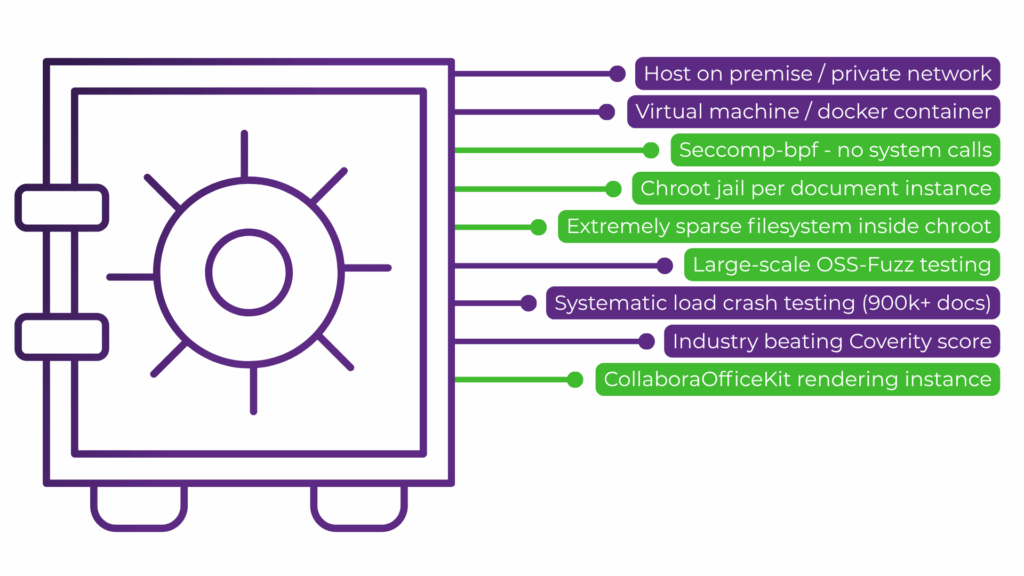
We explain how the architecture isolates each document within its own secure container, strictly limiting system calls and filesystem access through technologies such as Seccomp-bpf.
CoolWSD is the only process that communicates with the outside world and handles client network connections, manages user input routing, and securely communicates with external storage using encrypted tokens.
CoolWSD controls a helper process called CoolForKit. This component never interacts with or opens documents directly; instead, it pre-loads core software libraries into memory and rapidly forks itself to spin up individual CoolKit document instances.
To lock down the system, CoolKit runs inside a “chroot jail” that completely isolates it from the host machine. This environment operates as a sparse filesystem that contains no system shells, no core system directories, and strictly limits kernel API system calls to enforce the principle of least privilege.
Read Part 1 where we explain how Collabora Productivity’s security strategy is built on organisation compliance from our ISO 9001 and ISO 27001 certifications and large-scale continuous automated crash testing, fuzzing and regular static code analysis.
A Many Layered Security Onion
Security is a core consideration for Collabora Productvity, flowing from our internal processes to informing our software design and technical architecture through to our software development implementation, continuous testing, security reporting and support. In Part 2, we highlight our security strategy for software design and technical architecture.
If you missed Part 1 of this series you can read it here, we cover Collabora’s organisation compliance and large-scale continuous automated testing.
The design of Collabora Online’s architecture involves a multi-layer security strategy to make it as secure as possible out-of-the-box. Why is this important? While it is possible that a problem in the software at one layer enables some negative foo, because a situation would need to chain problems together to breach all of the layers we can dramatically reduce the probability, and ensure your systems remain safe while we fix any individual layer problems.
The Three Main Processes
COOL’s self-contained architecture is made up of three groups of processes:
- Cool Web Service Daemon (CoolWSD)
- CoolForKit (named after its function to ‘fork Kit’)
- CoolKit
In very broad terms, CoolWSD is the ‘master’ or ‘broker’ process that handles and routes network traffic. CoolForKit is a ‘helper’ or ‘forker /spawner’ process controlled by CoolWSD that optimises creating document processes by pre-loading and sharing the core libraries and before rapidly forking itself to provide instances of CoolKit – the ‘document engine’, that isolates and contains each document from other documents.
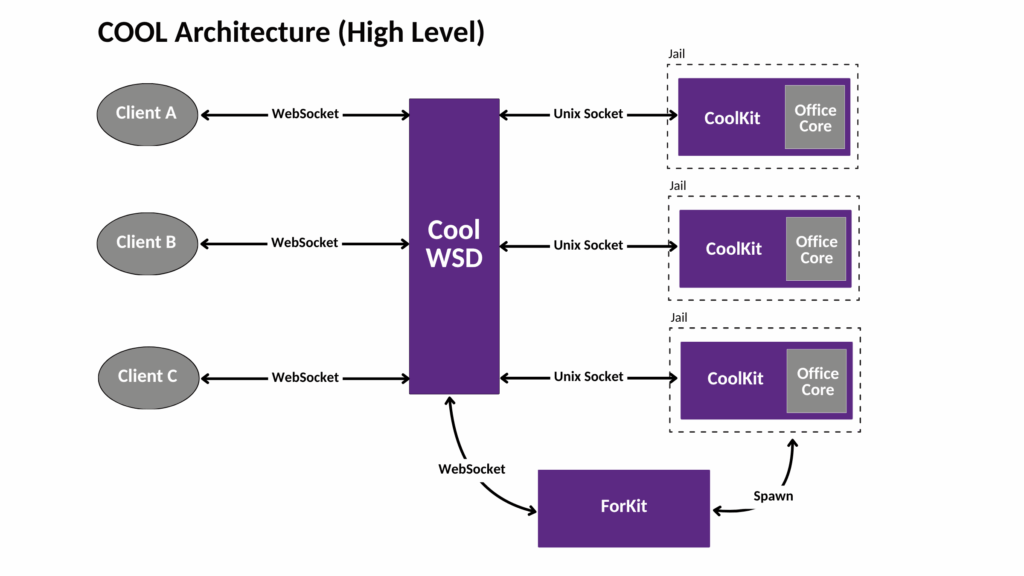
The three main processes of COOL Architecture. Storage and authentication is outside of the architecture and uses a WOPI-like protocol and storage provided by the integrator.
CoolWSD
CoolWSD is the only process in COOL that communicates externally. It is responsible for spawning CoolForKit, setting up the childroot directory for documents and listening on the public port (9980, by default) for client connections and routing user input (for example, when a user opens a document and a ‘load ‘ command is sent).
COOL uses isolated per document processes, which start when CoolWSD requests CoolForKit to ‘fork itself’ to create a Kit instance for each document. CoolForKit finds the CoolKit, based on a unique key, and sends on the CoolWSD request to the Kit instance to load the first document view.
| Security in CoolWSD |
|---|
| Jail ID Isolation: When it sets up the childroot directory, CoolWSD generates a random jailid path for the directory creating further isolation. |
| Controlled Comms: CoolWSD is the only process that communicates externally, and listens for incoming SSL-encrypted client WebSocket connections (on port 9980). |
| Auth Tokens: As COOL does not provide a document storage system, CoolWSD handles authentication via Collabora’s WOPI-like protocol. It stores and passes back an opaque authentication token supplied from the client sent to WSD. This token is sent back by WSD to the storage embedded in WOPI requests (via HTTPS) to read or save a document. |
| Validity checks: Messages to the WOPI storage are signed with WOPI proofsand naturally WSD checks the validity of the WOPI storage’s TLS certificate when making WOPI requests. |
| Host-local security: As mentioned, below, in relation to Kit, we containerise Kit instances in a ‘chroot jail’ where seccomp-bpf limits system calls and filesystem access, and where only one document is loaded per instance. As WSD and Kit are run on the same machine they communicate over a UNIX domain socket connection, benefiting from host-local security. The socket connection is verified using user id and group id matching. |
CoolForKit
As mentioned above, CoolForKit is primarily an optimization responsible for forking Kit instances. It does this by loading up Collabora Office dynamic object libraries (DSOs) into memory and pre-initializing all of the data we will need inside the Kit processe to ensure these will be Copy on Write shared. To make loading of documents faster CoolForKit forks Kit instances ahead of time (based on a prespawn config setting) and stands ready to fork more instances when requested by CoolWSD.
| Security in CoolForKit |
|---|
| Helper-only: ForKit never loads documents itself, it forks additional instances that do the document loading and are themselves isolated in many ways (see below). |
CoolKit
The CoolKit process is the fundamental core of our document editing engine. It is responsible for loading and rendering documents and for passing input and commands from users to the document and, similarly, for passing document events (e.g., a user typing etc) generated back to the client.
The Kit process contains the eight million lines of C++ code that comprises most of our attack surface, and as such we add many more layers of the security onion around it.
| More Security in CoolKit |
|---|
| Isolated from start CoolKit creates an isolated environment even before it becomes visible to CoolWSD. |
| A sparse jail & shadow filesystem is created for CoolKit. Bind-mounting is the preferred method (although linking and/or copying is possible as a fallback). bind-mount uses read-only permissions, this adds another security layer. Critically the jail contains no shell, very little code, and is compromised mostly of font data. There is no /proc, no /sys and no device nodes. |
| Per-document namespace or chroot jail: Using one of these two approaches the root filesystem for the document is changed to use the above filesystem, either by using the chroot(2) syscall, or the namespace unshare(2) approach – which restricts the filesystem view to this jail subdirectory. The kit process cannot then access or see files outside of this new root, and this isolates CoolKit from the host system completely. In the case of namespaces this also isolates the CoolKit in its own process namespace. |
| Least privilege: To finish the isolation process, Collabora applies the principle of least privilege using Seccomp-bpf (see below) and all system calls, including those used to implement the isolation, are disabled. |
| Internal A CoolKit instance only connects internally via websocket to CoolWSD. |
| Seccomp-bpf: For disabling Kernel APIs within coolKit instances, Collabora uses the Linux’s secure computing mode (Seccomp) coupled with the flexible approach of Berkley Packet Filter (BFP). This enables a less extreme restrictive approach than seccomp while applying tailored filter rules for each specific application. For example, we disable: – Kernel APIs which have no legitimate use by CollaboraOfficeKit, and have proven to cause local privilege escalation issues. – APIs that target other processes, such as kill, so they cannot be used even if a Kit instance is compromised. – Debugging APIs such as ptrace, which has been used in real-world scenarios to escalate privileges. – Server calls, such as listen, to reduce attack service and apply the principle of least privilege. |
As the main three processes in Collabora Online demonstrate, our multi-layered security architecture is designed to be as secure as possible, approaches using strict isolation, container jails (chroot) and the principle of least privilege.
In Part 3, we explore Collabora Online’s WOPI-like protocol and our approach to storage, we look at how server-side tile rendering keeps your documents secure, and highlight how our dedicated security engineers continuously work to improve security every day.
Evaluate Collabora Online for your organisation today. Try a pilot deployment of a document editor; obtain enterprise-grade protection straight out of the box so your organisation can collaborate with total peace of mind.