


Szymon Klos
Related issue: https://github.com/CollaboraOnline/online/issues/14257
In the browser we have limited control on how the rendering is scheduled. To be sure our code is not causing long hangs or jitter in the animation we should be smart about how we process incoming events and present them on the screen.
In the past there was a messaging queue introduced to be sure we squash frequently repeated state updates, also preventing server from flooding the client with commands quicker than it can consume them.
That is not enough when it comes to the scrolling animation, which happens purely on the browser side. When we mix small tasks for processing the incoming server messages and also next frame of the animation – we need to make it synchronized and try to make frame rate stable. To make that happen we use `requestAnimationFrame` function (https://developer.mozilla.org/en-US/docs/Web/API/Window/requestAnimationFrame).
It can happen that scrolling triggers additional work to be done: rendering new area of the document, moving the comments on the screen, updating the ruler, updating the current page indicator, etc. When any operation will trigger for example <div> position change and later checks size of that Element – browser needs to recalculate and layout surrounding pieces. That takes time and in case of frequent updates might significantly increase time needed to generate single frame. It’s usually easy to spot in a profile when we are calling the `getBoundingClientRect` (https://developer.mozilla.org/en-US/docs/Web/API/Element/getBoundingClientRect) method.
To make it easier to manage, we have the centralized document rendering callback which also runs queued so called LayoutingTasks. LayoutingTask is a callback we know we want to execute before the next repaint, they contain all the DOM modifications which done directly on event processing could trigger repaint out of our schedule (on browser’s arbitrary decision).
Pattern to solve such class of issues is:
– directly update the app state / UI model just now
– cancel any pending LayoutingTask for the same case
– schedule LayoutingTask which will update DOM to the current state
– remember TaskId for future – can be used to cancel previously scheduled one
Some of the issues are simpler: we check DOM element size on every method call, but that element has constant width (in example the Navigator sidebar). We can just check it once and cache.
I fixed few cases of the obviously problematic updates happening on simple scrolling, gathered under ticket: https://github.com/CollaboraOnline/online/issues/14257
To identify the code causing some additional recalculations due to DOM modification we can use profiler in the browser’s developer tools.

To make it easier I also introduced debug mode util:
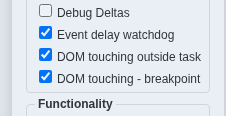
It checks if DOM modification happens during LayoutingTask execution. To achieve that it creates MutationObserver following the state of a document container. When enabled together with opened browser developer tools it can trigger breakpoint in the moment it detects bad behavior.
