The next release will fix a gap compared to Collabora Office Classics and add the ability to run solvers in Collabora Online and Collabora Office. The solvers have been added to the Notebook Bar in the “Data” section, next to “Goal Seek”, which is also a similar functionality to solvers.
Collabora Online Writer: format on top of format, different editors
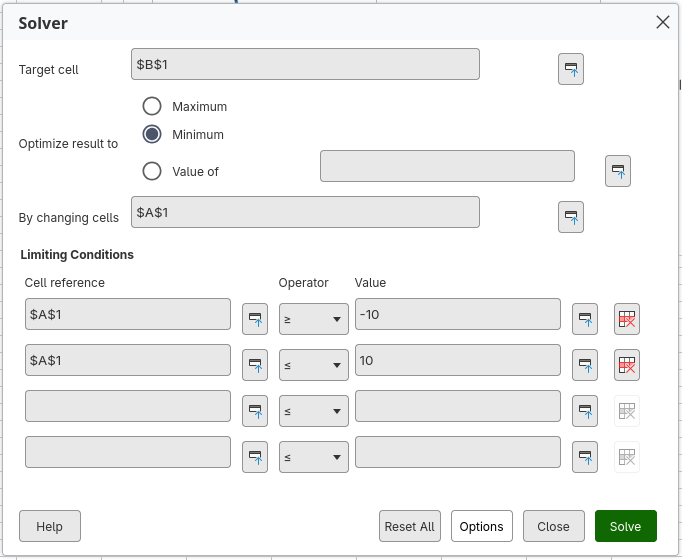
Once you click on the “Solver” icon, you will get an “Solver” dialog, where you can set the settings (target cell, what to optimize for, changing which cells, conditions…), just like you can do this in Collabora Office Classics. It’s the same dialog.
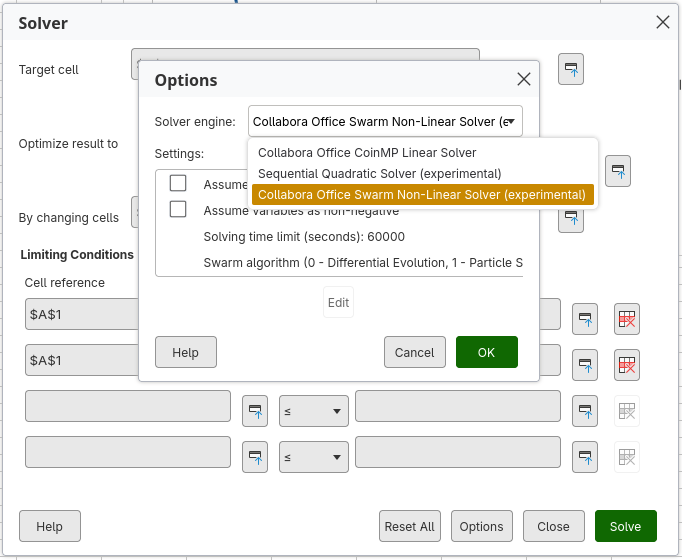
In “Options” you can set which solver engine to use, and adjust the solver specific settings.
Available solver engines are CoinMP Linear Solver, Sequential Quadratic Programming solver (SQP) and Swarm Non-Linear Solver. CoinMP is a linear solver that was already available in Collabora Office Classics and is a capable and fast solver for linear programming problems.
SQP is a new solver, which is a deterministic solver for (smooth) non-linear problems. Instead of solving a hard non-linear problem, it works in a way that transforms the non-linear problems into multiple small and easy to solve approximations, which can be solved by CoinMP.
Swarm Non-linear solver is a solver that uses a stochastic method to find a solution. It actually contains 2 algorithms of solving: Particle Swarm Optimization (PSO) and Differential Evolution (DE). This solver was already available in Collabora Office Classics, but now it has been greatly improved. In addition it now contains a third algorithm – a hybrid PSO and DE (DEPSO), which is a compromise between both methods and is not the default and recommenced swarm solver algorithm.
We also worked on the Solver framework to make it faster, by accessing the spreadsheet and calculations directly instead through UNO interfaces, and caching the calculated values, where this is possible.