Please find all information on updates, features, and fixes of the Collabora Online 22.05 branch on this page. Details about security updates are available here. For the best experience, we recommend that you use the latest version of Collabora Online from our most current development branch. Please follow these instructions for a seamless upgrade to Collabora Online 22.05. (Link currently leading to the 21.11 update instructions)
Collabora Online 22.05 reached end of support. Please upgrade to a newer version.
Fixed export as PDF with file names that contain space
Fixed saving of annotated PDF
Fixed submenus of context menus in RTL mode
Fixed date picker content control localization
Show Zotero buttons only if integration supports Zotero
Fixed Zotero command execution when a dialog is open
Limited the header avatar list to 6 with integrations
Impress: remove focus from slides pane when editing area is clicked
Writer: fixed wrong layout of textbox in document header
Calc: improved import of conditional formatting from XLSX files
Collabora Online 22.05.11
Released on March 16, 2023
Bugfixes
Translation updates
Known regression: annotated (changed) PDF cannot be saved
Collabora Online 22.05.10.7
Released on February 27, 2023
Some additional fixes to 22.05.10.2
Collabora Online 22.05.10.2
Released on February 20, 2023
New features and fixes:
Zotero plug-in The user can set Zotero API key in Nexcloud Office settings, then the citation/bibliography functionality will be enabled on the References tab. It is possible to insert citations from users’s Zotero citation database. Notes and group libraries are also accessible. All citation styles are supported.
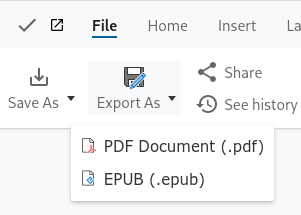
Export PDF (and EPUB) back to storage When integration supports (Nextcloud has been tested) Collabora Online can export PDF and EPUB) from the current document back to the storage.
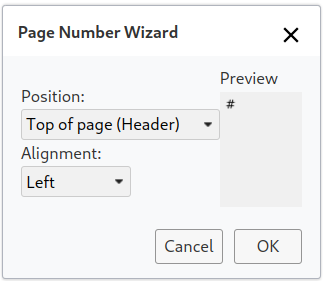
Insert Page Number dialog in Writer It has been possible to insert page number for a long time, but now it is easier with the dialog. It saves time, when the user needs a quick and easy solution.
Timezone support Now we have internal support for respecting the client’s time zone. There were some operations, e.g. “Insert – Time” when the users expected their time, not the server’s time, and now this has been addressed.
Now it is possible to use Duden Corrector for spellchecking and grammar checking (requires API key)
Calc RTL fixes
Translation updates
Collabora Online 22.05.9.3
Released on January 19, 2023
New features and fixes:
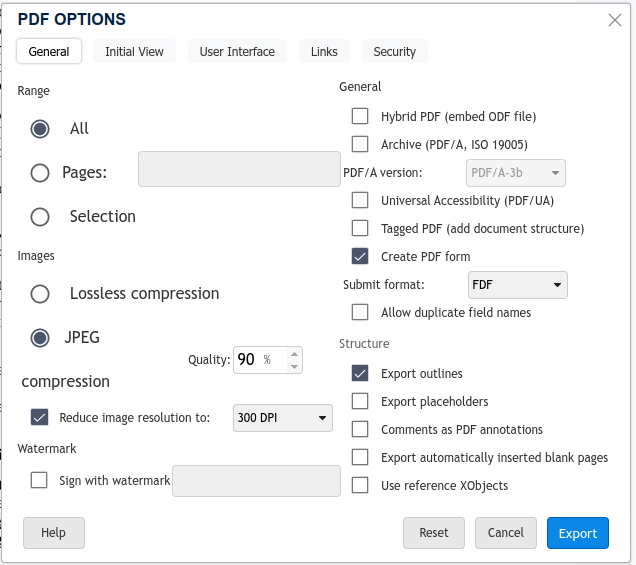
PDF export options Previously PDF was from exported with default settings from Writer. Now we have a tabbed dialog full of options, including accessibility, permissions, image quality and more.
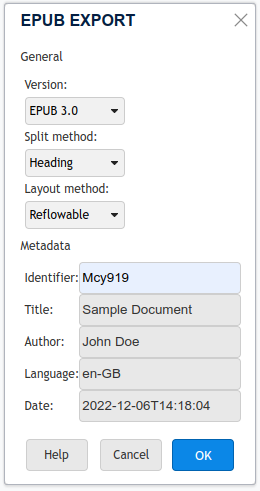
EPUB export options Similarly to PDF export, we enabled the EPUB export options dialog in Collabora Online. EPUB is the most widely supported vendor-independent XML-based e-book format.
New hyperlink pop-up with copy/edit/remove link buttons
New hyperlink pop-up with additional buttons
Math inline formula editing. This new feature enables editing of mathematical formulas in Writer documents.
Sidebar controls and widgets are now faster to load.
User interface fixes.
Translation updates.
Collabora Online 22.05.8.4
Released on November 24, 2022
New features and fixes:
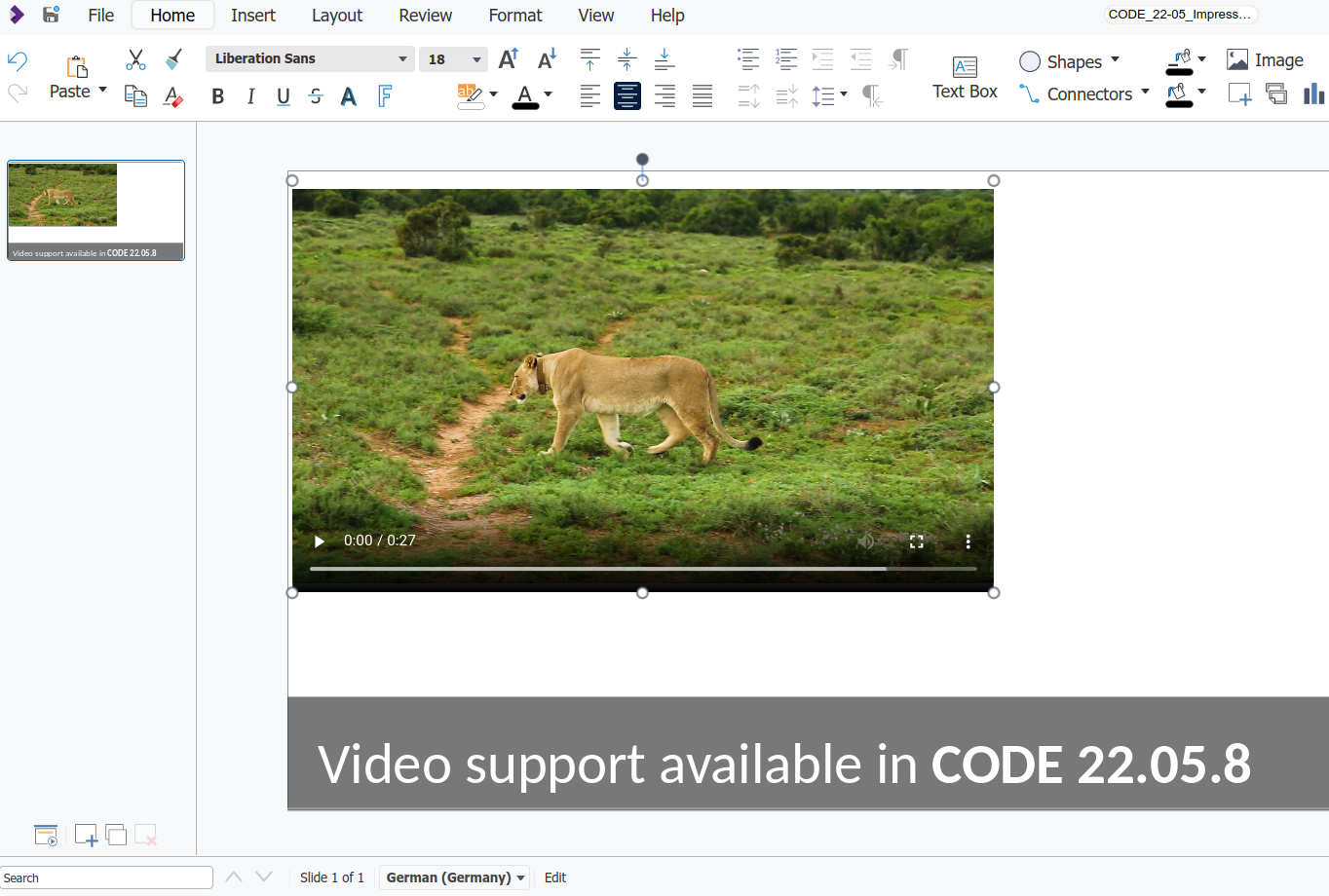
Playback of embedded videos in Impress
With new support for embedded media files, it is now possible to click on an embedded video, in edit mode, and have the video played back in the browser. The user is presented with the standard video controls, including the ability to pause, seek, control the volume, and maximize the video to full screen.In addition, the user is able to move the placement of the video by using drag-and-drop interactions, and resize it.
When a video is saved with thumbnail in the document, it will be presented in place of the video when displaying the document. Currently there is no support to extract a freeze-frame from the video to use as a thumbnail in Collabora Online.
Video playback also works in full screen presentation mode (i.e. SVG export of presentation).
Thanks to NLnet Foundation for sponsoring this work.
Video support in COOL 22.05.8
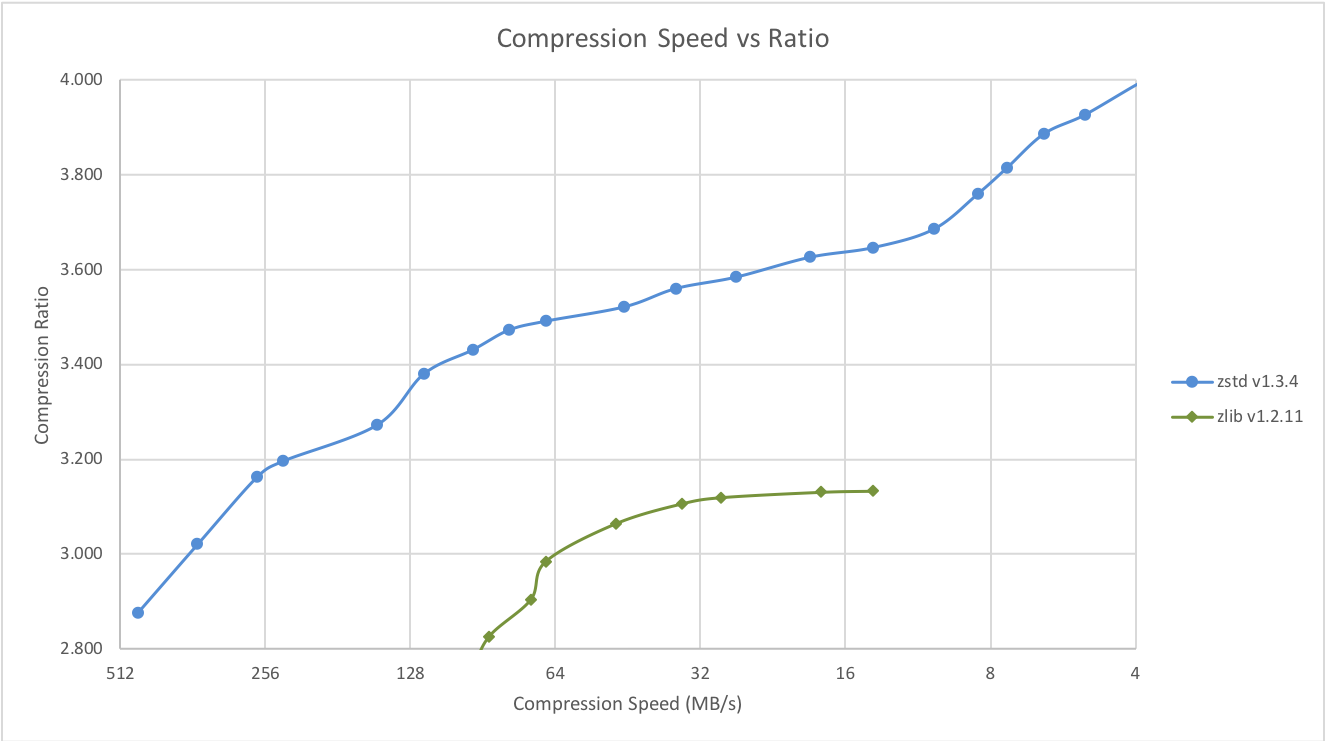
Faster tile compression with zstd
Five times less load on CPU for tile compression, thanks to the zstd compression library (developed by Facebook), than the old solution that used zlib
Compression vs. Speed ratio of zstd and zlib – about 10% performance improvement overall
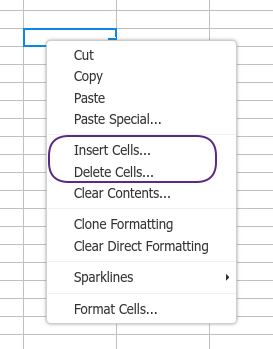
New menu items in context menu of a cell in Calc: Insert Cells… and Delete Cells…
Calc cell context menu
New setting for the log level at startup: logging.level_startup. Previously the log level of the initial phase was always trace, in order to debug startup issues better. We kept it as default, but now the log level is configurable in this initial phase, too. For docker, users can set the extra_params environment variable, like extra_params=--o:logging.level_startup=warning.
In Impress users get correctly rendered previews of slides (master page in Master page mode, standard page view in Page mode) and do not see single tiles from other mode when multiple users work at the same time.
Fixed SVG export (full screen presentation) of text fields (e.g. slide number, footer) of Impress presentations.
Small UI fixes.
Collabora Online 22.05.7.5
Released on November 17, 2022
Fixed a regression in 22.05.7.4 release: old/deprecated wopi.host setting was ignored.
Collabora Online 22.05.7.4
Released on November 16, 2022
Fixed a memory leak related to remote config feature
Collabora Online 22.05.7.3
Released on November 1, 2022
New features and fixes:
Detection missing fonts and easy remote font management without restart The problem: When a user loads a document in Collabora Online that uses fonts the server does not have, the document looks bad. The user may think that it’s Collabora Online’s fault. The Solution: the new fonts_missing.handling configuration setting controls whether Collabora Online reports missing fonts in the log and/or informs user with a popup window. Admins can acquire the font and add it to the server. Every minute Collabora Online checks for a JSON file with the URL given in remote_font_config.url configuration setting. It downloads missing fonts and makes the available for future editing sessions without the need of restart.
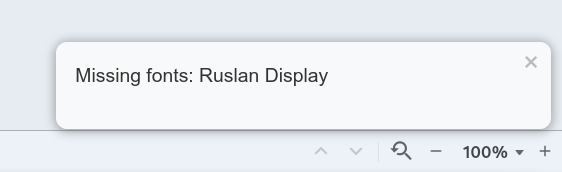
Missing fonts popup
In place translation of document text with DeepL DeepL Translator is a neural machine translation service that provides an API. After setting deepl.api_url and deepl.auth_key in configuration, DeepL is ready to use in Collabora Online. For example the selected paragraph can be translated from any supported source language to any supported target language with Translate button on the Review bar.
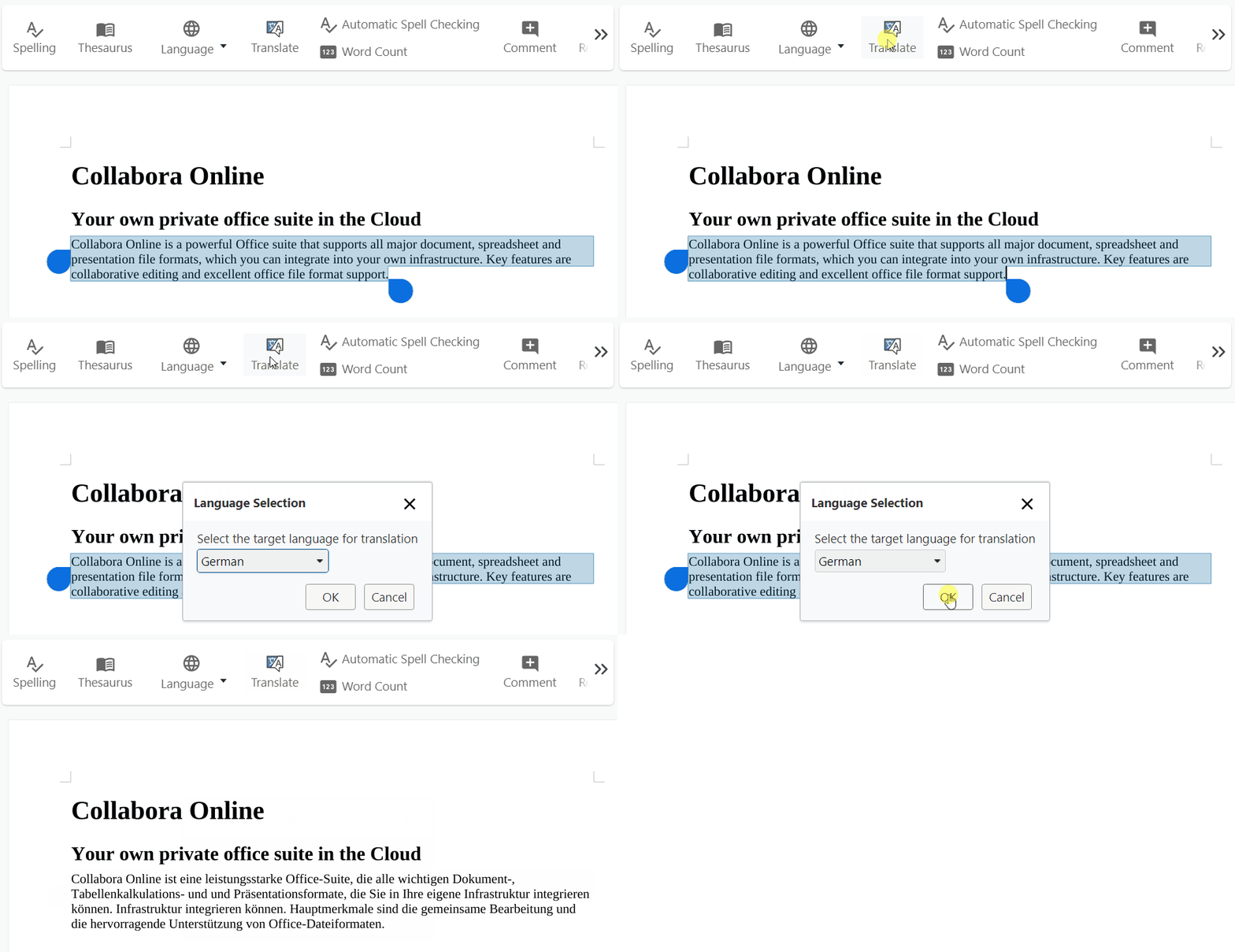
Translate text with DeepL
Export forms built with content controls to functional PDF forms Writer users can create fillable forms using content controls, and export them to PDF. During export content controls are mapped to PDF form widgets, therefore the resulting PDF form will be fillable, too. For more information about this unique feature, please refer to the developer’s blog post.
Interesting new features for integrators The mention feature, initally in Writer, can insert the link to the user profile of the mentioned user into the document. When the user types @ character, it activates the function. Integrators need to implement UI_Mention postmessage API endpoint. Collabora Online will send request to this endpoint with the initial character that the user typed in. In the Action_Mention postmessage API call a JSON is expected where each object contains { username: '<username>', profile: '<link to user profile>' }.The grouped Save As button allows the user to save the document in a different file format back to the storage. If the integration supports this feature, i.e. can handle the args: {format: '' } parameter in UI_SaveAs, then it can set the grouped Save As button by setting SaveAsMode='group' in uiDefaults.
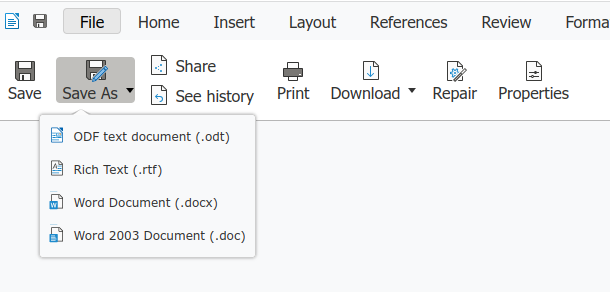
Grouped Save As button
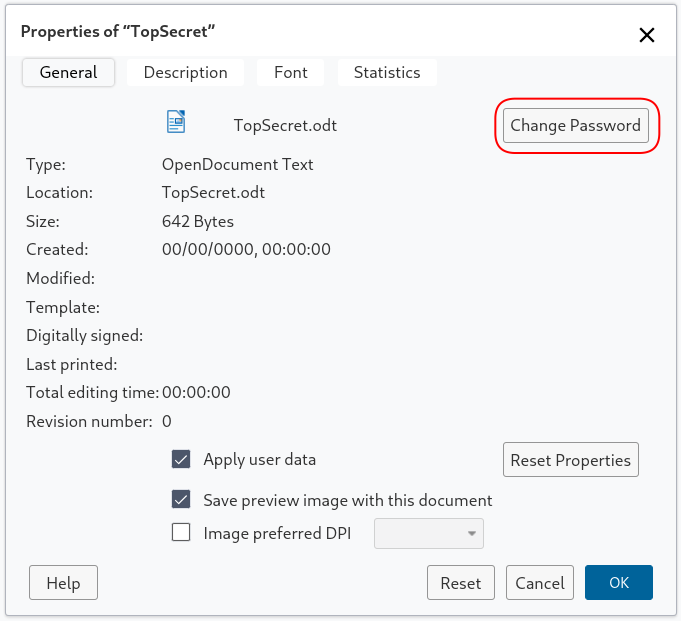
Set, change or delete document open password (encryption password) Now it is possible to set, change or delete password for a document in Collabora Online, that is required to open the file. The feature is accessible through the document’s Properties dialog.
Set, change or delete password
Slide sorter improvements in Impress (more visible selection)
Added EditPrintArea and AddPrintArea uno commands to Calc
Fixed SVG export of tabulators (Impress slideshow in browser)
Translation updates
Collabora Online 22.05.6.3
Released on September 27, 2022
Minor bugfix release with micro-features. Some highlights:
New platform: ppc64le (Ubuntu 20.04 packages and docker image for customers)
Cache the result of disk space check and return the error message correctly to the client, if disk space is low, all the time.
Properly remove comments from the document, when their anchor is deleted.
Fixed detection of capabilities needed for bind mounting in unprivileged LXC or docker containers
Improvements to scrollbars
UI tweaks
Translation updates
Collabora Online 22.05.5.4
Released on August 22, 2022
Small fixes to the initial release:
Fixed missing icons
LOKit: load template documents as regular documents, otherwise they cannot be directly saved
Fixed buttons in Autofilter popup not working correctly