

Collabora Office 6.0 release is based on upstream LibreOffice 6.0 source code, thus it contains all fixes from the upstream libreoffice-6-0 branch, plus more fixes and backported stable features from higher releases. (Go here for general info and a demo.)
Collabora Office 6.0-39
Released on 2021-01-06
Fixes
- Issues related to PDF signature verification
Collabora Office 6.0-38
Released on 2020-09-04
Upgraded 3rd party libraries (security fixes)
- curl: upgrade to release 7.71.0
- nss: upgrade to release 3.55.0
- mariadb: upgrade to release 3.1.8
- xmlsecurity: detect unsigned incremental update between signatures
Collabora Office 6.0-37
Released on 2020-05-20
Security fix
- A fix for CVE-2020-12801 Crash-recovered Microsoft Office encrypted documents defaulted
to not to using encryption on next save.
In affected versions, a crash could lead to a user accidentally saving a Microsoft Office file format
document unencrypted, while believing it to be encrypted.
Collabora Office 6.0-36
Released on 2020-01-07
Most important fixes
- COLEAT: Added and implemented ooo.vba.word.XDocument.Close() method
- XLSX import: Fixed tdf#128894 – Reference incorrectly updated when deleting rows in XLSX
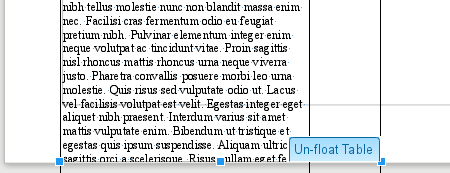
- tdf#129176: clear “TablePosition” grab bag when unfloating table
- tdf#128449: Set graphic when setting background in Impress
- PDF export: tdf#120343 – do not try to open PDF before the properties have been edited and the PDF is created
Collabora Office 6.0-35
Released on 2019-10-23
New features
- Allow spaces in AutoText suggestions
Most important fixes
- Save ActiveX form controls with accented letters correctly (tdf#118169)
- PPTX import fixes (tdf#127372 and tdf#127379)
- mysqlc: support connection to utf8mb4 server
- Redaction: enable anti-aliasing
- openssl: upgrade to version 1.0.2t
- CVE-2019-9854 and CVE-2019-9855
Collabora Office 6.0-34
Released on 2019-08-28
New features
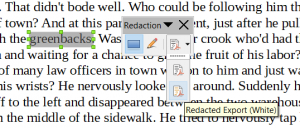
- Automatic Redaction – read the details of this powerful feature in this article.
- Text based date field in Writer, compatible with Microsoft Office date content control.
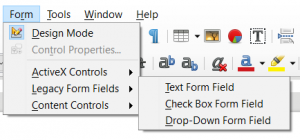
This adds to the recently considerably improved working with forms from Microsoft Word.
Most important fixes
- Opening files from SharePoint in read-only mode (Windows 32-bit only)
- Display user name instead of “Unknown user” when a locked file is opened from SharePoint
- Do not allow users to add more than 25 entries to a drop-down form field (MS Word limitation)
- mysqlc: Fix query of cursor position in result set
- mysqlc: Support reading blob as string. Test setting and querying the following data types: TINYTEXT, TEXT, MEDIUMTEXT, LONGTEXT
- nss: upgrade to release 3.45, fixes CVE-2019-11729 CVE-2019-11719 CVE-2019-11727, and the less important CVE-2018-12384 and CVE-2018-12404 from intermediate releases
- CVE-2019-9850, CVE-2019-9851 and CVE-2019-9852
- Other stability fixes
Collabora Office 6.0-33
Released on 2019-07-02
Most important fixes
- SharePoint 2010 integration fixes
- Register versions from 1 to 5 for SharePoint OpenDocuments object
- Detect WebDAV redirection (tdf#126121)
- CVE-2019-9848 and CVE-2019-9849
Collabora Office 6.0-32
Released on 2019-06-07
Most important fixes
- Redaction
- Respect page margins of the source doc during redaction
- Standardize content placement for redaction (tdf#125135)
- Interoperable Pivot tables
- Export longText attribute for sharedItems element (tdf#125046)
- Properly round fractions of seconds (tdf#125055)
- Write dataField attribute for fields that also appear in Data (tdf#125086)
- Interoperable conditional formatting in spreadsheets
- Import and export xlsx x14:cfRule element
- SharePoint 2010 integration
- WebDAV: Don’t unlock the file during saving of a document
- The SharePoint integration library has been extended to provide the same read-only/edit choice dialog that MS Office’s SharePoint integration has. This library requires the component Optional Components – ActiveX Control to be selected at install-time.
- MySQL Connector
- Add support for mysql type INT24
- Mail Merge
- Fix crash (tdf#117480)
- Do not remove database after close (tdf#122198)
- Other interoperability fixes
- Correct position of rotated shape in doc (tdf#118375, tdf#70838)
- Do not double _x005F_ escapement in document meta data (tdf#125279)
- Word import: fix column layout with sections (tdf#120145)
- Pie chart + legend layout fix (tdf#122765)
- Handle deferred breaks on frames (tdf#123636)
- PPTX export: export shape fill color from theme and export fill transparency (tdf#125360, tdf#125346)
- Other security and stability fixes
Collabora Office 6.0-28
Released on 2019-04-29
Most important fixes
- Redaction
- Handle other page sizes than A4
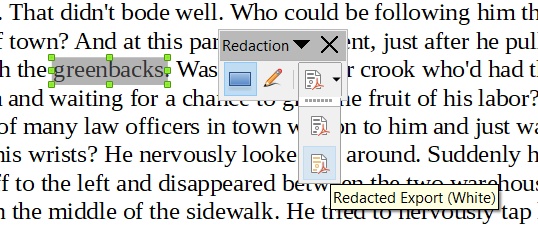
- Add direct PDF export to Redaction toolbar
- Make white rectangles the default to save toner
- Protect page position during redaction
- Enable redaction for Impress
- Interoperable Pivot tables
- Fixed a case when pivot tables exported by LibreOffice were considered broken and discarded by Excel.
- Worked around a standard non-compliance of Excel 2016, which introduced a requirement directly contradicting MS OOXML standard.
- Introduced saving pivot table group fields to XLSX – an important feature missing up tho that moment, without which there was no grouping by e.g. years/months in pivot tables resulting from export.
- Fixed order of items in group fields, without which selecting October in an exported pivot table filter could give November’s results in Excel.
- Introduced saving number formats of data fields to XLSX, without which results like $12 345 could become plain 12345 after pivot table refresh in Excel.
- Introduced round-tripping of pivot table style as defined in original XLSX, so that the pivot table would have original look in Excel (may need refresh though) after being edited in Calc.
- Fixed a problem, when data field name arrived empty in Excel.
- Allowed LibreOffice to import data field names as defined in Excel, thus preserving the names when round-tripping XLSX pivot tables.
- Fixed a crash in Excel caused by an exported empty data field under colFields tag.
- Fixed field label normalization in pivot cache, which should be case-insensitive for Excel.
- macOS specific fixes
- tdf#82009 – Fixed a painting problem of TreeList widget
- tdf#122172 – The OOoSpotlightImporter shouldn’t cause mdworker to crash
- tdf#124032 – Fixed drawing of background of Edit control
- tdf#101854 – Support faux bold of fonts that do not have bold version
- A few backported Calc fixes
- tdf#119623 – Deleting shared formula group top cell does not re-establish listeners for the remaining (group) formula cell(s).
- tdf#121002 – Cells not recalculated after moving data within ranges pointed to by a shared formula group.
- tdf#120013 – After Cut&Paste of an overlapping data range, cells of a shared formula group reference run are not recalculated.
- tdf#123714 – Moving (Cut&Paste, Drag&Drop) a column range within the same row into a shared formula group’s reference may not recalculate the first affected formula cell.
- tdf#123736 – Changing a reference in a formula cell of a shared formula group may not rebuild all dependencies of the then split group.
- Other security and stability fixes
Collabora Office 6.0-27
Released on 2019-04-09
New features
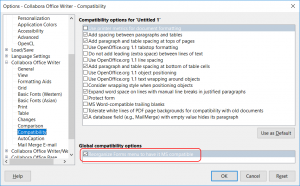
- Interoperable text based form fields and a special Forms menu that helps using them.
- Manual Redaction Toolbar
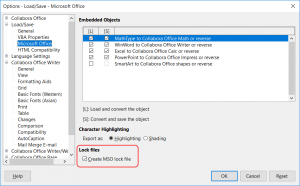
- Write Microsoft Office compatible lock files



Most important fixes
- AutoText: 20x import speedup from DOCX
- AutoText: fix unexpected page break on insert at end of document
- Security fixes of 3rd party libraries
- libjpeg-turbo: upgrade to release 1.5.3q
- mDNSResponder: upgrade to release 878.200.35
- openssl: upgrade to release 1.0.2r
Collabora Office 6.0-24
Released on 2019-02-21
Most important fixes
- Export number format of chart label to OOXML (tdf#122031)
- MySQL Connector fixes (e.g. tdf#122616)
- Don’t mis-detect .doc files as .dot (tdf#110987)
- Security fixes of 3rd party libraries: curl
Collabora Office 6.0-20
Released on 2019-01-19
New feature:
- Un-float Table button. Writer imports Word’s floating tables into TextFrames. However a TextFrame cannot span across multiple pages. The button turns a table-in-TextFrame into a normal table at the anchor point of the TextFrame.
Most important fixes
- Several MySQL Connector fixes
- Various OOXML import/export fixes
- Mail Merge fixes
- Security fixes of 3rd party libraries: curl, libxml2, libxslt, lcms2, poppler, python3
Collabora Office 6.0-13
Released on 2018-10-22
Most important fixes
- All recent fixes from the upstream libreoffice-6-0 branch
- Multiple small OOXML and binary DOC interoperability fixes
- Keep PyUNO script processing below base URI (fixes CVE-2018-16858)
- Other security and stability fixes
Collabora Office 6.0-12
Released on 2018-10-02
Most important fixes
- All recent fixes from the upstream libreoffice-6-0 branch
- Hidden shapes in XLS(X) files are not printed any more
- Multiple small OOXML interoperability fixes
- Fixes in the new MySQL/MariaDB database connector
- Other security and stability fixes
Collabora Office 6.0-7
Released on 2018-08-31
New features (developed by Collabora)
- New, built-in MySQL/MariaDB database connector, which replaces the MySQL connector extension
- Online help hosted at help.collaboraoffice.com
- Font effect “transformation” support (improves interoperability with MS Office)

Most important fixes
- All recent fixes from the upstream libreoffice-6-0 branch
- Multiple small OOXML interoperability fixes
- Upgraded internal NSS library to version 3.38 (fixes CVE-2018-0495 and “the ASN.1 code”).
- Other security and stability fixes
Collabora Office 6.0-6
Released on 2018-07-11
New features (developed by Collabora)
- Implemented VBA FormatNumber function (tdf#118218)
- Proxy Auto-Configuration (PAC) support and other proxy related fixes (tdf#114227)
Most important fixes
- All recent fixes from the upstream libreoffice-6-0 branch
- Mail Merge related fixes (tdf#116543, tdf#117817)
- Improved WordBasic support [ExistingBookmark()]
- Impress fix (tdf#102195)
- Calc fixes (especially a performance fix: tdf#118441)
- Handle direct formatting for numbering in DOC file format (tdf#117923)
- New Collabora Office app logo
Collabora Office 6.0-5
Released on 2018-06-13
See the release announcement here: Collabora Office 6.0 – The Migrator’s Choice.