mduge
Ticket: https://phabricator.collabora.com/T60996 non-updating DocProperties fields
Basics:
Office documents like ODF (odt, …) and OOXML (docx, …) can have so called Fields embedded in the text. Fields can automatically update the content they show. The most common example may be having a page number in the footer of each page. The piece of text showing the number is such a Field and if you insert another page above lets say page 3, then the field on page 3 will increment the number it’s showing to 4 – automatically! Also there are are so called Document Properties in office documents, which can be described as embedded metadata. These Properties typically contain information like the file creation date and the name of the author. But storing arbitrary text information like the name of the responsible company department is possible. And fields can also show information from the Document Properties. So if a company has a global template document and an author starts writing a document based on that template, a field at the top of the template can automatically insert the authors name and the department he’s being member of.
Getting to the point:
It’s common, that external software like document management systems, adds or modifies Document Properties. For example if a company division gets renamed. If that happens, it’s a matter of taste or requirements if the content a Field shows should be updated automatically when opened again in an office suite. While in the ODF world fields update automatically by default, in the Microsoft OOXML world the user has to click “Update” in the office suite. So users handling OOXML files are used to not have their fields updated automatically when Document Properties are being changed externally.
What’s new:
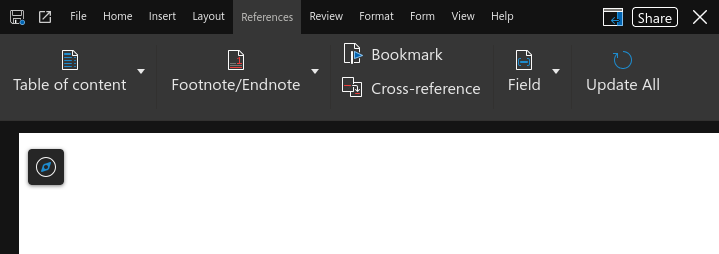
There has been a temporary solution. When Collabora Online opened a document containing fields which don’t match the Document Properties they refer to, then these fields where marked as “Fixed”. And the user had to manually remove that mark from the settings of each fields in the document before being able to update these fields. With Collabora Online 26.04 we implement an improved solution, where the fields are not being updated when the file opens, as in Microsoft software. But the user can simply trigger an update by clicking “Update All” in the UI.